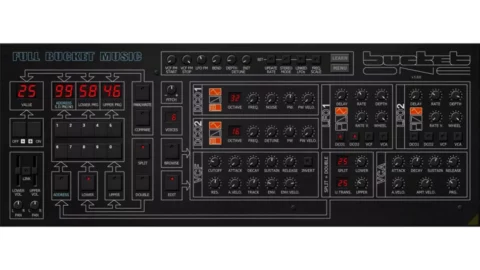
Full Bucket Music latest free plugin brings back the Crumar Bit One analogue polysynth – Released back in the mid-’80s, the Crumar Bit One was an Italian 6-voice analogue synth that was viewed at the time as a cut-price rival to the Roland Juno-106.
Now, the company is attempting to bring the Bit One back into the public consciousness with the Bucket One, a free plugin emulation. Download a “close emulation” of this ‘80s curio for your DAW.
Bucket One is designed to closely resemble the original hardware, meaning you get two oscillators with a choice of three waveforms (triangle, sawtooth, pulse) and an additional white noise generator. In addition, there’s a self-resonating, four-pole low-pass filter and a VCA, both of which have ADSR envelopes, and a pair of LFOs.
Polyphony has been enhanced to 64 voices and there are now Split and Double modes. Micro-tuning is supported, there’s MIDI Learn, and the interface is resizable.
Coded in native C++, Bucket One promises high performance even on lower-spec systems, and runs on PC and Mac in VST/AU/Clap formats. Find out more and download it on the Full Bucket Music website.
Bucket ONE Audio Demos:
Omnes Sonos, a group of developers creating music plugins in their spare time, have released Piano Forte, a free and open-source virtual instrument that combines artificial intelligence with more traditional DSP and physical modeling approaches.
Piano Forte is available in VST3, Standalone Windows (x64), and LLV2 formats, the plugin uses a dual engine, blending a lightweight neural network and a physical model, to balance efficiency and fidelity. It uses neural networks, trained on piano samples that are available under a Creative Commons license.
“We aimed for a well-rounded, flexible-sounding instrument,” they note. “Download it, use it, and let us know your opinion.”
Piano Forte is available now as a free download. The source is available via Github, and they welcome contributions to improve the instrument.
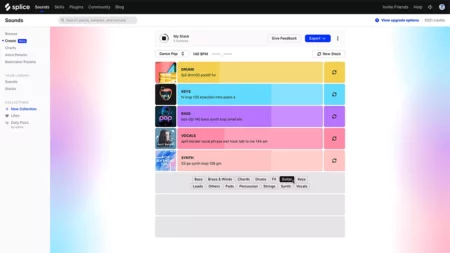
Splice is now letting you use AI to create ‘Stacks’ of complementary samples on its website. Choose a genre and the ‘Create’ feature will build you a loop.
It originally released as part of its CoSo mobile app, Splice has now brought its AI-powered ‘Stacks’ functionality to its website via the ‘Create’ feature.
Pick a genre and the AI tech will create a Stack – a group of complementary samples – for you. If you like what you hear you can tweak the Stack by adding/removing samples, muting/soloing layers and adjusting levels; if you don’t, you can simply press a button and a new Stack will be generated in its place.
Once you’re happy with your Stack you can save it and download the original samples or Stems options for use in any DAW. Alternatively, you have the option to export an Ableton Live Session file.
These export features are only available to Splice subscribers, but anyone can try Create now via the Splice website.