Donner Launches MEDO Portable Groovebox “Multi-Function Musical Instrument”


Donner throws a curve ball with MEDO, a handheld synth, sampler and music-making device.

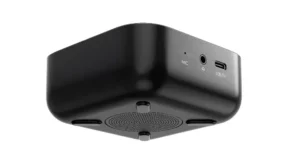
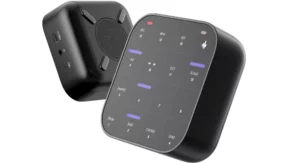
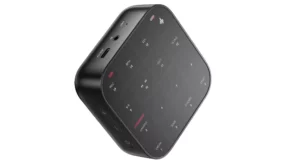
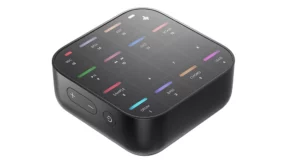
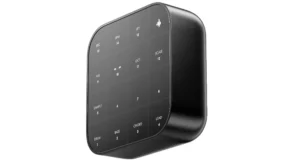
Donner Music, maker of the B1 analog bass synth and the D1 drum machine, has launched a Kickstarter project to fund production of the Medo portable groovebox, a revolutionary “multi-functional music instrument”, a standalone music-making device that incorporates a sampler, synthesis and a looper.

Medo is being released via Kickstarter Project, the modest £4,201 goal has already been achieved.

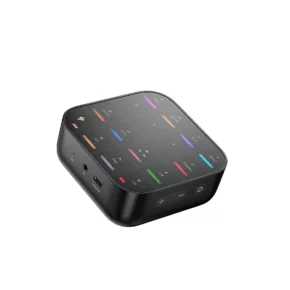
Medo gives you five seconds of sampling time, and has a grid-based touch control surface. The exact nature of this changes depending on which mode you’re in – drum, bass, chord or lead – and tracks can be built-up in the 128-bar looper. There are built-in speakers, RGB lights and a 2000mA lithium battery that can be charged via USB-C.

Additionally, there is gestural control – you can adjust parameters, apply effects and control modulation by moving the device around. Given its touch-based nature, perhaps, it will offer much more than a music-making app running on your phone.
Features:

  • One-click Recording.
  • Powerful Sound Engine.
  • One button looping, auto-quantization mode.
  • RGB lighting interaction for immediate feedback performance achieving better human-machine interaction.
  • Connects with other software and hardware.

Medo’s most attractive features, though, could be its compact design and prize. It is small enough to be taken with you wherever you go, and the early-bird pledge option of $149 (regular price will be $298) should ensure that there are plenty of takers. If you order now, delivery is expected to be in December.

Medo’s more experimental concept perhaps explains why it’s being released via Kickstarter; this gives Donner a way of assessing demand levels and ensuring that it’ll only be released if the campaign is funded.

*Note that crowd-funded projects can involve risk, which is detailed at the project website.
Synplant is back, Version 2 Enables You Create Synth Patches From Samples Using Artificial Intelligence


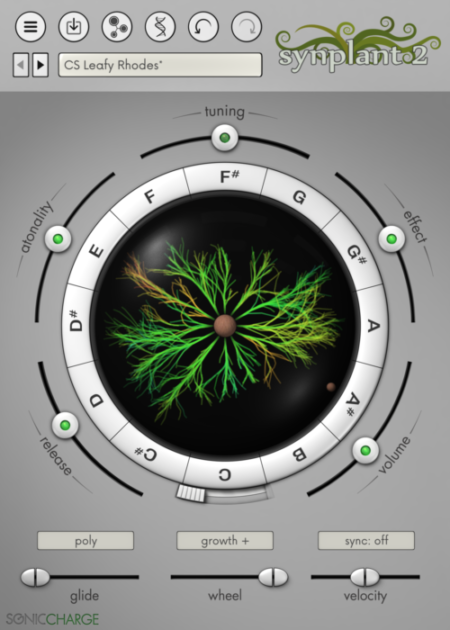
Synplant is back, and version 2 uses AI to grow sounds based on any audio file you feed it. And it looks, blooming marvellous.

Sonic Charge has announced that – after a decade of development – Synplant 2 is now available.

When the original Synplant arrived, back in 2008, it emboldened a whole generation of green-fingered synthesists to create new sounds by ‘growing’ rather than programming them.

Having spent a considerable amount of time in the development polytunnel, we can now finally get our hands on version 2. And the horticultural soft synth has blossomed into something even more impressive.

Synplant 2 is a major update that introduces ‘Genopatch’ technology, which lets you create synth patches based on audio source samples. Import a file and Synplant 2 will gradually start to synthesize a sound (there’s no sampling involved) that gets ever closer to resembling your original file.

It’s this element of unpredictability that could be Synplant 2’s biggest strength. This is an instrument that puts the emphasis on “exploration and discovery”.

It also features a vastly improved synth engine, a new DNA editor, alternative ways to trigger branches, tempo synchronization, automatable genes, and more.

However, if you want to grab your sonic shovel and dig deeper into a sound – whether it be derived from a random ‘seed’, a preset or a Genopatch – you can do so via the new DNA Editor, which offers more familiar features such as envelopes, oscillator types and filters. The settings for these are represented graphically.

Synplant’s familiar main interface remains intact. This enables you to grow sounds from seeds and play variations on them via different MIDI notes and velocities, and you can also layer them up. You can switch between polyphonic and monophonic play modes and apply portamento, tempo sync and more.

New in Synplant 2:

  • Genopatch crafts synth patches from audio recordings, using AI to find optimal synth settings, based on your source sample. As the strands in the user interface sprout and grow, they generate patches that increasingly match the chosen audio.
  • Rewritten audio engine with new parameters (“genes”) and improved DSP algorithms for every part of the signal chain.
  • New DNA editor with a structured parameter layout and animating graphs of the various settings. You can automate and control all genes with MIDI CC.
  • New “bulb modes” give you alternative ways to trigger the different branches: velocities, different ranges over the keyboard, and a “layered” mode that triggers multiple branches simultaneously.
  • New performance features, such as support for mono patches, glide/portamento, and tempo sync that synchronize any rhythmic components of the sound to the host tempo.
  • Instead of growing all branches, the mod-wheel can easily be reassigned to control various standard destinations, such as filter cutoff, LFO amount, envelope time, and more.
  • Rudimentary MPE support with per-channel mod-wheel, pitch-bend, and pressure.
  • Extendible and moddable with Javascript support, skins, etc., just like Microtonic.

Synplant 2 is available now for Mac and Windows for $149, while users of version 1 can upgrade for $50. Find out more and grab a three-week trial version on the Sonic Charge website.

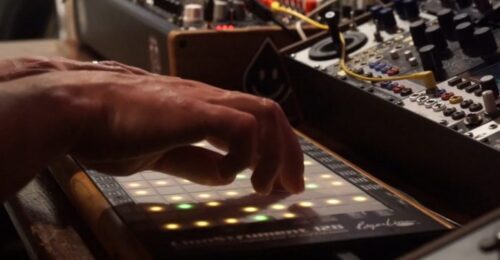
LinnStrument Firmware v2.3.2 Update Available


Roger Linn Design has released LinnStrument firmware v2.3.2, and update that includes both feature and bug fix changes.


New in LinnStrument firmware v2.3.2:


Feature:

  • In Per-Split Settings > MIDI Mode, holding ONE CHANNEL now resets all MIDI settings as they are after a Reset command. Similar to holding ChPerNote to quickly change all settings for MPE synths, this is useful for quickly changing all MIDI settings for use with common preset sounds of One Channel synth that are optimized for MIDI piano keyboards:

Main channel: 1

Bend Range: +/- 2

Timbre/Y: CC74

Loudness/Z: Poly Pressure

  • If MIDI Mode is set to ChPerNote and you change either the Bend Range setting or hold ChPerNote to force MPE settings, LinnStrument sends a MIDI RPN 0 “Pitch Bend range” message, which sets the external synth to the same bend range.


Bug fixes:

  • When using the Arpeggiator to arpeggiate through a held chord and you lifted one finger of the chord, the arpeggio order would reset to the starting note. Fixed.
  • When split was on with CC Faders on in one split and Low Row on in the other, sometimes the Low Row lights would turn on on the other split. Fixed.
  • When receiving a Bend Range configuration message through MIDI, LinnStrument would echo it back to the MIDI out, which was unnecessary. Fixed.
  • When LinnStrument would receive a MIDI Stop command to stop its Step Sequencer, it would unnecessarily echo it back out to the MIDI out. Fixed.