IK Multimedia introduces Paraphonic, Dual-Filter, Analog UNO Synth PRO X Synthesizer


IK Multimedia today introduced the UNO Synth PRO X, a new paraphonic, dual-filter analog synthesizer that they say “takes the UNO line to new dimensions of sound design, control and portability.”

The UNO range of IK instruments has been around since 2018 and includes three synths and a drum module.

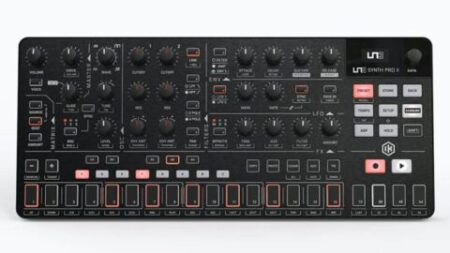
The UNO Synth PRO X takes the UNO ‘Pro’ concept to a new level. The new analog synth has more control, portability and sequencing options, but lacks a full-sized keyboard, replacing it with 13 buttons to audition sounds. The portable synth features a dual-filter, 3-oscillator paraphonic design, 256 presets, a 64-step sequencer and more.

Other key features include true-analog overdrive and 10 studio-quality effects (including a new shimmer reverb and uni-vibe-like modulations) in three simultaneous slots: modulation, delay and reverb. External signals can be also routed through the filters and the effects, in addition to UNO’s original thru-put for daisy-chaining multiple units together without using a mixer.
Sequencing and Performance Options:

The UNO Synth PRO X offers a 64-step paraphonic sequencer, with parameter automation, including CV and Gate. It has step and real-time recording, with a sequence randomizer (following the scale selected). Additionally, UNO Synth PRO X features a 10- mode arpeggiator with pattern designer.

In addition to legato, mono and paraphonic modes, users will find a new Bassline mode which modifies the behavior and interaction between core parts of the synth like the filter and envelopes.

The UNO Synth PRO X features over 30 hands-on controls plus a 16-slot modulation matrix.

UNO Synth PRO X stores 256 user-editable presets. Presets can be further managed with the included Editor/Librarian. The Editor works as both a standalone application and as a plug-in inside a DAW allowing users to program and play the UNO Synth PRO X just like a virtual instrument.

Connectivity includes USB-C and 5-pin DIN MIDI In and Out, making it easy to integrate with other synths and Mac/PC, while assignable CV/Gate connections let UNO Synth PRO X interact with Eurorack or other modular systems.

Watch a roundup of early Youtube demos and reviews:

We’d say that sounds like an awful lot of synth packed into a small box.

UNO Synth Pro X Paraphonic dual filter analog synthesizer is available now from the IK Multimedia website with a very reasonable price of $/€499.99. UNO Synth Pro X Paraphonic dual filter analog synthesizer
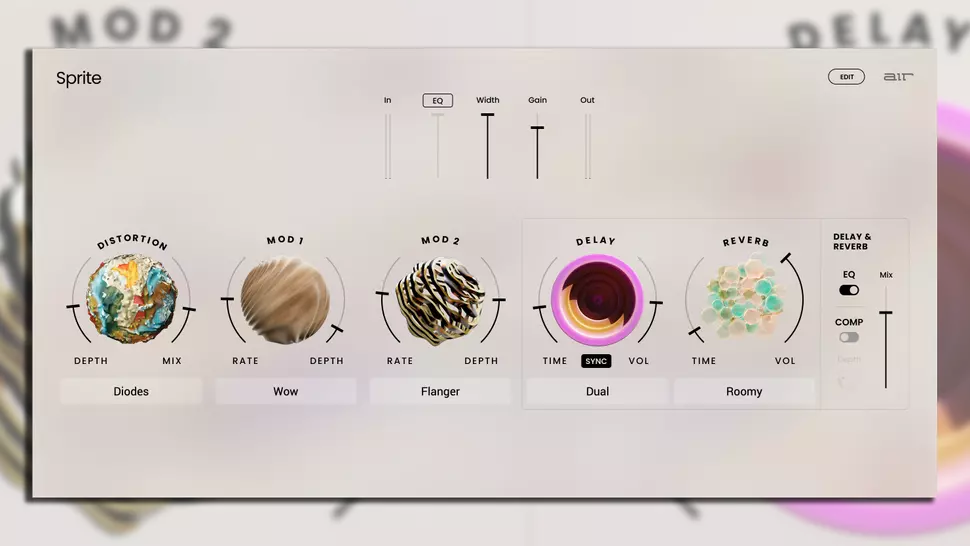
AIR Sprite multi-effects plugin ‘Go Beyond The Magic’ is a ‘modern take’ on the hardware effects processors of the ’80s


AIR Music Technology has announced the release of Sprite, a multi-effects plugin that’s said to be inspired by the ‘studio hardware staples’ of the ’80s and ’90s.

Before software did almost everything, producers relied on chunky, rackmount multi-effects processors like the Eventide H3000 to apply effects like reverb, chorus and delay. Sprite is reportedly a ‘modern take’ on machines like these. AIR Music Technology says the plugin does things ‘not possible in a hardware unit’.

Sprite features an array of effects under its virtual hood including a reverb with eight room characters, a BPM-syncable stereo delay and a comprehensive distortion section with nine distinct distortion models.

There’s a raft of modulation options, offering chorus, phaser, flanger, flutter, wow, tremolo and auto-pan, and an onboard pitch-shifter too. The compressor section will help you shape the signal’s dynamics while the EQ can finesse the plugin’s output without having to open up another window.

An interesting addition to Sprite that we don’t see in every effects plugin out there is an envelope follower; this will scan incoming audio, using the signal’s level to generate an envelope that modulates parameters like delay feedback and reverb amount. This means you can create responsive effects that evolve rhythmically in time with the sound that they’re processing; imagine a delay that amps up the feedback on every hit of a drum beat and dies down in between hits, for example.

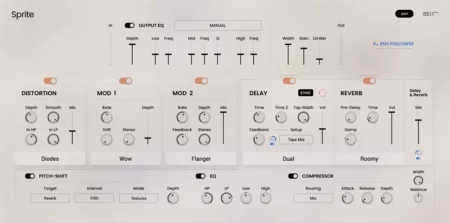
On first glance, Sprite’s interface shares a simplicity with the increasing number of stripped-down, easy-to-use plugins that we’ve seen pop up in recent years; there are five large dials that control five effects, and a few faders for shaping the overall mix. However, Sprite promises to give you the best of both worlds, as those hoping for more control over their effects can thankfully open up a separate window (pictured above) that contains deeper controls for advanced sound-shaping.

Sprite Walkthrough Video:


Features

  • Distortion section featuring nine distortion models with smoothing, hi/lo pass filtering and mix control.
  • Two modulation slots with eight classic modulation types. Choose between Flutter, Wow, Tremolo and Auto-pan in one slot, with rate, drift, stereo and depth controls as appropriate.
  • In the second slot, choose between Chorus, Multi-chorus, Phaser and Flanger with rate, depth, feedback, depth and mix controls as appropriate.
  • Dedicated and incredibly powerful delay and reverb section.
  • BPM syncable delay engine with Single, Dual and Cross modes, independent left and right time controls, feedback level and 24 feedback setups, width and mix control.
  • Reverb with eight distinct room characters, pre-delay, damp, time and volume controls.
  • Pitch-shifter with adjustable depth, assignable mix target, interval and algorithm.
  • EQ section with high and low cut and shelving controls.
  • Compressor section with assignable routing, attack, release and depth controls.
  • Width and balance controls.
  • Dedicated output EQ section featuring 31 character presets, plus a manual mode for detailed shaping of low, mid and high frequency content.
  • Envelope follower to automatically control delay feedback and delay & reverb mix based on incoming audio levels.
  • Final width, gain and limiter controls.

AIR Sprite is available for Mac and Windows in AU/VST/VST3/AAX formats. It’ll set you back $39.99 until 14th August, when the price goes up to $79.99.

Find out more or download a 10-day demo on AIR Music Technology website.


Autochroma Granular Synth Plugin is like ‘having a day off’


Granular synthesis is great. Anything that involves smashing something up and then making something new out of it is fantastic, like Lego as something that brings out the inner child of joy from within us.

Imagiro has introduced Autochroma granular synth plugin but aims to change that…

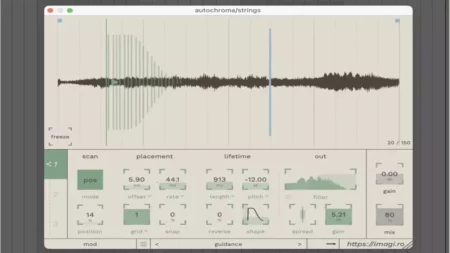
Imagiro knows that granular synths can be overwhelming but claims Autochroma is like ‘having a day off’, and the plugin does appear to be an inviting and quite inspiring plugin.

You essentially get a buffer of sound coming into the plugin, shown over the top half of the UI, and three different ways to apply your granular processing. You can use a Locked Mode where the processing follows the play head, a Velocity mode where the processing applies to the length of the audio at defined speeds, and finally a Position Mode where it just processes certain parts of the audio.

All easy so far, but there are more detailed controls should you need them. You can change the grain offset and rate to change the level of granulising, and a set of ‘Lifetime’ parameters defines how the effect takes place over time.

And really, this is as deep as you need to go, because the best bit is how it sounds. A demo:

The Autochroma is easy to use and capable of a wide range of effects.

The plugin cost just $40. Find out more info from the Imagiro website.