Live Enhancement Suite Enhancing Ableton Live

Are you an Ableton Live user? This free workflow will probably change your life.

Live Enhancement Suite will save you hours of time by optimizing the Live experience with handy shortcuts, especially for anyone who spends a lot of their time working with music software, workflow is everything. A simple hack that saves a few seconds by making an oft-repeated action quicker can eventually add up to hundreds of hours saved. Making the production process feel smoother and more efficient, this helps us stay in our creative flow.

That’s exactly what the Live Enhancement Suite was designed for. This free tool does exactly what it says, enhancing Ableton Live with a number of shortcuts and tweaks so useful that, once they become part of your workflow, you won’t believe you got by without them.

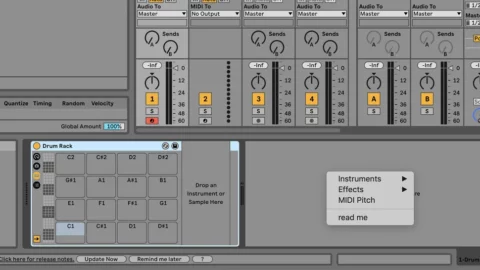
By far the most time-saving of these is the ability to quickly add devices from a customizable menu. Just double right-click in Live’s bottom panel, where instruments and effects for each track are loaded, and you’ll open up a menu (pictured above) that contains a list of plugins to be dropped in with one click.

Gone are the days of menu-diving in the browser or typing out a plugin’s name in the search bar every time you need it. You can add your most frequently used devices to this menu and load them up almost instantly. This makes loading up complex effects chains or instrument racks about ten times quicker.

That alone would make Live Enhancement Suite worth a download, but there’s more. The app adds several handy shortcuts to Live’s arsenal that make it much quicker to do things like closing all plugin windows at once, clearing tracks, placing locators, drawing notes and saving alternate versions of a project.

Live Enhancement Suite also gives you the option to double right-click the piano roll to quickly apply a scale, making it easy to see if your melodies are in key. You can also open up a timer that tells you how long you’ve been working on your project, an FL Studio feature Live users have been after for a while; this can be customized to tell you how long you’ve been in Live or how long Live has been open.

Watch tutorial video below:

It’s available for Windows and macOS. Live Enhancement Suite is an open source and free to download at Enhancement Suite website.
Rob Papen introduces LowSane Lo-Fi Effect


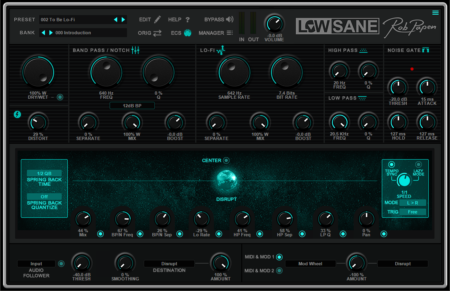
Rob Papen has introduced LowSane, a lo-fi effects processor for Mac + Windows.

LowSane offers a Distortion module, Band Pass / Notch Filter, Lo-Fi section, Hi and low Pass Filters, and a Noise Gate.

These parameters can be controlled by the ‘Disrupt Sphere’. Additionally, there is an Audio Follower which can control the “Disrupt Sphere” or any of the other parameters.

Last but not least there is a 2-slot modulation matrix which you can use to connect parameters, and use MIDI to control parameters and the ‘Disrupt Sphere’.

Features:

  • LoFi FX with additional distortion, Band Pass / Notch Filter, Hi-Pass Filter, Low-Pass Filter, and Noise Gate
  • Disrupt Sphere control for creating FX changes
  • Audio Input Follower, for controlling LowSane’s parameters
  • GUI sizes available are 100%, 125%, 150%, and 200%


LowSane is available now for $25/€25.

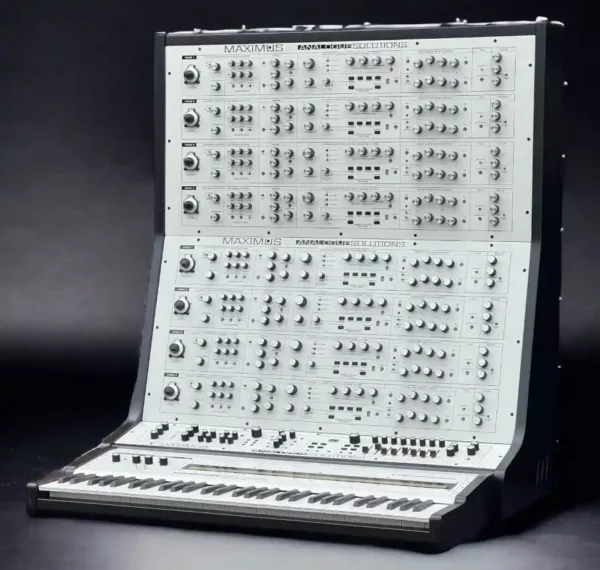
Analogue Solutions introduces Maximus 8-Voice Mega-Polysynth


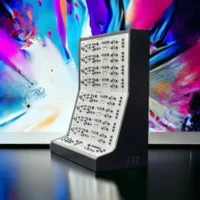
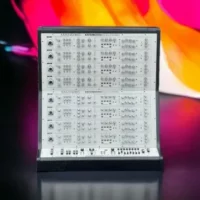
Analogue Solutions has introduced Maximus, a new “mega-polysynth” with a design ethos that creator Tom Carpenter says is “truly from the dawn of analog synths.”

Maximus will make its official debut at Synthfest UK 2023, scheduled for Oct 7th, 2023 in Sheffield, England.


In the meantime, here’s what Carpenter has shared about Maximus:

“Although we label this as a polysynth – it is so much more. We can’t think of a label to give this synth since it is so much more than that.

When you think of polysynth you think of flat synths with one set of controls that control all voices equally. By giving Maximus independent controls for every voice, you have more freedom to create unique styles of poly sounds impossible on traditional polysynths, whether they are hardware or software. You can dial up ‘traditional’ poly sounds (pads etc) or have something unimaginable different.

Because you can never dial up each voice completely identically, standard polys pads will sounds superbly vintage.

All the voice and modulation circuits are of course 100% analog. We purposely steered away from digital, aside from of course the digital needed in MIDI and the mini-sequencers.

This synth is purely for those who want it just as it was in the 1970s – but new with parts still in production. For those who want a synth that could have been built in the 70s.

There are no gimmicks – this is pure synthesiser. A huge sound enclosed in a solid metal case wrapped in solid hardwood. No expense has been spared to bring this incredible machine to life.”

Specifications:

  • Voice – x8
    • 2 VCO
    • 1 Mixer
    • 3 12dB filters
    • 2 Full ADSR envelopes
    • 1 16 step note/modulation loop sequencer
    • 1 BBD style retro echo
    • 1 Main out VCA
    • 1 White Noise
    • 1 Sub Osc
    • 1 Portamento / Glide
    • 1 VCO tune Vernier dial
    • Generous selection of cross modulation controls.
  • Master
    • 1 VC LFO
    • 1 LFO with delay
    • 1 LFO
    • 8 channel stereo mixer
    • 2 Real spring reverbs
    • 1 Master control knobs
    • 1 Poly MIDI to CV converter
    • 4 Key modes
    • 2 MIDI Sync modes
    • 1 Multiple
    • Generous modulation routing
  • Misc
    • Metal cabinet
    • Birch ply real wood
    • Healthy set of jack sockets for patching on all panels
  • Optional AS400 keyboard
    • 61 full length keys
    • Weighted
    • Velocity
    • Aftertouch with VCA for modulation
    • 64 pad touch controller (can be split to 2×32)

Maximus is available to order now, with the following pricing:

  • AS300 main unit £22500 £19900 Launch price – batch 1 only
  • AS400 optional keyboard £1900 £1800 Launch price – batch 1 only