Moog Music Introduces Mariana Bass Synth for iOS, macOS + Windows – ‘The Next Evolution Of Bass’
Moog takes a deep dive into the world of bass sounds with the new Mariana soft synth, and the good news is that it runs on iOS, Mac and Windows
Today, Moog Music has introduced a software synth for iOS, macOS and Windows that they describe as “The Next Evolution of Moog Bass”.
If there’s one part of the frequency range that Moog has been synonymous with down the years, it’s bass, so it seems entirely fitting that the company is launching a new soft synth that’s devoted to low-end tones. Known as Mariana – it goes deep, presumably – this takes inspiration from Moog synths of the past – the likes of the Minimoog, Taurus, Sub Phatty and Minitaur – while also promising to bring something new to the party.
Mariana is a dual-layer synth; layers can either be stacked together or played duophonically, and each layer offers two oscillators and a sub-oscillator. There are two classic Moog resonant filters, along with a third one that’s designed specifically for the sub-oscillator.
Effects include tube, tape and overdrive saturation, and there’s a “tight” compressor for glueing everything together. You also get delay and chorus processors that can be applied on a per-layer basis.
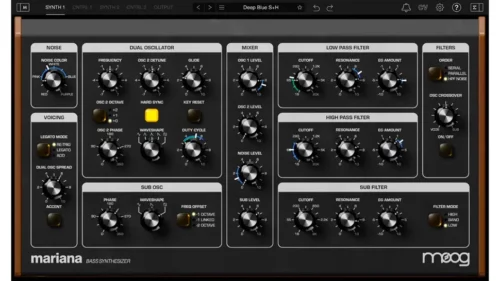
On the modulation side, there are three LFOs, three envelopes and two random generators per layer, plus a dedicated modulation editor. This enables you to design sounds that evolve over time – every parameter of Mariana can be modulated internally via MIDI, MPE, and virtual CV.
All of this functionality comes packed into what appears to be a typically straightforward Moog interface that also benefits from built-in metering. Although it has a definite bass focus, Mariana can also provide lead sounds, percussion and effects, and 200 presets come supplied.
Here’s what they say about it:
“Mariana is a dual-layer synthesizer, allowing you to mix together two completely different synthesizer sounds that can dynamically complement each other or be played duophonically. Each layer is built around two oscillators with precise and inventive controls to make your bass tone punch through a mix and stand out from the rest, with a sub-oscillator adding even more low-end weight. Two resonant Moog filters and a third filter specifically for the sub-oscillator let you shape your sound, adding warmth while rolling off high frequencies or pushing up the resonance for added bite. With stereo oscillators and crossover filter functionality, Mariana is optimized for quickly fine-tuning stereo content while simultaneously preserving a powerful mono bass foundation.
Warm tube, tape, and overdrive saturation and a tight compressor add heaviness and glue to your bass lines while an illuminating real-time metering section lets you monitor your sounds and dial them in to a professional standard. Flexible built-in delay and chorus effects operate on separate layers and can expand the stereo image of your sounds while preserving a solid mono signal with high-pass filters. Whether designing your own bass tones from scratch or using one of the 200 included presets as a starting point, Mariana is an accessible and versatile tool for any modern production environment. And although Mariana is optimized for bass, it is fully capable of producing strong leads, punchy percussion, and multidimensional effects, making it possible to craft an entire song using this single instrument.
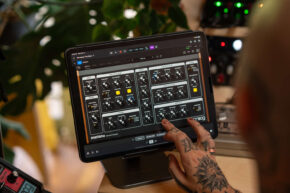
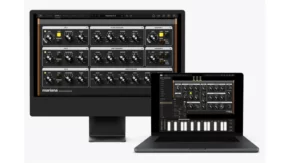
Mariana’s intuitive user interface is designed for quick and efficient workflow while being fully equipped with three LFOs, three envelopes, and two random generators per layer. Combined with a creative and extremely deep modulation editor, Mariana excels at in-depth sound design and sounds that dynamically evolve over time. Nearly every parameter of Mariana can be modulated internally via MIDI, MPE, and virtual CV to build an interconnected ecosystem right in your DAW. With an optimized resizable user interface, expressive on-screen keyboard for iPad and standalone desktop versions, and seamless integration into any DAW (digital audio workstation), Mariana is the most accessible way to add the unmistakable Moog bass sound to your productions.”
Features:
- Powerful, modern Moog bass sound in an accessible format
- Dual layers for complementary sound stacks or independent duophonic playing
- Deep, complex modulation sources, destinations, controllers, and functions
- Resizable and user-friendly interface
- Built-in effects, compression, and metering
- Seamless interconnectivity with Moogerfooger Effects Plug-ins via virtual CV
- Flexibility as a plug-in within your DAW or standalone use via MIDI
- More than 200 presets, covering a wide range of musical styles and genres
Moog Mariana Tutorial Video:
This is Moog’s first release since the company’s acquisition by InMusic, and is also its first soft synth to run on not only iOS and macOS, but also Windows (it should be noted that the Moogerfooger effect plugins are also compatible with Microsoft’s OS).
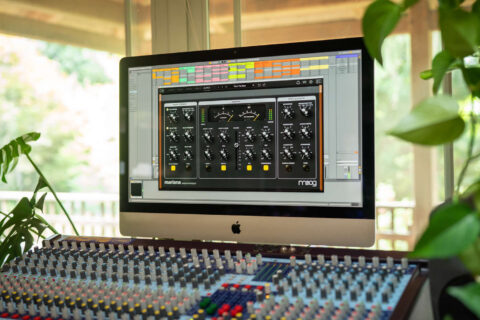
Moog Mariana is available now for desktop, with an intro price of $49 (normally $99), and for iOS, with an intro price of $14.99 (normally $29.99)
To celebrate Mariana’s release, Moog has enlisted actor, writer, producer, and comedian H Jon Benjamin to narrate a video that celebrates the company’s bass sound history, and there’s an hour-long deep dive tutorial video from Thavius Beck.
Find out more on the Moog Music website.