Sinevibes has released Array 4, a major update to their spectral sequencer effect plugin for Linux, Mac and Windows.
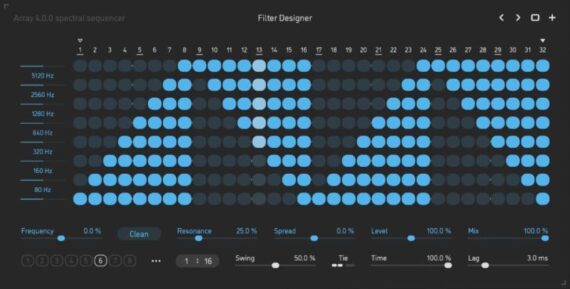
Using multiple crossover filters, Array splits audio into 8 frequency bands that are separated exactly one octave apart. Each band then runs through a gate controlled by an advanced step sequencer – allowing you to carve the audio spectrum in precise rhythmical fashion.
The official video intro:
The sequencer holds a total of 8 different gate patterns, with up to 32 steps each, and offers a wide range of timing settings for creating polymetric or polyrhythmic motion in any time signature.
The gate switches on every frequency band are shaped using a two-pole low-pass filter. Combined with the unique design of the filter section, this timing engine makes Array an versatile instrument for complex rhythmical manipulation of the sound spectrum.
Features:
Clean, neutral -24 dB/octave crossover filters that split audio into 8 frequency bands, tuned one octave apart
Optional state-variable, resonant band-pass filters per each frequency band, tuned one octave apart, with adjustable slope
Individual gate sequence per frequency band, with 8 separate sequence patterns per preset
Step sequencer with rhythmically correct swing, polymetric and polyrhythmic abilities
Two-pole analog-style lag filters for variable gate transition smoothing
Progressive bipolar pan spread between the frequency bands
One-pole lag filters on all continuous parameters for smooth, click-free adjustment
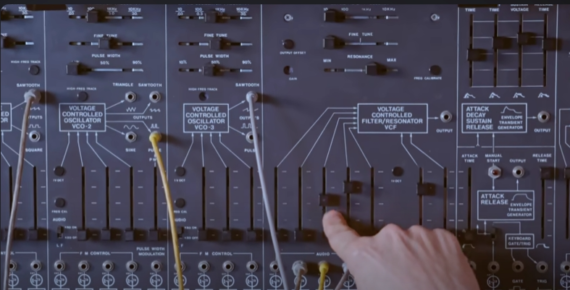
Composer & synthesist Anthony Marinelli – in his latest video – takes an in-depth look at how to recreate the sliding melody synth sound from Roy Ayers’ classic track, Everybody Loves the Sunshine.
Marinelli demonstrates how to recreate this sound using the ARP 2600, but notes that you could get similar results with a Minimoog and other synths. Along the way, he covers the oscillator tunings and performance techniques that are essential to creating this classic sound.
He also explores how the track’s arrangement makes space for the lead, complementing the song’s rhythm section.
Watch the video, and share your thoughts on it in the comments!
Amazon Spring Promotion Effective February 25, 2025 to March 10, 2025, Find Your Favourite!
Aly James Lab has introduced VProm 3.0, a major update to their virtual instrument for Windows & Mac
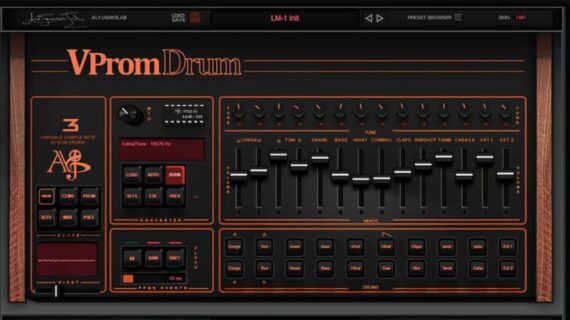
VProm is a virtual instrument that emulates the EPROM-based drum machines of the 80s, primarily the LM-1. In addition, it lets you create and load custom EPROM sound files.
VProm 3.0 video intro:
New in VProm 3.0:
Enhanced circuit emulation:
Enhanced circuit emulation, including some OB DMX voice cards features like VCA and filter tracking, customizable start and end memory points and loop control.
Upgraded voltage-controlled CEM filters with expanded controls—adjust trimmer, decay, pulse time, envelope response, or keep it simple with legacy mode (just one pulse control).
µLaw madness
Real-time variable sample rate decoding of EPROM sound data using the precise AM6070 DAC response, ensuring unparalleled authenticity.
New unique µLaw DAC real-time transfer response customization per voice—allowing precise control over the µLaw decompression ratio. By tweaking the transfer function slightly, you can subtly refine the response to better approximate real-world variations between original AM6070 DAC chips. At extreme settings, this feature transforms into a unique powerful creative transient / distortion shaper: with ratios closer to 0.5/1, quieter details are brought forward significantly, while values above 1/1 enhance snappiness and impact, delivering a uniquely dynamic and tonal character, a unique feature taking advantage of digital processing while keeping some level of authenticity.
Sample/Convert/Burn
VProm now features a built-in EPROM creator, allowing you to generate custom EPROM binary files without any external tools and ready for use in VPROM or hardware drum machines.
Import any .wav file and sample it just like in the classic hardware days. The resampling process uses a crude emulated R2R ADC with tweakable input settings and home-made tweaks* before capturing at ? 27 kHz. If the original .wav file rate is less or equal than 27 kHz, resampling is bypassed. You can also disable the resampling stage if needed.
Once sampled, preview the file with µLaw 8bit (12bit quality) compression applied or save it directly as a µLaw-encoded .bin EPROM file.
Maximum EPROM size is 64K ? 2.5 seconds @ 27Khz —larger sampled .wav files will be automatically truncated to fit during sampling.
Make your own:
New EPROM Management Panel – Manage all 14 custom EPROMs in one window with **waveform visualization**, direct loading on click, real-time auditioning, quick reset, and more.
New EPROM Library Browser – Easily access, preview, and organize your custom and vintage EPROMs from a dedicated internal library.
New .VPromKit Format – Save and reload an entire custom EPROM set as a .VPromKit file, allowing you to switch drum kits instantly without affecting other settings.
That ‘Mythical Feel’:
Authentic 48 PPQN Timing Emulation – Recreates the subtle groove and feel of vintage drum machines. Unlike modern high-resolution clocks (~960 PPQN), this low-res 48 PPQN pulse locks trigger events in real-time, syncing tightly to your DAW. The effect is subtle but noticeable, especially on swung or loose beats, adding that extra bit of human feel without overhyping the impact.
Real-Time Clock Drift – Recreates the natural clock drift found in vintage drum machines, where internal clocks were never perfectly stable. Unlike the subtle effect of the 48 PPQN clock, this feature introduces a more noticeable, organic timing shift, mimicking the imperfections of classic hardware. With a tweakable drift range from 1ms to 40ms, you can achieve anything from a realistic analog-style drift to a more exaggerated laid-back groove, similar to a drummer playing with extreme looseness and feel.