PreSonus Studio One v6.5 Updates Adds Dolby Atmos Integration & More


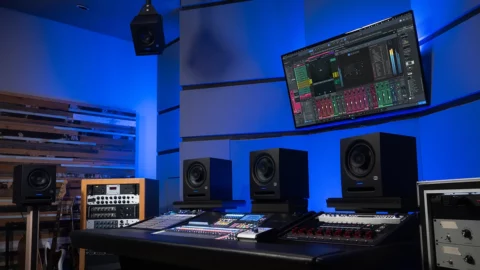
PreSonus has dropped the latest iteration of Studio One, version 6.5, and with it comes a slew of updates for spatial audio with Dolby Atmos. You can now record, edit, mix and monitor up to 9.1.6 channels.

The Dolby Atmos renderer is now natively integrated into the multi-channel mixing workflow and there’s also a parallel headphone output for Binaural monitoring.

In addition, to further aid you in your multi-channel projects, version 6.5 also comes with a new Surround Panner and Dolby Atmos Object Panner, with support for 3rd-party panner plugins also included.

The power of your machine will dictate how smoothly all the object panning and rendering works.

Take a look at the new renderer and panner in action:

New features in Studio One 6.5

  • Recording and Mixing
    • Spatial audio recording, editing and mixing with mixing and monitoring layouts up to 9.1.6 channels
    • Dolby Atmos Renderer natively integrated
    • Parallel headphone output for Binaural monitoring in Dolby Atmos
    • NEW Surround Panner and Dolby Atmos Object Panner
    • Support for 3rd-party Panner Plug-ins
    • Surround Panner in Sends
    • Extended export/mixdown for multichannel audio
    • Dolby Atmos (ADM) export with multiple simultaneous downmix formats
    • Extended audio I/O setup
    • Dolby Atmos Renderer remote panel in Mixer
  • Plug-ins and Instruments
    • Updated plug-in set with multichannel support
    • Speaker mapping for native and 3rd-party plug-ins
    • Flanger/Phaser with additional surround modes
    • Surround Chorus
    • Updated Mix Tool with multichannel level controls,
    • Mute and Solo options
    • NEW Surround Delay
    • NEW OpenAir
    • 2 convolution reverb with location images
    • New impulse response library with true 7.1.4 HDIRs
    • IR Maker supports up to 9.1.6 for capturing custom impulse responses
    • Improved Bitcrusher
  • Arrangement and Editing
    • Loop length tooltip shows loop length in ruler timebase
    • Drag & Drop copying of plug-ins in Inspector
    • New commands for “Write Automation to Start/End”
    • Tab through automation lanes when renaming
    • Legato command extends note events to Part end
  • Score Editor
    • Display chords from Chord Track
    • Rhythm Slashes
    • Custom string tunings
    • Display and edit guitar bends
  • Tablature Rhythmic Display
    • Reset option for Drum Maps
    • Reworked Text Editor for Lyrics
  • Mastering
    • ARA plug-in support on Project Page
  • Browser
    • Merge option for multichannel audio files
  • Start Page
    • New “Mix in Surround” Smart Template
    • Interactive Dolby Atmos tutorial
  • General
    • DAW Project format support (Import and Export)
    • Public beta version for Ubuntu Linux
    • Studio One Remote 1.8 update features touch-enabled surround panning

PreSonus Studio One 6.5 is available now as a free update for version 6 perpetual license holders as well as current Studio One+ members. For more information head over to the PreSonus website.
Avid Launches Pro Tools Sketch for iPad


Avid makes its pitch to loop-based music makers. Pro Tools Sketch: industry-standard DAW gets Ableton Live-style clip launching and a free iPad app, but will it convince you to switch?

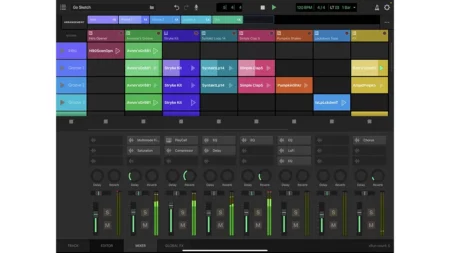
Like many other DAW developers, Avid has introduced an Ableton Live-style clip launching window in Pro Tools. Known as Pro Tools Sketch, this is also available as a free iPad app.

Pro Tools has long held quite a distinct position within the DAW market. In certain circles it’s something of an industry standard – still the go-to application for a lot of larger recording studios and producers who regularly record bands or large-scale projects. However, it has far less of a foothold among dance music producers and home studio musicians, who tend to gravitate towards the likes of Live, Logic, Cubase or FL Studio.

Recent years have seen Avid make moves aimed at addressing this latter fact. The primary way it’s done this is through the launch of Pro Tools Artist, its most affordable tier, which offers a slightly scaled-back version of the DAW with more emphasis on virtual instruments and a generous library of loops. Now, with the launch of Pro Tools Sketch – part of the 2023.9 update – Avid is making an even bolder play for the Logic and Live market.

On desktop, Sketch is available as a dedicated window within all versions of Pro Tools (including Artist), and is designed to function as a self-contained music making environment. There are various ways, however, to integrate it with Pro Tools’ traditional timeline.

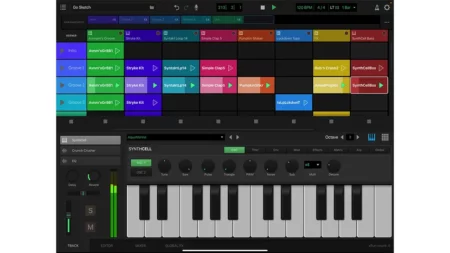
Sketch is focused around a clip launching workflow that owes an obvious debt to Ableton Live. However, Sketch also has whiffs of Apple’s GarageBand’s Live Loops and Touch Instruments.

In its current state, Sketch offers a significantly pared-back take on the Pro Tools toolset. It enables users to create using up to 16 tracks of audio or MIDI clips and an unlimited number of scenes.

Tracks can make use of an included 1GB+ library of loops and samples, along with over 30 instruments for Avid’s Playcell sample player and more than 100 presets for the SynthCell virtual synth. There are also nine effects that can be applied to individual tracks. Simple audio and MIDI editing tools enable users to program and adjust their loops.

The main drawback compared to working with the full DAW is a lack of plugin support, although Avid tells us that AAX plugin support is on the roadmap for the near future, for the desktop version of Sketch at least. Given Pro Tools’ use of the AAX format, it will be interesting to see if and how plugin support might come to the iOS version, which would likely need to rely on Apple’s AUv3 format.

The most appealing aspect of Sketch right now is how seamlessly it works with the main Pro Tools timeline. While the Sketch window has its own clock/transport, it can be synced with the main Pro Tools transport at a click of a button, enabling users to trigger loops and make longer recordings on the timeline simultaneously. Clips can also be dragged to and from Sketch, although in the current version this results in MIDI parts being rendered to audio in the Pro Tools timeline.

Given its slightly limited nature, it’s difficult to imagine Sketch luring across Logic, Live or even GarageBand users by itself. Similarly, those who currently use Live (or possibly Bitwig Studio) alongside Pro Tools are unlikely to be swayed.

As an addition to the overall Pro Tools workflow though, Sketch represents a significant step forward, and could convince those who dabble in or are curious about the DAW to take another look. Avid is being open about this merely being the first step on a long roadmap too, so Sketch is likely to grow and expand with future updates.

And of course, this is all great news for existing Pro Tools users. The Sketch iPad app is totally free to download on the App Store, so they now have a purpose-built jamming and composing tool that can be used anywhere. Projects created in Sketch are saved using a new .ptsketch file format that includes all audio and MIDI clips, and these can be emailed or sent via the cloud for transfer between iOS and desktop.

In other big Pro Tools news, Avid is reinstating the sale of perpetual licences for all Pro Tools tiers. Regular users will be aware that recent years have seen the company pivot to a purely subscription model for the DAW, which suits some more than others.

As of now, you can once again buy Pro Tools outright, but only via official Avid resellers. Prices range from $199 for the Artist tier up to $1,499 for Pro Tools Ultimate.

Find out more about Pro Tools Sketch on the Avid website.


Live Enhancement Suite Enhancing Ableton Live


Are you an Ableton Live user? This free workflow will probably change your life.

Live Enhancement Suite will save you hours of time by optimizing the Live experience with handy shortcuts, especially for anyone who spends a lot of their time working with music software, workflow is everything. A simple hack that saves a few seconds by making an oft-repeated action quicker can eventually add up to hundreds of hours saved. Making the production process feel smoother and more efficient, this helps us stay in our creative flow.

That’s exactly what the Live Enhancement Suite was designed for. This free tool does exactly what it says, enhancing Ableton Live with a number of shortcuts and tweaks so useful that, once they become part of your workflow, you won’t believe you got by without them.

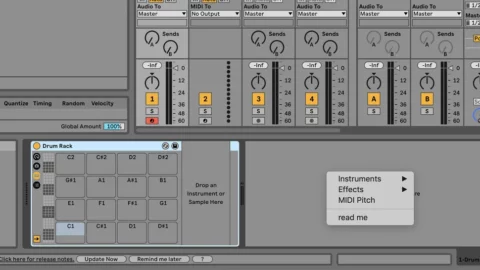
By far the most time-saving of these is the ability to quickly add devices from a customizable menu. Just double right-click in Live’s bottom panel, where instruments and effects for each track are loaded, and you’ll open up a menu (pictured above) that contains a list of plugins to be dropped in with one click.

Gone are the days of menu-diving in the browser or typing out a plugin’s name in the search bar every time you need it. You can add your most frequently used devices to this menu and load them up almost instantly. This makes loading up complex effects chains or instrument racks about ten times quicker.

That alone would make Live Enhancement Suite worth a download, but there’s more. The app adds several handy shortcuts to Live’s arsenal that make it much quicker to do things like closing all plugin windows at once, clearing tracks, placing locators, drawing notes and saving alternate versions of a project.

Live Enhancement Suite also gives you the option to double right-click the piano roll to quickly apply a scale, making it easy to see if your melodies are in key. You can also open up a timer that tells you how long you’ve been working on your project, an FL Studio feature Live users have been after for a while; this can be customized to tell you how long you’ve been in Live or how long Live has been open.

Watch tutorial video below:

It’s available for Windows and macOS. Live Enhancement Suite is an open source and free to download at Enhancement Suite website.