Valhalla Supermassive Update Adds A New Algorithm, Sirius


Valhalla Supermassive 5.0 is capable of everything from clean delay to “nearly eternal space reverbs”, and it’s still completely free.

Valhalla DSP’s Supermassive is one of the modern freeware greats. Originally launched in 2020, Supermassive is an algorithmic delay capable of creating both standard echos and epic washes of reverb thanks to its ability to densely layer feedback loops.

Rather than being a ‘lite’ version of another Valhalla plugin, Supermassive is a characterful and fully-featured effect in its own right. At launch it was pitched as an unnatural, uncanny effect to sit alongside the more realistic offerings elsewhere in Valhalla’s lineup, although annual updates have added a variety of new algorithms that have expanded the sound significantly.

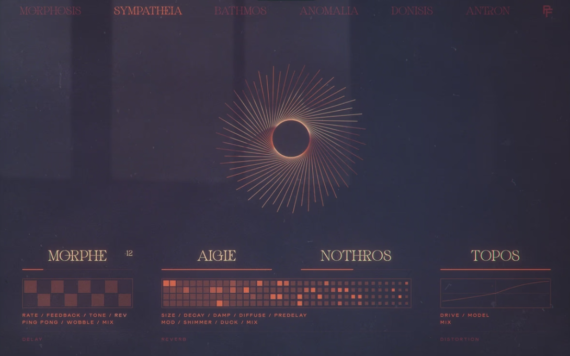
Now Valhalla DSP has dropped another free update, bringing Supermassive up to version 5.0 with the addition of a new algorithm named Sirius. This mode is said to have a fast attack, smooth decay, a broad range of echo density from low to very high, and a filtered feedback loop.

“The Sirius mode is a true workhorse,” Valhalla DSP said, announcing the release. “With a clear and clean decay, Sirius is great at creating any size of room, hall or cathedral reverb, and can range from tiny ambiences to nearly eternal space reverbs. Turn up the feedback and turn down the density to create lush modulated echoes, or strange bouncing ball delays.”

Supermassive 5.0 isn’t ValhallaDSP’s only recent release – the developer dropped its latest paid effect, FutureVerb, earlier this month. Futureverb is said to be based on eight years of research and development, a process which also gave rise to Supermassive’s latest algorithm.

“Sirius was originally created as part of our massive research and development project for Valhalla FutureVerb,” the developer explains. “We ended up using different algorithm approaches for FutureVerb, so we’ve decided to leave our R&D work in Sirius for your sonic explorations.”

Along with the new Sirius mode, version 5 of Supermassive also adds next/previous arrows for quickly jumping between its various modes.

Supermassive 5.0 is available to download for free from the ValhallaDSP website.

Free ‘A cross-DAW Project Manager’, SessionDock


Struggling to keep track of your DAW projects? This free app can help you.

SessionDock helps musicians, producers, and engineers stay organized across every project. It’s a genius project organization tool for macOS, designed to help you stay on top of a mountain of unfinished tracks

If you record and produce music with a DAW, then there’s a good chance that you have a sprawling and disorganized collection of project files on your hard drive, labelled with unhelpful names that provide little knowledge of their contents.

This kind of organizational chaos can become a genuine obstacle to creativity. How many brilliant ideas have been lost forever, abandoned in a digital graveyard of labyrinthine folders and cryptic filenames?

As the unfinished projects pile up, the prospect of sorting through them to discover the material we’ve neglected becomes all the more unappealing. Especially on slower machines, opening up a session just to check out the contents can be a time-consuming process.

Christopher Warner – the developer behind DAW project management tool SessionDock – understands this problem acutely. “SessionDock was born out of a common pain every producer knows: a desktop full of old sessions, forgotten mixdowns, and endless folders,” he tells us. “As an indie developer and musician, I wanted a better way to see my creative history – to bring visual order to all the work I’d made. That’s how SessionDock began.”

SessionDock is an organizational hub for DAW sessions where each unfinished project becomes “a little piece of your discography”, instead of an anonymous file festering on your hard drive. Bringing together sessions from Ableton Live, Logic Pro, FL Studio, Pro Tools and more in a single streamlined library, it allows you to browse, tag, and even preview projects without opening up your DAW.

Open up SessionDock, and all of your projects will be displayed on a central dashboard with customizable titles, artwork and notes. Projects can be given multiple tags denoting their genre, instrumentation, or just about any relevant information that’ll help you identify and categorize them, and you can choose from a range of status labels to remind you how close a project is to completion.

Another handy feature is the ability to upload mixdowns to SessionDock which can then be previewed from the dashboard, providing a way of instantly checking how a project sounds without opening up your DAW. Time-stamped notes can even be added to the preview for later.

SessionDock is available for macOS, with a companion app for iOS – the desktop app can be synced to iPhone or iPad using iCloud or Dropbox, making it possible to browse sessions on your mobile devices. You can even check out your mixdowns in the car, thanks to CarPlay support.

Key Features:

  • View all sessions saved from the desktop app
  • Preview session audio/mixdown
  • Read project names, notes, and metadata
  • Fast, lightweight, and read-only
  • Keeps your creative catalog consistent and secure
  • CarPlay support – browse and play session previews hands-free while driving

SessionDock Companion makes it easy to stay connected to your music projects wherever you go.

The best part is that SessionDock is completely free. The app’s free tier gives you all the core features across unlimited desktop projects, with no signup or subscription required, but you’ll only be able to sync up to four sessions with the iOS app.

SessionDock’s Pro tier gives you unlimited mobile sync, automatic cloud backups and custom visual themes, and is available for a one-off payment of €34.99 or a monthly subscription of $6.99.

Download SessionDock via the App Store or find out more here.


Free Instrument, Slower Fragment, Captures The “Evocative Warmth & Warped Textures” Of Half-speed Tape Recordings


If you are curious to explore tape’s creative potential but are not yet willing to fork out the cash for a paid-for product, German software developer e-instruments is hoping to give you a taste of its “evocative warmth and warped textures” free of charge.

e-instruments has just released Slower Fragment, a virtual instrument that’s designed to capture the unique sound of analogue tape when it’s been slowed down to half speed. By recording sounds to tape and reducing the playback speed, we can shift the pitch down an octave and introduce a colourful and expressive lo-fi tone.

Here’s the Official Walkthrough:

In developing Slower Fragment, e-instruments has recorded a number of sound sources through four different tape machines, ranging from the Studer A812 – a top-end master recorder that you’d find in a professional studio – to a Tascam Portastudio 424, Uher 4400 and even a Sony M650v handheld dictaphone.

Slower Fragment features a selection of six presets covering pianos, synths, strings and flutes, and three macro controls can be used to tweak delay, reverb, modulation and more, depending on the preset selected.

This new free instrument delivers instant inspiration straight out of the box. Slower Fragment is built on the acclaimed Slower instrument, Slower, a paid-for plugin features 230 presets built from 65 sound sources, along with expanded modulation and effects capabilities. Slower is priced at €149.

Head over to e-instruments website to download the free plugin and find out more.