SynthEdit Comes To Mac After 30 Years
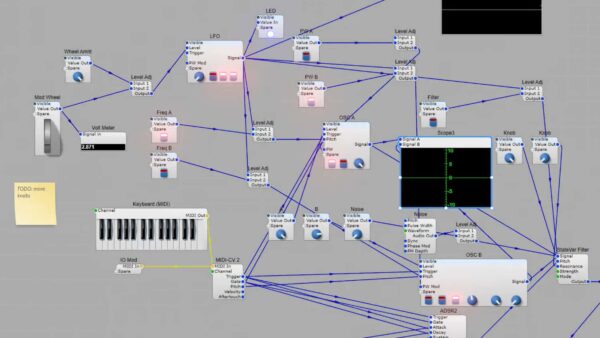
Developer Jeff McClintock has announced that SynthEdit 1.6, now available as a beta release, is for the first time available for Mac, in addition to Windows.
SynthEdit is a visual modular development environment for creating virtual instruments and audio effects, allowing users to design and export plugins without writing low-level DSP code.
It was originally introduced on Windows back in 1987. With verison 1.6, SynthEdit is adding Mac support. A Linux version is also in development.
SynthEdit lets you build virtual instrument plugins by placing modules onto a graphical canvas and connecting them with virtual patch cables. A built-in panel designer is used to create the plugin interface.
The application supports exporting VST3 and Audio Unit plugins and can be extended with third-party C++ modules.
Features:
- Visual modular patching environment for building synthesizers, effects, MIDI utilities, and experimental audio processors
- Drag-and-drop workflow using interconnected modules instead of traditional programming
- Built-in GUI designer for creating custom plugin interfaces
- Export support for VST3 plugins on Windows and macOS and Audio Unit plugins on macOS
- Supports creation of subtractive, additive, FM, wavetable, hybrid, and sample-based instruments
- More than 300 built-in modules are included
- Expandable through a library of over 1,000 third-party C++ modules
- MIDI 2.0 and MIDI Polyphonic Expression (MPE) support
- SFZ sample playback support
- Universal VST3 export supporting both Intel and Apple Silicon Macs
- “Export as JUCE” option for generating additional plugin formats in supported workflows
- Searchable module browser
- Zoomable editor interface
- XML-based project format
- No royalties are charged on plugins created with SynthEdit
SynthEdit is available now for Mac and Windows. A free demo is available with no expiration period. A Linux version is also in development.


