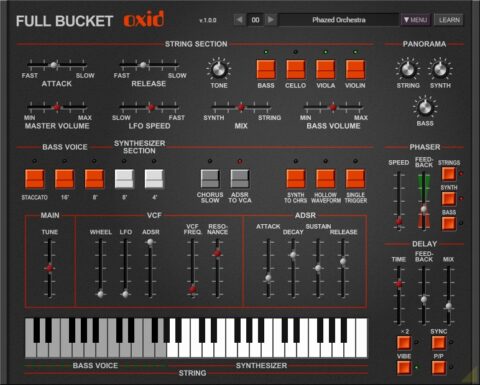
Full Bucket Music has introduced Oxid, a free software synthesizer for Mac + Windows, based on the sound of the classic ’70s ARP Omni-2 polyphonic synthesizer.
Features:
Close simulation of the original hardware
64 voices polyphony
String and Synthesizer sections
Paraphonic madness
Additional Phaser and Delay effects
Resizable user interface (not “N” version!)
MIDI Learn – all parameters can be controlled by MIDI CC
Plug-in supports Windows and macOS (32 bit and 64 bit)
Audio Demo:
Oxid is available now, for Microsoft Windows (VST2/VST3/CLAP) and Apple macOS (VST2/VST3/CLAP/AU), as a free download. If you like it, you can donate at the developers website to help support future development.
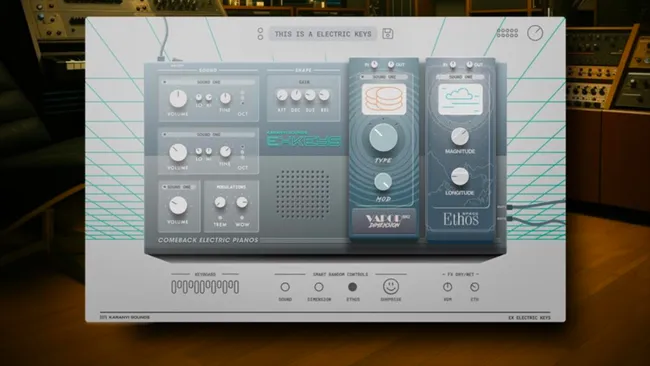
The wind beneath your wings? Electric Keys is free plugin that gives you those classic ‘80s ballad FM electric piano sounds. Learning to love these DX-style tones is the greatest love of all.
Fans of big ‘80s ballads can start preparing their truck driver key changes, because Karanyi Sounds has just released a free plugin that focuses on those classic FM electric piano sounds that were found in the likes of Yamaha’s DX7 and helped to propel the likes of Whitney Houston, Chicago, Bette Midler and Phil Collins to the top of the charts.
Electric Keys is described as a set of “comeback electric pianos”. It comes with “10+” presets, one of which gives you that classic ‘LA’ sound. Sounds have three individually tweakable layers and there are dual DSP effect units: Vapor Dimension MK2 contains 10 algorithms, and Ethos offers 20 types of reverb.
In addition, there are various randomisation options, and all controls offer MIDI learn.
It runs on PC and Mac in VST/AU formats.
Electric Keys has a regular price of $29 but can be downloaded for free for a limited time by using the code on the Karanyi Sounds website.
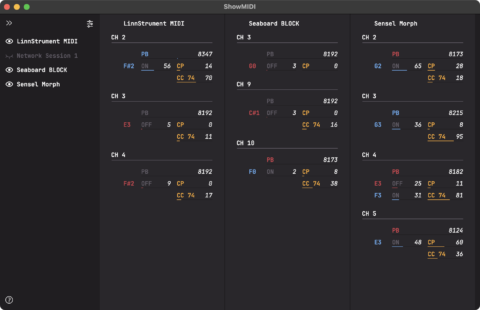
Developer Geert Bevin (Moog Music, LinnStrument, MPE standard co-author) has introduced a free and open-source tool, ShowMIDI, that’s designed to make it easy to visualize what’s going on with MIDI data.
“I had this idea many years ago,” notes Bevin. “This time, when I had to wade through logs of MIDI monitor messages again, I finally rolled up my sleeves and got it implemented. I think it presents real-time MIDI data in a new way that makes it much more understandable and discoverable.”
ShowMIDI is available for macOS, Windows and Linux, with AU, VST, CLAP and LV2 formats. There’s also a standalone version.
It visualizes:
MIDI ports
channels
program change
note on/off
channel pressure
polyphonic pressure
continuous control change
pitchbend
RPN and NRPN
MPE configuration and channel modes
ShowMIDI is designed to be always on and auto-hides past information, using the spacebar you can pause the flow and focus on a data snapshot with the latest state of any MIDI entity.
ShowMIDI is available now as a free download. You can download pre-built binaries for Linux, Mac and Windows, and h@xx0rs can get the source at Github.