Akai Pro intros MPC for Synth Players, The MPC Key 37


Akai Pro’s MPC Key 37 is a standalone synth and sampling keyboard that promises to blend portability with power.

Today, AKAI Pro introduced a new MPC for synth players, the MPC Key 37.

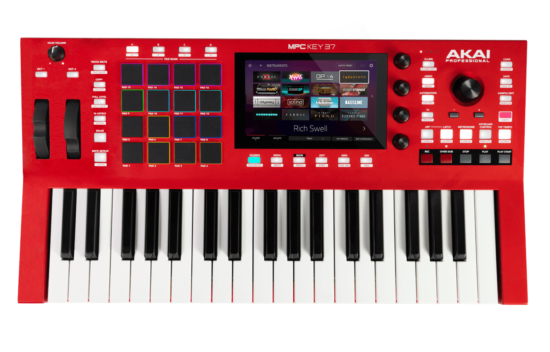
The MPC Key 37 packs a lot of power into a compact and – at $899 – relatively affordable instrument. It features 37 full-size synth-action keys, 16 RGB MPC pads, 32GB of internal storage, support for the MPC Stems and more. It’s designed to be a portable and powerful MPC for synthesist, electronic musicians and producers.

The keys support aftertouch, and there are dedicated pitchbend and modulation wheels. Further control comes via the four assignable Q-Link knobs.

This being an MPC, you get a bank of velocity-sensitive pads, as well. These sit alongside a 7-inch touchscreen that enables you to navigate the now well-established MPC standalone workflow, which includes both sampling and sequencing.

MPC Keys 37 contains more than 8GB of sounds and sample content, and new owners also get a voucher for one additional plugin from the available range. This includes classic synth and other keyboard emulations and the Flex Beat plugin, and you can also bolster your content selection via MPC Expansion packs. There’s a direct link to Splice over Wi-Fi, too, and support for the MPC Stems music separation feature is on the way.

Effects are also included, and MPC Key 37 ships with the MPC2 desktop software so that you can continue to work on projects on your computer, adding more tracks and using VST/AU plugins.

In terms of hardware specs, MPC Key 37 offers a quad-core ARM processor, 2GB RAM and 32GB of storage, 16GB of which is available as user storage. There’s audio and MIDI I/O, CV/Gate connectivity and an SD card slot. The MPC Key 37 is available now for $899
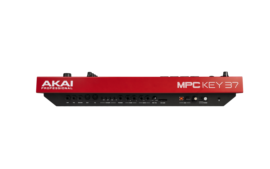
Features:

  • Standalone MPC
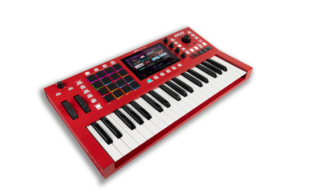
  • 37 key synth-action keybed w/ Aftertouch / Pitchbend and Modulation Wheel
  • 16 Velocity and pressure-sensitive pads, RGB-backlit
  • 8 Banks accessible via 4 Pad Bank buttons
  • 4 360° touch-sensitive Q-Link knobs for parameter adjustment
  • 1 Data encoder for value adjustment and selection via push buttons
  • 38 Dedicated-function buttons
  • Full-color LED-backlit display with touch interface
  • Processor: Quad-core ARM® processor
  • RAM: 2 GB
  • Storage: 32 GB (over 22 GB available for user storage)
  • Connections
    • (2) 1/4” (6.35 mm) TRS Inputs (1 stereo pair)
    • (2) 1/4” (6.35 mm) TRS Outputs (1 stereo pair)
    • 1/4” (3.5 mm) stereo headphone Output
    • 1/4” Sustain Input
    • 1/4” Expression Input
    • 1/4” FS2 Input
    • (1) 5-pin MIDI Input
    • (1) 5-pin MIDI Output
    • (4) 4 TRS CV/Gate Jacks, 8 Outputs Total
    • USB Type-A port
    • USB Type-B port
    • SD Card slot
    • Power Adapter Input


New Dirtywave M8 Model:02 Handheld Tracker


The Dirtywave M8 handheld hardware tracker is getting in shape for summer with a new Model:02 version that offers several physical improvements.

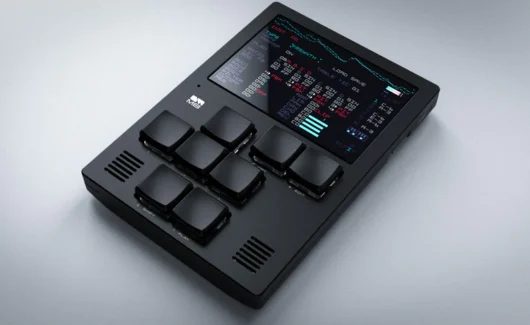
Dirtywave announces M8 Tracker Model:02. This is the successor to the original M8, and promises the ‘same brains with improved physical features’ – an aluminium case, a larger display and improved battery life.

To recap, the original M8  a handheld tracker that was powered by the Teensy microcontroller and took its inspiration from Game Boy tracker Little Sound DJ. It offered eight monophonic tracks/voices, each of which could be used for one of the built-in synthesis engines or to trigger external MIDI hardware.

The Model:02 takes this concept and adds in a new machined aluminium case, a larger 3.5-inch IPS TFT display (up from 2.8-inch) and improved battery life of up to 12 hours. There’s also a built-in mic for onboard sampling and a USB-C connection that can be used in device mode.

If you own the original M8 then there’s no need to panic: your model will continue to be supported with the same features as the 02 in concurrent firmware updates.

The M8 Tracker Model:02 is available for pre-order now priced at £525, with shipping set to begin in May 2024. Find out more on the Dirtywave website.


Audacity now gets Free AI Plugins for Music Generation and Stem Separation ‘This is just a first step’


Audacity recently received a new plugin suite powered by Intel’s OpenVINO AI toolkit. Intel-powered OpenVINO processors are designed to “offer capabilities that were previously unavailable or just really difficult to achieve”

This free and open-source software offers stem separation, transcription, and generating new music from a text prompt or an existing audio track.

First up, we have Music Generation and Music Style remix, both of which use the Stable Diffusion AI model – specifically in its Riffusion guise – to create either new music from a prompt, or existing music.

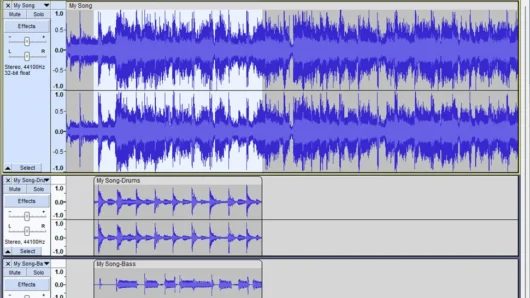
Music Separation does what it says: breaks a song up into either vocal or instrumental parts, or into vocal, drums, bass and a combined ‘anything else’ part.

Stem Separation is a feature that is becoming more and more commonplace; not only does it form the basis of a number of desktop and browser-based applications, but it’s also being included in an increasing number of DAWs and other music production packages.

In addition, Audacity gets Noise Suppression, which is designed to remove background noise from an audio file, and Whisper Transcription, a tool for transcribing spoken word audio or vocal recordings.

“We decided to add AI features to Audacity so that we could offer capabilities that were previously unavailable or just really difficult to achieve,” says Audacity Product Manager Martin Keary in a video posted by Intel Business. He also confirms that “the plugins run locally on your PC rather than from a server, addressing privacy concerns.”

According to Keary, there could be more to come, too: “This is just a first step,” he says. “We hope to continue partnering with Intel to develop all kinds of new AI tools in the future to help take Audacity to a level no one’s ever seen before.”

The AI plugins are currently only available to Windows users, but we’re hoping that they’ll be coming to Mac and Linux, as well. Find out more – including how to download and install them – on the Audacity blog.