Avid Pro Tools 2024.3 Now Available, Here’s What’s New
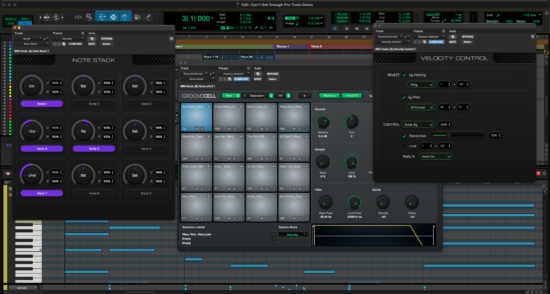

Avid’s new Pro Tools update brings “music creators powerful new ways to work with MIDI”. Pro Tools 2024.3 also benefits from live re-rendering in Dolby Atmos Renderer and improved integration with Pro Tools Sketch.

Avid’s Pro Tools DAW has received its first update of the year. Now available to download, Pro Tools 2024.3 arrives with a range of new MIDI tools and now offers support for third-party MIDI effect plugins.

Pro Tools 2024.3 introduces the concept of MIDI Chains, a new way of routing and processing MIDI data within the DAW. As mentioned, this allows you to make use of third-party MIDI effect plugins, but also to quickly and easily create custom MIDI routings between various tracks and instruments.

Pitch Control and Velocity Control applies transformation to both pitch and velocity of incoming notes and can also be used to apply randomized processing to your melodies, chords and beats to create evolving patterns and textures.

In addition to these three plugins, Pro Tools has partnered with several plugin developers to offer bundled MIDI effects plugins to those on its Artist, Studio and Ultimate plans: these include Modalics EON-Arp, a creative arpeggiator plugin, Audiomodern’s Riffer 3, a sophisticated MIDI sequencer and automatic pattern generator, and Pitch Innovations’ Groove Shaper, a rhythm generator.

The latest iteration of Pro Tools also adds support for live re-rendering in Dolby Atmos for the bundled Dolby Atmos Renderer, a tool for rendering and previewing Atmos mixes from within the DAW.

Avid’s clip-based app Pro Tools Sketch has also been updated with improve drag-and-drop functionality between Sketch and Pro Tools.

Last week, Ableton released Live 12, a new version of its flagship DAW that also features an expanded array of tools for MIDI generation and transformation. Find out more on Avid website.
Bitwig Remote Control App R-Kontrol Updated to v1.5, Here’s what’s New

Developer Marko Krueger has updated R-KONTROL, a dedicated iOS controller for Bitwig Studio.

New in R-KONTROL v1.5:

  • Auto discovery (aka zeroconf, R-Kontrol automatically searches for Bitwig, making it easier to connect. If the network doesn’t allow it, you can still manually configure the IP connection conventionally.)
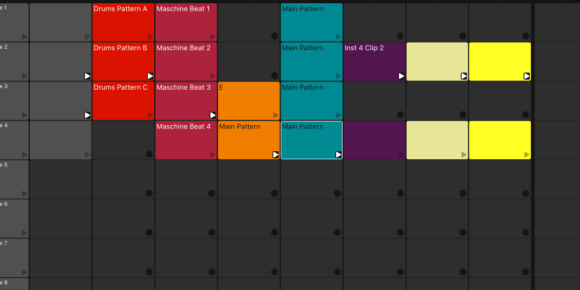
  • The ClipLauncher has been updated – the launcher itself is now, depending on the current state, either the
  • Play/Stop/Record button, and additional actions like Quantize, Transpose, or setting the Clip Length have been added.
  • For better readability, the font color of the ClipLauncher (light/dark) now corresponds to the color of the ClipLauncher.
  • You can now display Remote Controls and Sends together with either the Mixer or the ClipLauncher on one screen (iPad only).
  • Several actions such as: Reset Peak Levels, show/hide (and select) the AB Crossfader, Restore Automation Control, show/hide inactive tracks have been added.
  • All groove-relevant actions are now also controllable via R-Kontrol.
  • Cue markers now fit better layout-wise into the mixer, and actions like jump-to-previous/next and deleting cue markers have been added.


R-KONTROL is available now for $7.99


Casio FZ-1 Sampling Synthesizer Hands-On Demo

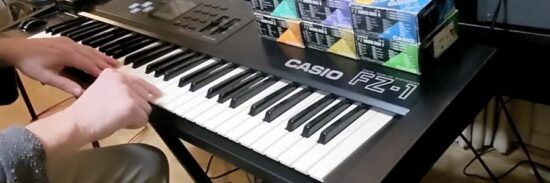
In the latest Synthdude video series offers a hands-on demo of the Casio FZ-1 sampling synthesizer.


The Casio FZ-1 comes from the mid-’80s, when the company was trying to make affordable profession gear. Though the sampling specs are lo-fi by today’s standards, the FZ-1’s hybrid architecture adds additive and subtractive synthesis, letting you create a wide range of interesting sounds.

In addition to offering an overview, the series also offers an introduction to sampling with the FZ-1.


If you’ve used the FZ-1, leave a comment and share your thoughts on it!