SampleScience intros 808 Bass Revolution, Sky Piano


SampleScience has introduced two new virtual instruments: 808 Bass Revolution and Sky Piano:

808 Bass Revolution is a collection of 40 expertly designed 808 basses. It is tailored for a wide range of genres, including rap, pop, EDM, and trap. The product features multi-LFO and amplitude shaping function features, allowing users to sculpt and personalize their sound. It also includes onboard effects and adjustable distortion settings for complete tonal control.
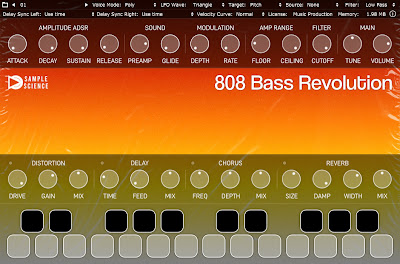

808 Bass Revolution is compatible with Windows and macOS, available in VST, VST3, and AU formats.


Sky Piano is a meticulously multi-sampled Grand Piano captured with a high-precision microphone. It includes integrated delay and reverb effects for creating ambient piano tones. The product also features distortion and chorus effects in tandem with the Multi-LFO, allowing users to craft soothing lo-fi piano tones with ease.
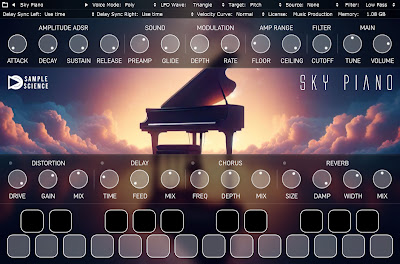
Sky Piano is compatible with Windows and macOS, available in VST, VST3, and AU formats.

808 Bass Revolution and Sky Piano are each available now for $30.
 

SideRack Enables You Integrate iOS Plugins With Your DAW

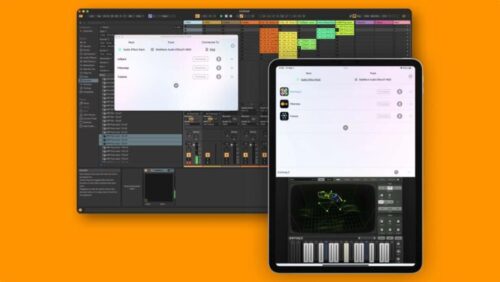
NovoNotes has introduced SideRack, a new system that lets you integrate iOS plugins running on your iPad or iPhone with your Mac DAW.


The system includes 3 plugins:

  • SideRack Audio Effect sends audio to and receives audio from the SideRack Server.
  • SideRack MIDI Effect sends MIDI to and receives MIDI from the SideRack Server.
  • SideRack Instrument sends MIDI to the SideRack Server and receives audio back.


Features:

  • AUv3 Plugin Compatibility – SideRack makes these plugins usable from a DAW on a Mac.
  • Low Latency – The latency associated with transferring and processing audio and MIDI is kept as low as possible. This latency is automatically compensated for in many DAWs, ensuring that audio between tracks is perfectly synchronized with sample accuracy.
  • Multiple Instruments and Effects – You can use as many instrument and effect plugins on iOS devices as your machine’s power allows. Unlike hardware products or IDAM, the number of plugins is not limited by the number of I/O channels. Flexible routing is possible, allowing you to chain multiple effects within a single rack or process in parallel
  • Synchronizing Sequencer Plugins – SideRack synchronizes sequencer plugins on mobile devices with the tempo and playback position of the desktop DAW. AUv3 plugins with functionalities like piano rolls or drum machines are integrated into the DAW workflow more seamlessly than ever before.
  • High-Quality Audio Processing – SideRack transfers uncompressed audio and MIDI data in real-time.
  • Easy Setup – SideRack can be set up in a few steps, allowing immediate use of mobile device plugins in your DAW. The setting information of AUv3 plugins, including parameters, is also saved in the project file on the Mac side, so there is no need to manage separate files for each device.

SideRack is available now for $78 (normally $98).

Akai MPC Stems Out Now, Letting You ‘Unmix’ Samples For Your MPC


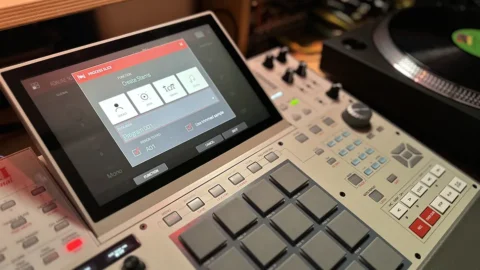
MPC Stems, Akai Pro’s new audio extraction technology, is now available in the MPC Desktop Software.

Announced earlier this year, Akai Pro’s MPC Stems technology – which enables producers to separate the bass, drum, vocal and other musical elements in mixed audio – has now arrived in the company’s MPC Desktop Software.

Said to usher in “a new era of sampling, enhancing creativity and precision for music producers and beatmakers,” and to represent “a monumental leap forward in sampling technology for producer communities around the world,” this is powered by zPlane’s stem separation engine, which Akai Pro claims delivers “superior sound quality” and minimal artifacts.

Once separated, stems can be assigned to pads within the MPC software, and you can also assign sample slices to different pads and isolate specific parts of the original track.

The workflow is easy: simply select the Create Stems option and you can choose which of the layers you want to extract. The volume, pitch and pan levels for each stem can be adjusted individually or across all four layers, and your audio can be cropped on an individual or global basis, too.

As we mentioned, MPC Stems currently only works in the desktop version of the MPC Software,but is fully supported when you use your MPC Live Series, MPC One, MPC One +, MPC X, MPC Xse, MPC Key 61, MPC Key 37, or MPC Studio Mk2 in Controller mode.

If you want to use your stems in standalone mode, you’ll have to create them in the desktop software and then open the project you saved them in on your standalone hardware.

The MPC Stems update cost only $10.79 including  for existing MPC Software users. It is available exclusively through the MPC Store, and requires users to have installed the 2.14 software/firmware update.