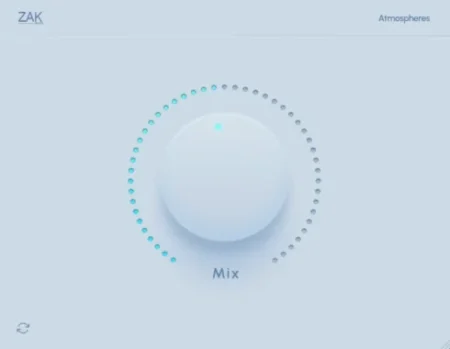
ZAK Sound has introduced Atmospheres, a free reverb plugin for macOS and Windows that’s designed to create immersive spaces and dreamy textures.
Here’s what they say about it:
“Atmospheres is a one-knob plugin for crafting dreamy and atmospheric textures. It was created using its big brother Deep Waters processor, renowned for its water-based approach to creating distinctive reverbs.
This free plugin allows you to create textures and effects without thinking too much, with just a knob and a button. The Randomizer function allows you to change many internal parameters and reverb types with a single touch.”
Stability AI’s music generator can now edit and transform your samples and produce full-length, structured tracks. Now Stable Audio 2.0 is edging closer to becoming a revolutionary tool for music-makers.
Last year, we reported on the launch of Stable Audio, a text-to-audio AI music generator from the makers of Stable Diffusion capable of producing musical clips of up to 90 seconds based on text prompts provided by the user.
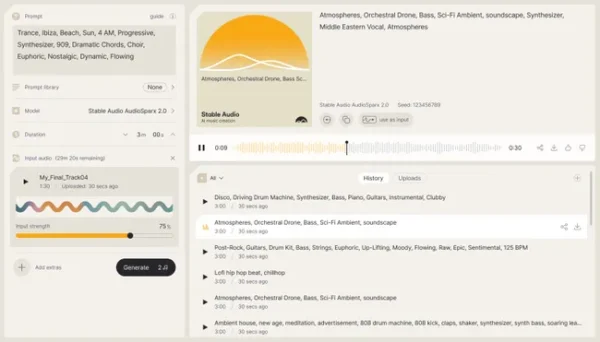
This week, Stability AI has launched Stable Audio 2.0, a substantial update to its AI-powered platform that brings the ability to generate “high-quality” and fully structured tracks of up to three minutes in length, in addition to melodies, backing tracks, stems and sound effects.
What’s more interesting than the increase in track length and structural complexity, though, is that Stable Audio 2.0 can now process and transform audio uploaded by the user.
This can be used for all sorts of musical applications; in a demo shared on Stable Audio’s YouTube channel, a synth bassline is transformed into the sound of a bass guitar playing the same melody, a snippet of scat singing is used to determine the pitch and rhythm of a drum part, and a beatboxing recording is morphed into a lo-fi hip-hop beat.
Stable Audio says that its audio-to-audio capabilities are intended to help its users “transform ideas into fully produced samples”. While still in its early stages, the possibilities here are endless, and this new feature could become a hugely useful tool in a music production workflow – especially if it was integrated into a DAW or a plugin.
When asked Stability AI if this kind of integration was something they might explore in the future, and while they didn’t comment specifically on any future projects, they said that “enhancing current production workflows by providing more granular control and editing capabilities” is a focus for the company.
Stable Audio 2.0’s ability to generate sound and audio effects has also been improved, giving users the potential to add AI-generated imitations of real-world sounds to their creations.
Like its first iteration, Stable Audio 2.0 was trained on a dataset of 800,000 audio files from the AudioSparx sound library. All of the artists behind the music in the dataset were given the option to ‘opt out’ and stop their music being used in the model training process.
In November last year, Stable Audio VP Ed Newton-Rex resigned from his post, describing the practices used in training the model as “exploitative”.
“Companies worth billions of dollars are, without permission, training generative AI models on creators’ works, which are then being used to create new content that in many cases can compete with the original works,” Newton-Rex said in a statement. “I don’t see how this can be acceptable in a society that has set up the economics of the creative arts such that creators rely on copyright.”
While Stability AI has refused to provide us with comment on Ed’s statement, they reiterated that the Stable Audio model is solely trained on data from their partners at AudioSparx. “All of AudioSparx’s artists are compensated and were given the option to ‘opt out’ of the model training,” they told us.
When asked Stability AI whether they believe that tools such as Stable Audio have the potential to impact the livelihoods of working musicians as they continue to advance in sophistication.
“Our mission at Stability AI is to build the foundation to amplify humanity’s potential, which includes artists,” they replied. “Our aim is to expand the creative toolkit for artists and musicians with our cutting-edge technology, thereby enhancing their creativity.”
Say hello to a new, inspiring workflow! Tracktion adds clip launching and Wavetable Synth to Waveform Pro 13 update. The Pro 13 gets the live performance workflow you’ll recognise from Ableton, Logic and Bitwig, and might just be the tempter you need to switch DAWs.
Over recent updates, Tracktion Waveform Pro has become the DAW you didn’t know you should be using, but its latest version could seal the deal, with familiar clip launching and a new wavetable synth promising to draw in newcomers and increase its user base.
The Waveform Pro 13 version could be seen as an obvious update, but something about its integration with the arranger window makes it look somewhat neater in our record. If we were to maintain that ‘party’ analogy, then, it’s like the cooler kid has arrived late, but they are dressed in the latest killer combat slacks, and everyone at the party is going ‘wow’. Ok, maybe…
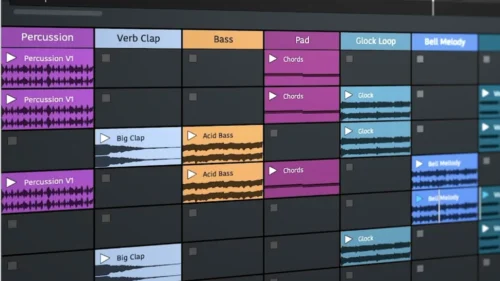
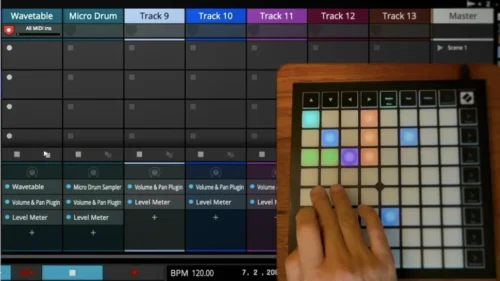
Waveform Pro 13’s takes on clip launching lets you record and edit MIDI and audio clips on a grid and use a number of different sequencer actions to play and perform with them. You can choose to pre-arrange these actions and set probability levels so move towards more random events if you wish.
As with other DAWs, all of your live performances can be recorded – in this case using Performance Recording – and edited in an arranger window after the event, which, like we say, seems more handily placed than in most DAWs.
To go with the new clip launching feature, Tracktion has announced support for Ableton Link and a range of MIDI controllers from Novation and Akai.
The other big update to Waveform Pro is a wavetable synth called, handily, Wavetable which has two wavetable oscillators, and a sub and noise oscillator. There are 150 included wavetables and the option to import your own WAVs and Serum wavetables. The synth has five effect slots that can be re-ordered and also includes plenty of modulation features.
Tracktion has redesigned the main Waveform Pro UI to welcome the new clip launching features, and has improved the DAW’s automation. V13 also includes all-new content from Mode Audio.
Waveform Pro not only runs on a wide range of platforms, but is available in a wide (and slightly confusing) range of sizes.
The basic $199 Pro gets you the DAW plus AutoTune and Melodyne Essential. The $299 ‘Recommended’ bundle adds RetroMod FAT, LoFreq Modern, F.’em and Dan Dean Essential Bass instruments. ‘Studio Content’ ($599) adds extras like MOK Waverazor, Abyss, Hyperion, SpaceCraft and Modeler. Finally, the ‘Everything’ bundle has, well, everything Tracktion for $999. You can go here to see what’s included.
If you are a Pro 12 user, upgrade it as it’s just $99 to get you the synth and a whole new way of working. You can get more info from the Tracktion website.