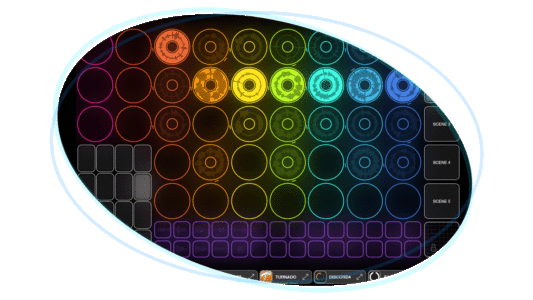
Developer Michael Tyson of A Tasty Pixel has released Loopy Pro 2.0 for iOS – a major update to their über-looper application.
Tyson says that this is the biggest update yet for Loopy Pro, and it opens up a whole new world of possibilities.
Loopy Pro is like “musical Lego”. You can add loops, one-shots, and buttons to the canvas along with customized sliders, dials, XY pads, clip slicers, encoders, grids, and more. You can use your iPad or iPhone stand-alone, or connect audio interfaces, MIDI controllers and external instruments.
Here’s what’s new in Loopy Pro 2:
MIDI CLIPS & SEQUENCER
Record, edit, and play back MIDI directly in Loopy Pro. Sequence beats, melodies, or automate your performance — right on the canvas.
POLYPHONIC CLIP PLAYBACK
Play audio clips sliced or pitched across your controller. Turn any clip into a playable instrument.
BUS-TO-BUS ROUTING
Route audio between buses for advanced mixing setups and custom FX chains.
GROOVE QUANTIZATION (“WARP”)
Quantize audio and MIDI clips to swing, randomness, or your own groove — tight or loose, your choice.
REVISED MIXER
Collapse groups, see signal sources clearly, and stay focused even in big projects.
DOCKABLE PLUGIN PANELS
Pin plugin windows to screen edges to keep your workspace clean.
MORE MIDI & CANVAS TOOLS
On-screen dockable MIDI keyboards
Rotary encoder widget
“Next Empty Clip” action targeting
New “Assign Clip Settings” and “Clip Offset” actions
Developer Iftah Gabbai has released Sting 2, a major upgrade to the M4L acid line generator.
What Gabbai has to say about it:
“It’s an expressive, improvisational acid line performance system.
Sting can generate anything from random to acid patterns and morph between them fluidly. It features a new generation algorithm, advanced editing, expressive control, generative sequencing, and modulation capabilities, along with a set of live performance oriented features. These include a dedicated Push takeover mode that transforms Sting into a hands-on live performance system when used with Ableton Push 2 or 3.
All of Sting’s parameters are logically laid out and fully controllable via Tabbing, making it accessible to blind, visually impaired, and sighted users.”
Sting is available now, as either a free or paid download. The developer notes, “Both versions are identical, you can decide whether you want to support my work.”
Waves Audio has announced a V16 update to COSMOS Sample Finder, its AI-powered sample manager.
The V16 update brings significant improvements, enhancing workflow efficiency and DAW integration. They say that the updated version “offers the smartest, fastest, and most efficient way to manage all your samples”.
Key new features include:
DAW Plugin & Sync: COSMOS now functions as an insert plugin within DAWs (as well as a standalone app).
Sample Auditioning: Preview samples in context, adjusted to session BPM and key.
Smart Organization: Auto-grouping of sonically identical audio files for streamlined management.
CPU Optimization: Adjustable performance settings tailored to user preferences.
Refreshed User Interface: A sleek, updated design for an improved user experience.
Additional features include: The COSMOS Sample Finder offers AI-powered sample categorization, efficiently organizing collections by instrument, key, BPM and tags. It supports multiple formats, including WAV, AIF, OGG and FLAC files, ensuring compatibility with various sample types. Users can choose between using COSMOS as a standalone application or as a DAW-integrated plugin, adapting it to their preferred workflow. The tool also includes over 2,500 royalty-free samples, providing immediate creative inspiration. COSMOS also offers both waveform and list views, allowing users to preview samples visually or access detailed descriptions. The unique COSMOS Cluster View presents related one-shots in intuitive clusters, making it easier to audition and select the right sounds. Multiple search options provide flexibility in finding samples by instrument, tags, key, BPM or specific search terms. Users can explore broad categories, refine their selections, and even let COSMOS group identical audio files to eliminate duplicates.