Sampleson releases The Evolving Soundscapes generator SandStorm

Sampleson SandStorm plugin could be a cheap code for creating epic, evolving soundscapes.

If you spend a lot of time, money and effort on creating cinematic evolving soundscapes, SandStorm could be your answer.

SandStorm is a simple plugin designed for generating these Hollywood-esque atmospheres in seconds.

It’s secret sauce is its ability to stack up to 17 sound sources, including orchestral instruments, analogue synths and both granular and wavetable modules. Want to introduce a bit of wind noise? There’s a layer for that.

Parameters can be assigned to mouse macro control, enabling you to tweak your sounds to taste simply by dragging the mouse over the GUI.

If you want the ultimate in convenience you can use the supplied presets. Additionally, it is possible to build up your own textures from scratch.
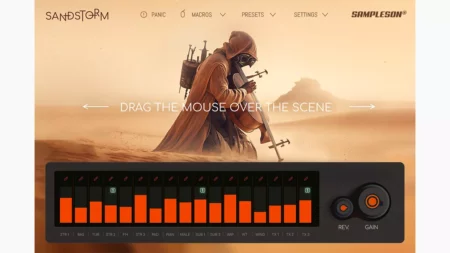

Although Sandstorm has obvious appeal for beginners, Sampleson suggests that it could also be useful for pros who want to sketch out quick ideas without setting up a massive multitrack DAW project. It could also be used for playing live ambient sounds.

Available for PC and Mac in VST/AU formats, SandStorm is available now for the introductory price of $39. The regular price will be $59. Find out more on the Sampleson website.
 

Free Groovifi App promises a better way to create Spotify playlists.


Groovifi is a free app that promises a better way to create Spotify playlists by letting you decide the mood, BPM, key, rhythm and genre of your songs.

Spotify is known for its ability to generate personalised playlists based on what its algorithms perceive to be your musical taste.

If the algorithm isn’t cutting it – what if it doesn’t know you as well as it thinks it does? If your ‘made for you’ playlists sound like they’ve been ‘made for someone else’, maybe it’s time for you to take control. The makers of Groovifi think they have the answer.

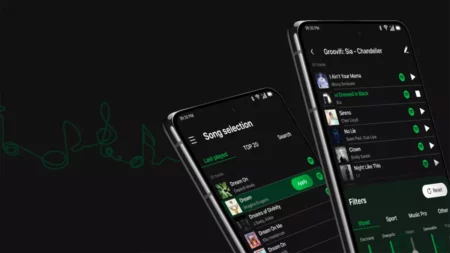
This free app is designed to give you more control over playlist generation. First up, choose a song on Spotify that you like. Next, use any combination of Groovifi’s filters to fine-tune the playlist to your taste.

The parameters are divided into four categories: Mood, Sport, Music Pro and Other. The Mood section includes five sliders that you can move up or down (Acoustic, Mellow, Sad, Chill and Obscure) while the Sport section enables you to select a BPM range.

You can dive even deeper in the Music Pro category, filtering songs by key, mode and rhythm. You could choose to only find songs in 4/4 and D minor, for example.

Lastly, over in the Other section you can select your favourite genre and select how likely it is that you will be fed vocal/instrumental and live/studio recordings. It’s also possible to exclude explicit tracks.

The playlist you’re creating will refresh every time you make an adjustment to one of the filters, so you can just keep tweaking until you’re happy with the results. Playlists you want to keep can be saved and then shared with friends.

Groovifi can be downloaded for free on Android and iOS, with a $5 in-app purchase unlocking full functionality. Find out more on the Groovifi website.

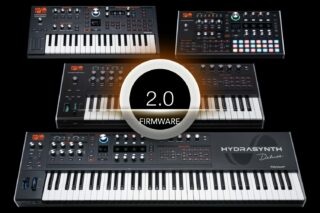
ASM Hydrasynth gets Major Free Firmware Update; Here’s What’s New

Ashun Sound Machines (ASM) let us know that they have released a major firmware update for their Hydrasynth line.

The free version 2.0 update adds new synthesis capabilities, new performance options, expanded patch memory and more, and is compatible with the entire Hydrasynth line.

What’s new in Hydrasynth 2.0:

  • ASM’s major (2.0) firmware update adds three more memory banks to the Hydrasynth keyboard, desktop, and Explorer models, matching the Deluxe’s existing eight banks for a total of 1,024 patches.
  • Each Hydrasynth oscillator — OSC 1, OSC 2, and OSC 3 — now includes a new BitRedux (bit reduction) parameter that allows users to choose between OFF, 16, 12, 10, 9, 8, 7, 6, 5, 4, 3, and 2 bits.
  • More modulation options – a new modulation source called VoiceMod (voice modulator) allows users to offset values for each voice that can then be applied in the Mod Matrix to vary chosen parameters per voice. D
  • All five envelopes — ENV 1 through to ENV 5 — and LFOs (Low Frequency Oscillators) — LFO 1 through to LFO 5 — have new Quantize options, so users can quantize their outputs to achieve unique stepping effects. It is also now possible to choose to advance through the steps with each new note on with the LFOs in Step mode, meaning users can play through the steps one by one with each new note press.
  • Bypass each of the (Pre-FX, Post-FX, Delay, and/or Reverb) effects globally in the system page — to record a dry signal without having to edit each patch.
  • Choose how the sustain pedal operates. The three options available are: Sustain — traditional sustain (as it has always worked), Sostenuto — press and hold a single note while playing notes above it, and Mod Only — disables the sustain function, allowing users to then route it in the Mod Matrix.
  • Other added features and functions, to include: Arp range expanded to six octaves; new Arp Step Offset parameter; Bank selection from browser window; ability to randomize all steps in LFO Step mode; new display Dim, On/Off options; Glissando mode added to Glide options; fine control for more subtle options offered by Vibrato; and Local On/Off status recalled (with in-screen reminder).

As ASM CEO Glen Darcey duly concludes:

“Hydrasynth firmware 2.0 is a huge update. ASM CEO Glen Darcey suggest downloading the manual update to find out more about the features, adding “There are some good tips and tricks on each of the new features and functions in there.”

Owners of any Hydrasynth can download the latest (2.0) firmware update for free, along with the Owner’s Manual addendum.
An introduction to Hydrasynth 2.0 from ASM CEO Glen Darcey:

Hydrasynth 2.0 VoiceMod (voice modulator) feature overview:

Hydrasynth 2.0 LFO Step advance mode, with Product Specialist Ken Pierce:

Hydrasynth 2.0 LFO/Envelope Quantize feature overview.
Performance demo, by ASM Senior Product & Design Manager Dominic Au, focusing on new features in 2.0:

You can learn more about the Hydrasynth line at the ASM website:
Hydrasynth keyboard
Hydrasynth desktop
Hydrasynth Deluxe
Hydrasynth Explorer