Limited-edition hardware for newbies and a free firmware update for existing users.
Arturia MicroFreak synth gets a Stellar update – new look, sampling capabilities and 3 granular engines.
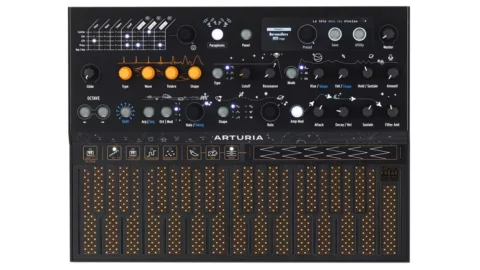
Ahead of Superbooth 2023, being held in Berlin May 11-13, Arturia has unveiled the MicroFreak Stellar Experimental Hybrid Synth, a limited-edition variant of the popular MicroFreak, and a free firmware update for existing users.
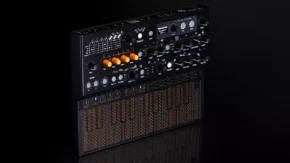
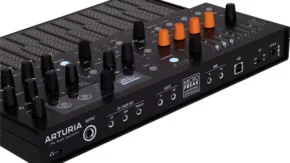
MicroFreak Stellar is a limited edition that features a sleek black finish with ‘quirky’ space-age graphics. There are some exclusive new presets as well.
What they say about it:
“The Freak within. MicroFreak Stellar features the same inspiring, bonkers sound but embellished with a unique space-age design.
Beneath its space-age exterior, you’ll find sparkling digital and wavetable oscillators collide with a velvety analog filter. A unique poly-aftertouch PCB keyboard combines with a distinctly freaky arpeggiator & sequencer. Bathe your mix in sonic hysterics with the erratic mod matrix or the unique Spice & Dice randomizers. MicroFreak is out to break the rules. It’s an unpredictable instrument for the adventurous. An adrenaline rush for the thrill-seeking musician. A mind-bending tool that dares you to stray from the path and think differently. Freak out.”
Alongside this – Arturia has unveiled a V5 firmware update for all MicroFreak owners, including those who purchase the Stellar.
Arturia MicroFreak version 5 is a massive update that adds 4 new engines and allows users to load their own samples and use them with one of the four new sample/granular engines.
You can now import, play back and loop your own samples, and they can be manipulated using the three new granular engines. The MicroFreak’s keyboard can be transformed into a S&H modulation source, and the synth’s envelopes can now have even shorter attack values for a little extra snap.
Finally, you can now access 512 preset slots, and the factory preset count has risen to more than 300.
What’s new in MicroFreak v5.0:
New sampling engine: Manipulate and trigger recorded audio using MicroFreak.
3 new granular engines: Scan, Cloud, and Hit modes for Freaky granular exploration.
New Preset factory
Using MIDI Control Center, you can import your own samples, up to 24 seconds long. You can then send them to MicroFreak.
The new v5 Firmware will be available for download on May 30th, 2023. See the Arturia website for more info.
The MicroFreak Stellar is available now priced at $399/ €349. The Firmware V5 will be available for all MicroFreak owners May 30th, 2023.
Apple today unveiled Final Cut Pro and Logic Pro for iPad, applications that establish the iPad as a content creation platform on a par with traditional desktops.
Since the device was introduced by Steve Jobs in 2010, many have considered the iPad primarily to be a device for consuming media, rather than authoring media. With the iPad now using the same powerful processors as Apple’s desktop computers, though, interest has grown in running desktop applications on it.
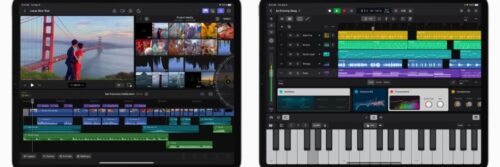
With Final Cut Pro and Logic Pro for iPad, Apple is bringing industry-standard professional media applications to the iPad, but with new multi-touch interfaces.
Logic Pro for iPad puts the power of professional music creation in the hands of the creator — no matter where they are — with a complete collection of tools for songwriting, beat making, recording, editing, and mixing. Apple says that it “combines the power of Logic Pro with the portability of iPad to unlock an all-in-one professional music creation app”.
With Multi-Touch gestures, music creators can play software instruments and interact naturally with controls, as well as navigate complex projects with pinch-to-zoom and swipe-to-scroll. Plug-in Tiles put the most useful controls at the creator’s fingertips, making it easy to quickly shape sounds. With the built-in mics on iPad, users can capture voice or instrument recordings, and with five studio-quality mics on iPad Pro, users can turn virtually any space into a recording studio.
Creators can also make precision edits and draw detailed track automation with Apple Pencil, and connect a Smart Keyboard Folio or Magic Keyboard to utilize key commands that speed up production.
Diving into the detail, an all-new sound browser puts all available instrument patches, audio patches, plugin presets, samples and loops in a single location, and you can tap any sound to audition it before you add it to a project.
And there’s certainly plenty of content to play with: Logic Pro for iPad ships with more than 100 instruments and effects, with the multitouch-capable interfaces enabling you to bring them to life.
New Sound Browser
A new sound browser uses dynamic filtering to help music creators discover the perfect sound whenever inspiration strikes. The sound browser displays all available instrument patches, audio patches, plug-in presets, samples, and loops in a single location, and users can tap to audition any sound before loading it into a project to save time and stay in their creative flow.
Professional Instruments and Effects Plug-Ins
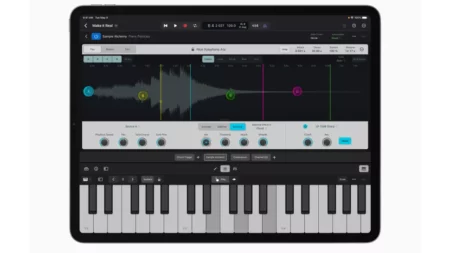
Creators can shape the sonic qualities of their music with over 100 powerful instruments and effects plug-ins in Logic Pro. Effects like vintage EQs, compressors, and reverbs let users tweak and fine-tune their tracks. With Multi-Touch, creators can play instruments using a variety of play surfaces. Logic Pro on iPad comes with a massive collection of realistic-sounding instruments and powerful synths including Sample Alchemy — a new sample manipulation instrument that can transform any audio sample with the tap of a finger.
Beat Making and Production Tools
Producers can chop and flip samples, program beats and bass lines, and craft custom drum kits with a set of beat making and production tools. Beat Breaker, a new time and pitch-morphing plug-in, lets music creators swipe and pinch to radically reshape and shuffle sounds. Quick Sampler can chop and transform audio samples into entirely new playable instruments, and Step Sequencer lets users program drum patterns, bass lines, and melodies, and even automate plug-ins with just a few taps. Drum Machine Designer enables the creation of custom drum kits by applying samples and unique plug-ins to any drum pad. With Live Loops, users can capture inspiration and quickly build arrangements by mixing and matching musical loops.
Pro Mixer
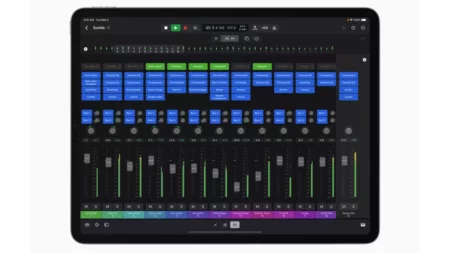
A full-featured mixer — complete with channel strips, volume faders, pan controls, plug-ins, sends, and precise automation — gives users everything they need to create a professional mix entirely on iPad. Multi-Touch enables creators to mix intuitively and move multiple faders at once, and the mixer meter bridge lets them quickly navigate an overview of track levels, all from iPad.
Import and Export
Logic Pro for iPad supports roundtrip capabilities, making it easy to move projects between Logic Pro for Mac and iPad.
iPad users can export their finished songs in a variety of compressed and lossless audio formats, as well as individual audio track stems. Music creators can make a soundtrack in Logic Pro for iPad and export it into Final Cut Pro for iPad — providing flexibility for working across music and video.
Logic Pro for iPad also supports the ability to open projects created in GarageBand for iOS, so users can take their music to the next level with pro features and workflows.
Final Cut Pro for iPad
In addition, Apple introduced Final Cut Pro for iPad, which introduces a powerful set of tools for video creators to record, edit, finish, and share, all from a portable device.
Final Cut Pro for iPad introduces a new touch interface and intuitive tools that allow for new workflows for video creators. A new jog wheel makes the editing process easier enables users to interact with content in new ways. They can navigate the Magnetic Timeline, move clips, and make fast frame-accurate edits with a tap of a finger.
With Live Drawing, users can draw and write directly on top of video content using Apple Pencil. On iPad Pro with M2, Apple Pencil hover unlocks the ability for users to quickly skim and preview footage without ever touching the screen. They can also speed up their workflows by adding a Magic Keyboard or Smart Keyboard Folio to utilize key commands. Creators can view and edit HDR video and apply color grades with accuracy using Reference Mode.
Pro Camera Mode and Multicam Video Editing
Pro camera mode brings greater control to the creation process on iPad. Video creators can shoot high-quality video in portrait or landscape orientation, monitor audio and available recording time, and manually control settings like focus, exposure, and white balance.
Creators can capture, edit, and publish from a single device while in the field, and on iPad Pro with M2, users can even record in ProRes. With multicam video editing, clips can automatically be synchronized and edited together, and users can even switch angles in a multicam clip with just the touch of a finger.
Fast Cut Features with Machine Learning
Final Cut Pro for iPad harnesses the power of Apple silicon and machine learning to speed up time-consuming editing tasks. With Scene Removal Mask, creators can quickly remove or replace the background behind a subject in a clip without using a green screen. Auto Crop adjusts footage for vertical, square, and other aspect ratios, and with Voice Isolation, background noise can easily be removed from audio captured in the field.
Scene Removal Mask uses machine learning to analyze a shot and isolate a subject, removing the background with just a tap.
Pro Graphics, Effects, and Audio
Video creators can choose from a vast library of professional graphics, effects, and audio. These include HDR backgrounds, customizable animated patterns, and professional soundtracks that automatically adjust to the length of a video.
Import and Export
Editors can import supported media from Files or Photos, and save it directly inside a Final Cut Pro project. Final Cut Pro for iPad also supports the ability to import projects created in iMovie for iOS,4 and iPad users can export their Final Cut Pro projects to Mac.
Final Cut Pro is compatible with M1 chip iPad models or later, and Logic Pro will be available on A12 Bionic chip iPad models or later. Final Cut Pro for iPad and Logic Pro for iPad require iPadOS 16.4. Starting Tuesday, May 23, Final Cut Pro and Logic Pro for iPad will each be available on the App Store for $4.99 per month or $49 per year with a one-month free trial.
UDO’s binaural, hybrid analogue Super Gemini synth promises to fuse the past, present and future. And offers polyphonic aftertouch and 20 voices of polyphony
Ahead of Superbooth 2023, being held in Berlin May 11-13, UDO Audio shared this sneak preview of their new Super Gemini synthesizer.
The Super Gemini is a 20-voice polyphonic, bi-timbral analog-hybrid flagship keyboard. UDO says that the keyboard gives you “immediate comprehensive control” over both timbral layers.
The synth features a hybrid voice architecture. Digital oscillators offer wave morphing, cross and ring modulation, bi-directional sync and more. These feed into an analog signal path that they say is inspired by classic vintage instruments from the past, creating an instrument that’s said to fuse a state-of-the-art FPGA digital architecture with a typical voltage-controlled synth.
The Super Gemini is equipped with a 61- note semi-weighted keybed with polyphonic aftertouch, in addition to a custom engineered ribbon sensor. There are 256 performance and patch slots, 64 interchangeable waveforms and 16 sequences.
Like the Super 6, the Gemini can be used as a 20 voice synth, or as a 10-voice, true-stereo binaural synth.