Numerical has released version 1.2 of Konstrukt, its music-production environment for iPad and iPhone, formerly known as MIDIRack.
The update introduces third-party AUv3 plugin hosting, built-in synthesizers and effects, audio recording, an integrated mixer and several new sequencing tools. It also expands the application’s visual MIDI and audio routing environment with a new feature called Fragments.
Originally introduced in August 2026 as a MIDI instrument-building application, MIDIRack allowed users to create custom performance surfaces using touch keyboards, pads, knobs, faders and sequencers. With version 1.2, the application adds its own sound-generation and audio-processing capabilities, making it possible to build more complete software instruments and music-production environments.
The name change reflects this expanded functionality. Konstrukt combines customizable performance interfaces, MIDI processing, sequencing, sound generation, third-party plugin hosting and audio routing within a single environment.
AUv3 Plugin Hosting And Built-In Instruments:
One of the most significant additions in version 1.2 is the ability to host third-party AUv3 instruments, effects and MIDI effects directly within the standalone application.
Hosted plugins appear in floating windows and retain their own presets. Their parameters can also be assigned to controls on Konstrukt’s customizable performance surfaces, allowing users to build dedicated interfaces for controlling individual instruments and effects.
Konstrukt can also generate sound without external plugins. Its built-in instruments include an Analog synthesizer with two oscillators, a Wavetable synthesizer, MegaSaw, a drum instrument, a sampler and a loop slicer.
The application also includes eight built-in effects: Drive, Filter, Delay, Reverb, Compressor, EQ, Chorus and Phaser. Each effect has its own hardware-style control panel.
The built-in instruments include 164 factory sounds, organized into categories for browsing.
The Rack: Audio Routing And Mixing:
Version 1.2 introduces a new Rack page that provides a centralized environment for managing audio signals and mixing instruments.
Each instrument receives its own channel strip with a fader, pan control, mute and solo functions, insert effects and auxiliary sends. Sends can operate pre- or post-fader and route signals to bus channels. Sidechain routing is also supported.
The master channel includes its own insert effects, while scenes can recall mixer levels with adjustable fades. MIDI Learn support allows hardware controllers to operate mixer faders and pan controls.
An External Instrument channel provides a way to integrate hardware synthesizers into the same environment, connecting MIDI output with the application’s audio routing and mixing facilities.
Audio Input, Recording And Synchronization:
Konstrukt 1.2 adds audio input channels, allowing users to bring external instruments, microphones and other audio sources into the application.
The transport can record the master output and individually armed channels as 24-bit WAV files, providing a way to capture performances and separate instrument parts.
Synchronization features include Ableton Link, MIDI clock input and output, tap tempo and a metronome with count-in. Multi-output routing is also supported when using compatible multichannel audio interfaces.
New Sequencers And Pattern Generation:
The update expands Konstrukt’s sequencing capabilities with several new tools.
The Drum Grid sequencer places the rows of an entire drum kit on a single card, providing a consolidated interface for programming percussion patterns.
The Stage Sequencer introduces an eight-stage sequencing structure in which each stage has its own pitch and pulse count, along with gate modes, ratchets, slide and skip functions.
The Chord Sequencer receives additional Rhythm, Strum and Voicing layers, expanding its capabilities for generating and manipulating chord patterns.
Konstrukt also introduces pattern generators that can create sequences for Drum, Drum Grid, Step, Analog and Chord Sequencer lanes. Users select a style and adjust a Complexity parameter to generate a starting pattern. The resulting sequences remain editable using the regular sequencer controls.
Fragments Expand The Visual Graph Editor:
Konstrukt retains the visual graph editor introduced in the original MIDIRack application, but version 1.2 expands its capabilities to accommodate both MIDI and audio routing.
The graph includes more than 80 node types, covering MIDI processors, generators, instruments and effects. Users can connect these elements to construct custom signal-processing and instrument configurations.
A new feature called Fragments allows users to select a group of connected nodes and save them as a reusable component. Each fragment becomes a single card with its own input and output connections, making it possible to reuse complex processing structures across different patches.
Controls assigned to the nodes are preserved when a fragment is saved. Fragments can subsequently be inserted into other patches and edited in place.
The graph editor also provides a visual representation of the audio routing configured on the Rack page, including instrument outputs, effects, sends and sidechain connections.
Features:
- Standalone music-production environment for iPad and iPhone.
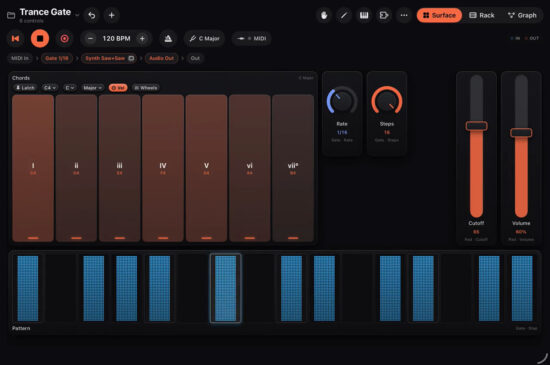
- Customizable performance surfaces with touch keyboards, pads, knobs, faders and sequencer lanes.
- Six keyboards carried over from the KB-1 Expressive Keyboard Suite, including piano, chord pads, scale keyboard, two MPE controllers and drum pads.
- AUv3 hosting for third-party instruments, effects and MIDI effects within the standalone application.
- Built-in Analog, Wavetable, MegaSaw, Drums, Sampler and Slicer instruments.
- Eight built-in effects: Drive, Filter, Delay, Reverb, Compressor, EQ, Chorus and Phaser.
- 164 factory sounds for the built-in instruments.
- Integrated Rack with instrument channel strips, inserts, sends, sidechain routing and master effects.
- External Instrument channels for integrating hardware synthesizers.
- Audio input and 24-bit WAV recording of master and individually armed channels.
- Ableton Link, MIDI clock input and output, tap tempo and metronome with count-in.
- Drum Grid, Stage Sequencer and expanded Chord Sequencer.
- Pattern generators with adjustable style and complexity settings.
- Visual MIDI and audio graph editor with more than 80 node types.
- Fragments for saving and reusing groups of connected graph elements.
- CoreMIDI and virtual MIDI connectivity, including support for MPE.
- Standalone operation and AUv3 MIDI processor or instrument functionality in compatible hosts.
Konstrukt version 1.2 is available now for iPad and iPhone through the Apple App Store, priced at $7.99.