Archive for April, 2023

Free Update brings new sounds and features to Yamaha YC Stage Piano Series


Yamaha’s YC stage pianos get new DX7, CP80 and felt piano sounds as part of a free update.

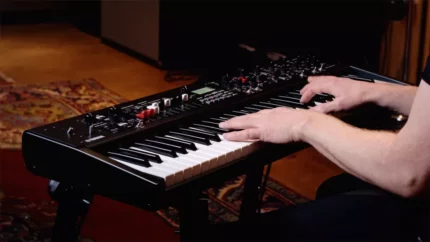
Yamaha has released a free OS update for the YC Stage Keyboard line, YC OS v1.3, that adds new sounds, features and workflow enhancements.

Yamaha’s v1.3 OS update for its YC series stage keyboards might be full of new features, but it turns out that many of them are inspired by instruments from the company’s past.

In response to requests from the Yamaha IdeaScale community there is a new CP80 electric grand piano voice to enables you channel your inner Tony Banks/Phil Collins, and 16 classic DX7 sounds have also been added (bass, brass and pad patches to be precise). Not every addition is retro, though; there are also 16 additional ‘modern’ FM sounds.

On the acoustic piano front there is a new Hamburg Grand, while the fashionable Felt Piano from Yamaha CP series also makes an appearance.

Other enhancements include- The FM organs get vibrato and chorus, the pan settings for each part can now be adjusted individually, and parts can now be linked for quick control over overall volume, tone, filter/EQ and effect settings (useful when you’ve set up splits and layers). Improvements have also been made to the rotor speaker functionality.
New in YC OS v1.3:

  • New sounds – An expressive Hamburg Grand, intimate Felt Piano from the CP Series, and an all-new CP80 sampled from the Yamaha Synth Space collection have been added. The YamahaSynth IdeaScale community requested the CP80 Voice, which Yamaha says delivers the expressive bite you would expect from this classic stage piano.
  • In addition to the new Piano Voices, are 32 new FM Voices. You’ll find 16 classic DX7 basses, brass and pads and 16 modern FM sounds for contemporary genres.
  • Vibrato and Chorus for FM Organs: Vibrato and Chorus effects are now available for FM Organs, and the F2 and F3 types match the classic effects found in vintage 60s combo organs.
  • Pan to Parts Settings: Freely adjust pan for each Part separately for greater stereo mix flexibility.
  • A/B Parameter Link Function: Press and hold the Keys A/B button and you’ll get control of Volume, Tone, Filter/EG and Effect settings for both Parts simultaneously. Great for controlling both Parts when set up in a Split or Layer.
  • Rotary Speed Hold: Before OS v1.3, Rotary Speaker speed settings were saved in the Live Set. This new setting allows you to keep the Rotary Speaker speed settings the same regardless of the Live Set.
  • Studio Rotary Speaker Type Default: All organ Live Set sounds using the Rotary Speaker effect now default to the Studio type introduced in OS v1.2.

The Yamaha YC OS v1.3 update is compatible with all three YC keyboards (the YC61, YC73 and YC88) and can be downloaded now via the Yamaha website. Users are advised to back up their settings before installing the update.
United Plugins is offering you Free FirePresser Compressor Plugin


United Plugins is offering you FireSonic’s multi-pronged squasher for nothing.

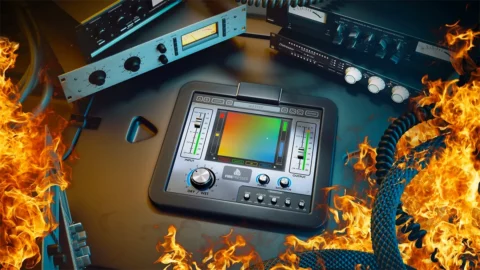
FirePresser packs emulations of 4 analogue compressors into one plugin, and it is currently being given away for free

United Plugins has announced that it’s currently giving away FireSonic’s FirePresser – which packs emulations of four compressors into one plugin – for free.

FirePresser was inspired by the studio trick of using multiple compressors in series, but rather than having to invest in a load of expensive hardware, you can do it with a single effect.

Although we are not told which compressors have been emulated here, we’re assured that each one has its own unique set of characteristics and that they’ll all complement each other nicely.

You can adjust the amount of presence for each compressor in the chain using FirePresser’s Rainbow Pad, and compressors can be re-ordered simply by dragging them. If you want to dive deeper, the Detector offers access to the more advanced features of each engaged compressor.

If you need more ‘squash’, give the Turbo knob a turn. This will also have the effect of dialling in some analogue-style saturation. There are plenty of presets, as well. In fact, United Plugins says that, in most cases, it should just be a case of calling one of these up and tweaking the wet/dry knob to taste.

FirePresser runs on PC and Mac in VST/AU/AAX formats. You can download it for free from the United Plugins website.

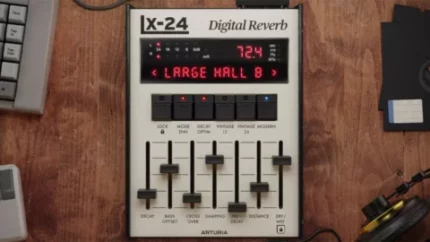
Arturia Rev LX-24 plugin breathe new life into a classic Lexicon digital reverb

Lexicon 224, released in 1978, remains one of the best-selling and most-loved digital reverb units of all time. In fact, it is still in use today.

This makes it ideal fodder for the eagle-eared emulators at Arturia, who are now recreating the 224 as a plugin known as LX-24.


This takes visual inspiration from the 224’s cream-coloured interface, right down to the skeuomorphic buttons and sliders. The sound, too, is said to be on the money; LX-24’s eight algorithms promise everything from huge reflections and crisp ambience to small-room bounce, all with that all-important musicality.

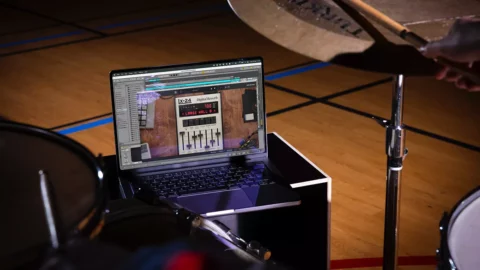
As with the hardware – which has previously been emulated by Universal Audio and Native Instruments – LX-24 promises to be extremely versatile, providing “the missing magic” on vocals, adding space to drums and delivering long decays on synths. Basically, it works on anything.

Arturia Rev LX-24 Overview

If the old-school GUI isn’t giving you the level of control that you want, you can switch to the advanced view, which looks altogether more modern and offers the likes of visual editing and the ability to create sidechain-like effects.

LX-24 is available now for PC and Mac in VST/AU/AAX formats, with introductory offers in play until 23 April. Log in to your Arturia account to view your discounted price for the plugin on its own or in a bundle with FX Collection 3. Find out more about the LX-24 on the Arturia website.