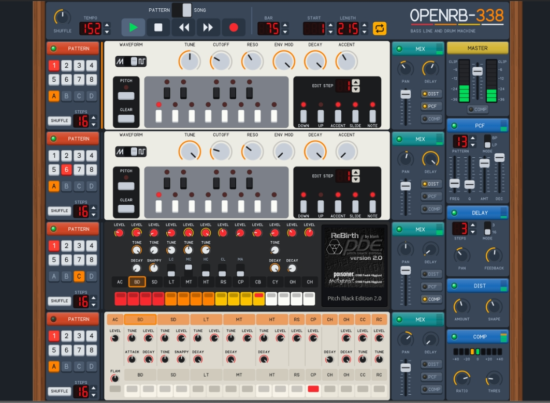
OpenRB-338 is a free, open-source reimplementation of Propellerhead’s ReBirth RB-338, bringing its combination of two TB-303 basslines and TR-808 and TR-909 drum machines to modern macOS, Windows, and Linux computers.
Originally released in 1997, Propellerhead ReBirth RB-338 combined software recreations of classic Roland instruments into a streamlined virtual studio.
OpenRB-338, a free and open-source application developed by pingw33n, recreates ReBirth for current desktop operating systems, with an audio engine designed to reproduce the original software’s output.
The project also supports original ReBirth song files and provides tools for working with the format.
Features:
OpenRB-338 recreates the original ReBirth configuration, including two TB-303-style bass synthesizers, a TR-808 drum machine, and a TR-909 drum machine.
The audio engine was rebuilt based on ReBirth 2.01 to provide bit-accurate rendering. The project documentation describes byte-for-byte comparisons against the original software’s exported loops, tested against a collection of more than 1,200 songs.
The interface brings the complete virtual studio onto the screen, including the four instruments, mixer, delay, distortion, PCF filter, compressor, pattern and song modes, shuffle, loop, and recording functions.
A scalable vector-graphics interface keeps the control panel sharp at different window sizes and display resolutions.
OpenRB-338 can open ReBirth 2.x song files in RBS versions 4.0 through 4.2, as well as ReBirth 1.x songs. It can also save RBS 4.2 files that can be opened by the original ReBirth software.
The application supports ReBirth modification files, allowing users to load alternative drum samples and associated mod sounds. The standard drum kit is included, so the original installation media is not required for that kit.
Audio loops can be exported in WAV, FLAC, and Ogg Vorbis formats.
The project also includes a command-line application called orb. It can render songs to audio files, play songs without the graphical interface, inspect song information, and unpack, repackage, or re-encrypt modification files.
OpenRB-338 is distributed for macOS on Apple Silicon and Intel processors, Windows on x64 and ARM64 systems, and Linux on x86_64 and ARM64 systems.
The source code is published under the GNU General Public License version 3.0. The developer states that OpenRB-338 is an independent project and is not affiliated with or endorsed by Propellerhead Software or Reason Studios.
*Note: The software is a standalone application. The project’s documentation currently lists MIDI input, MIDI synchronization, VST, AU, and ReWire support as unimplemented. It also notes that some original pattern-editing functions and undo are not yet available.
OpenRB-338 is available now as a free, open-source download.
Splice Create Combines a full DAW with integrated sound library & AI Assistance.
Splice Create is currently available for Mac application users in beta, a free DAW with Splice at the heart of its workflow, and a voice-controlled AI chatbot that can teach you how to make a track… or make it for you.
In recent years, the company has grown into a multi-million-dollar music tech behemoth, diversifying into mobile music-making apps, virtual instruments and even soft synths. Now, Splice takes the next step in its evolution from sample platform and software marketplace to an end-to-end music creation ecosystem by releasing its very own DAW.
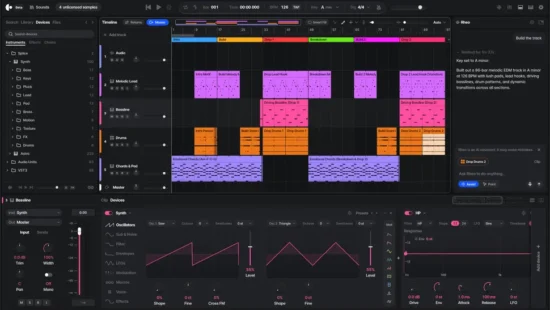
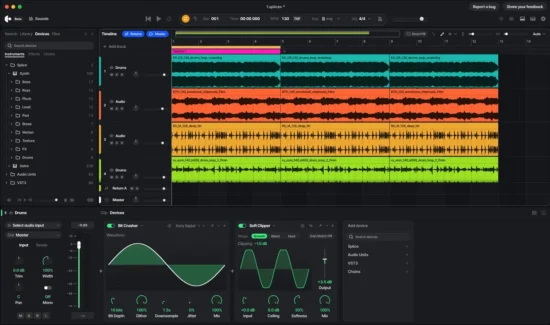
Splice Create is a fully-fledged digital audio workstation with all the Splice catalog, instruments, and effects built in. It’s uniquely designed to sharpen your music production skills and help you break through creative blocks.
Splice’s sample library embedded directly into its workflow, and the most advanced AI-powered features we’ve seen in any DAW to date. It’s free to download, but exporting songs requires a Create Pro subscription, currently priced at $9.99/month.
Splice Create can host third-party plugins, and it arrives with five instruments included: the aforementioned Sampler and Drum Rack are joined by Splice INSTRUMENT, a virtual instrument released last year, and two stock soft synths. Synth is a new two-oscillator subtractive affair, while Astra is a hybrid synth with virtual analogue, wavetable, granular, FM and sample-based engines that was already available through Splice’s Creator plan. There’s a collection of 38 stock audio effects and utilities onboard, too, covering all the usual bases.
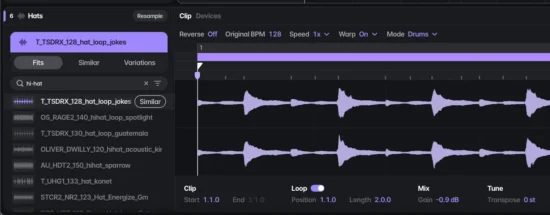
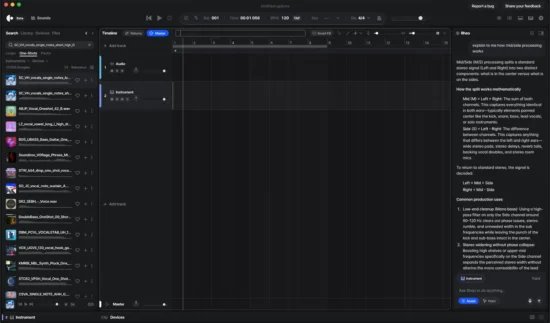
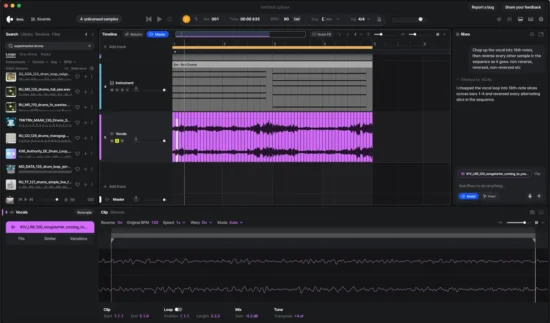
On the left-hand side of the interface is a browser that provides direct access to Splice’s extensive library of samples. Several DAWs, like Live and Pro Tools, already have Splice integration built-in, but the integration in Create is much deeper. Create an empty clip in an audio track and Splice will show a search bar that’s linked directly to the sample platform. Type in what you’re after, (“female R&B vocal”, for example) and Splice will choose a sample for you and load it up on the timeline, transposed and time-stretched to match the key and tempo of your project.
Select the clip, and a list of alternative Splice samples that fit your brief will pop up next to the clip editor below. Here you can search by similarity for sounds in Splice’s library (this even works with non-Splice sounds) or create Variations. This is an AI-based feature Splice added to the Splice Sounds plugin that generates unique alternatives to an existing sound that are close to. Using an in-house model trained on Splice’s catalogue, Variations are covered by the same license as the original sample, and the creator of that sample is compensated when a Variation is licensed.
And, Create lets you drag any sample into your project without automatically licensing a sample or using a Splice credit. They land in your project as MP3 previews, allowing you to build a track in Create using as many unlicensed samples as you want – when your track is finished, you’ll need to license those samples before you can export the project, otherwise they bounce as silence.
For producers that rely on Splice samples in their music-making, having this kind of direct access to the platform embedded into the DAW could prove to be a significant upgrade to their workflow – especially if their current DAW doesn’t already have Splice integration. The ability to audition samples on the timeline in the context of a project without licensing them or spending any credits is useful too, and means you don’t have to spend a dime on a sound until you’re sure it’s the right one for your track. On the whole, though, none of this is particularly game-changing.
Create is a perfectly serviceable DAW. It’d be well-suited to anyone that already works with Splice’s existing tools. What really sets Create apart, though – for better or worse – is its AI chatbot, Rheo.
Like most chatbots, Rheo can offer advice and guidance on topics related to music production
Like most chatbots, Rheo can offer guidance on how to use the DAW and give you advice on music-making more generally. Where it goes beyond anything we’ve seen in other DAWs, though, is its ability to control the software, taking actions inside the DAW in response to the user’s instructions, whether that’s through text commands in the chatbot interface or voice control. This kind of “agentic” AI – AI that can control computers, make decisions and complete tasks for you, rather than just generating text – poked its nose into the mainstream in 2026 with the release of tools like ChatGPT Work and Meta’s Muse.
The level of control that Rheo provides is much deeper than anything we’ve seen in another DAW. Rheo can search for sounds, generate melodies, design synth patches, create arrangements, analyse audio and execute multi-stage tasks that would usually take minutes in just a few seconds, all in response to conversational, natural-language instructions. Using Rheo requires “Rheo units”, which are distinct from Splice credits, and cost $10 per 1000. (Free users get 100 units to start off with.)
Rheo has two modes, Assist and Point. Point shows you how to do the task you ask it to complete, not only guiding you through the process with text instructions, but actually pointing out each step with a glowing cursor on the screen. Not sure how to set up sidechain compression on your kick and bass? Struggling to get set up for recording a vocal? Just ask Rheo, and it’ll walk you through it, step-by-step. This will be immensely helpful for beginners, and it’s a welcome alternative to simply having the AI do something for you, which won’t help to build skills in the long run.
Assist goes one step further and actually executes the task for you. As mentioned, the AI can do almost anything in the DAW.
Splice Create assistive features could be a real help for beginners learning their craft, but if the software makes it easier for beginners to ask for a melody instead of actually learning to write one, then perhaps it’s not pushing them in the right direction after all.
Splice says that it wants Create to “amplify” human creativity, not replace it. “Most music tools either make the song for you, or assume you already know how to do everything. Create is different,” Splice CEO Kakul Srivastava says in a press release – but Rheo can make the song for you, if you let it. Splice wants Create to help you go “deeper into the creative flow”, but go far enough down the AI rabbit hole, and you might stop being creative altogether.
Many music tools today either make the song for you, or assume you already know how. Splice Create is different—it helps you learn how to make the music you want. You determine and describe what you’re after, Create points the way only as you need, and you call all of the shots.
Features:
A standalone digital audio workstation combining Splice’s sound catalog, virtual instruments, effects and production tools.
Integrated access to more than three million human-made, fully licensed sounds and samples from the Splice catalog.
Splice INSTRUMENT virtual instruments are incorporated into the production environment.
Native support for third-party VST plug-ins, allowing users to incorporate their existing software instruments and effects.
Voice and text commands allow users to search for sounds, group tracks, apply effects and perform other production tasks using natural language.
Rheo, an integrated AI assistant, provides context-aware assistance with sound selection, production techniques and DAW operations.
Point Mode provides interactive, step-by-step guidance through the application, demonstrating production techniques and explaining different workflows.
AI-assisted sound discovery can identify samples that fit the tempo, key and harmonic characteristics of a project.
Additional AI-assisted tools include stem separation, audio-to-MIDI transcription and sample variations.
Generative MIDI tools can assist with creating drum patterns, melodies, basslines and chord progressions.
AI-assisted operations produce editable audio and MIDI material that remains under the user’s control.
Projects can be exported as audio for continued production in other digital audio workstations.
Splice Create is now available in beta (with Windows and web coming soon) as a standalone Mac application, and you can get started with it for free here.
Infinite is a free, open-source audiovisual workstation that connects modular synthesis, audio effects, MIDI sequencing, visual processing, and 3D graphics within a single node-based environment.
Developer Naman Soni has introduced Infinite, an audiovisual workstation designed to bring music production, visual composition, and creative coding together in one application.
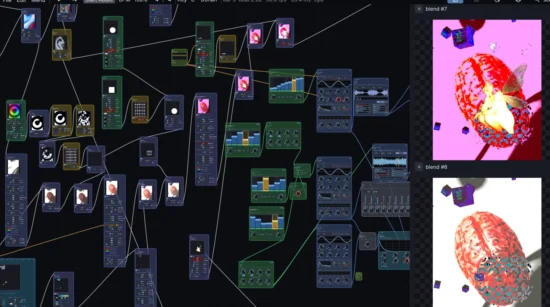
Rather than organizing every process around conventional tracks and separate plugin windows, Infinite uses a node-based canvas in which users connect synthesizers, effects, modulators, visual processors, and other components.
The software includes a range of synthesis and sequencing tools, audio effects, third-party plugin hosting, and facilities for creating real-time graphics and procedural 3D scenes. Its approach allows musical signals and control data to interact with visual elements, making it relevant to electronic musicians, sound designers, audiovisual performers, and VJs working with interconnected audio and image systems.
Features:
Infinite organizes projects around a node-based canvas. Users can add individual components and connect them with virtual cables, creating custom signal paths and modular instruments without being restricted to a fixed arrangement of tracks or devices.
The synthesis library includes wavetable, FM, analog-style, granular, string-modeling, and other sound-generation tools. Additional options include a metallic resonator, partial-based resynthesis, and spectral processing, giving users several approaches to sound design within the same environment.
MIDI and note-processing nodes provide tools for generating, routing, and transforming musical information. Available functions include MIDI input, arpeggiation, note sequencing, chord generation, quantization, humanization, and note routing, allowing users to construct generative patterns or build customized sequencing workflows.
The software includes drum sequencing, sampling, and looping tools alongside its synthesizers. Users can combine these components with effects and modulation sources to build custom instruments, performance setups, and processing chains.
Audio processing nodes include filters, equalization, dynamics, delay, reverb, chorus, phaser, saturation, bitcrushing, granular processing, and spectral stretching. These effects can be connected and controlled within the node graph rather than being confined to a conventional mixer-and-insert workflow.
Modulation is a central part of Infinite’s design. LFOs, envelopes, random generators, MIDI control, and audio-analysis tools can influence parameters across the project. This makes it possible to connect musical activity to sound processing and visual behavior, including using audio levels or spectral information to control graphics.
Infinite supports third-party plugin hosting, including VST3 and Audio Unit plugins on supported platforms. This allows users to incorporate external synthesizers and effects into projects alongside Infinite’s own nodes. Plugin format and operating-system compatibility depend on the host platform and build.
Beyond audio, Infinite provides tools for image and video processing, compositing, generative effects, and procedural 3D geometry. Users can combine video sources, visual effects, shapes, particles, and 3D objects, with audio and modulation data available to influence visual parameters. These capabilities make the software suitable for developing music-responsive graphics, live visuals, and audiovisual performance systems.
The embedded Field programming language provides a way to create custom behavior within the node environment. Instead of being limited to the built-in functions, users can write code for specialized processing and modulation tasks, extending the system for experimental synthesis, generative graphics, and other creative applications.
Infinite also provides a library of nodes, patches, and examples, along with documentation and community development resources. Projects can be saved as portable files, making it possible to share node arrangements and creative setups with other users. The open-source codebase gives developers an additional route for studying the software and contributing to its development.
Infinite Overview:
Infinite is available free of charge for macOS 11 or later, Windows 10 or later, and Linux. The source code is available under the MIT license, while the default binary distribution includes bundled VST3 hosting components and is licensed under GPLv3; builds without VST3 hosting can be produced under the project’s MIT licensing terms. Downloads, release notes, documentation, and the source repository are available through the official Infinite website.