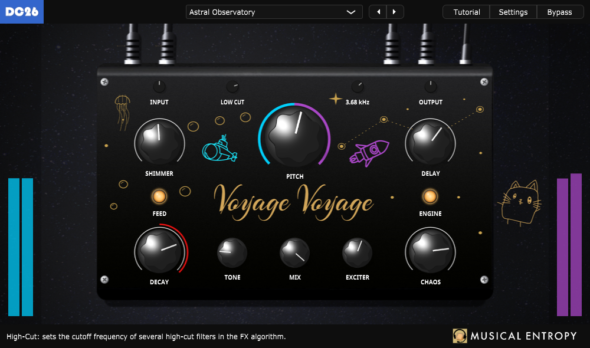
Its pitch-shifted tails run through a BBD-style delay emulation with dedicated time control, blending ethereal, rising harmonics with the grain and instability of analog bucket-brigade circuits.
But Voyage Voyage doesn’t stop at reverb, though. Push the decay up and it transforms into a true instrument — a parametric, evolving drone and texture generator.
Two controls take you deeper. The Chaos knob introduces modulation, diffusion and resonators, bending your tails into unpredictable, organic territory. The Exciter knob generates signals that re-trigger the reverb’s delay lines, keeping the sound alive indefinitely — no input required.
Summary:
classic decay, tone, mix, input, output, low cut and high cut controls, as expected in a reverb plug-in.
Shimmer amount & pitch control, with an additional delay time control featuring the BBD chip emulation.
innovative Exciter & Chaos parameters, useful when Voyage Voyage is in self-oscillation / resonator mode.
additional features such as resizing capabilities, integrated help, extra accessibility functionalities, mix lock control etc.
Padbangers has released a free application MPC Sample Project Converter, that’s designed to let you change MPC Sample projects to the bigger MPC Format.
Here’s what they have to say about it:
“For the big standalone MPCs — MPC One, MPC Live and MPC X/XL.
When they import an MPC Sample project, everything ends up crammed into a single track — hard to read and hard to edit. This app splits it into clean tracks and turns your chops and “16 Levels” tuning melodies into real, playable programs: chops become a chop program, tuning melodies become keygroups — plus an in-app preview and an optional template for your own mixer setup. Now also supports converting to MPC 2.”
MPC Sample Project Converter is available now as a free download for Linux, macOS and Windows.
Plasmatic shared COGG, a free audio effect that’s designed to “industrialize and metallize” your sound:
“COGG is a free effect (VST3/AU) that transforms your audio with a chain of metallic processing: granular pitch layering, harmonic distortion, and a convolution reverb built from synthetic metal plate impulse responses.
Simply turn up the Grind knob and watch the cog spin faster to begin metallizing your sound. Or, if you prefer more control over your sound, adjust the other knobs to perfect and fine tune the metallic mayhem!”
Version 1.1 adds 8 new presets for anyone to easily add metal and grit to their instruments.
COGG is available now as a free download for Mac + Windows. Just “download and destroy”!