The AQ64L is an 8×8 RGB clip-launch controller with dedicated Ableton Live and FL Studio integration. Music Tribe has also published a developer kit for creating and installing custom firmware.
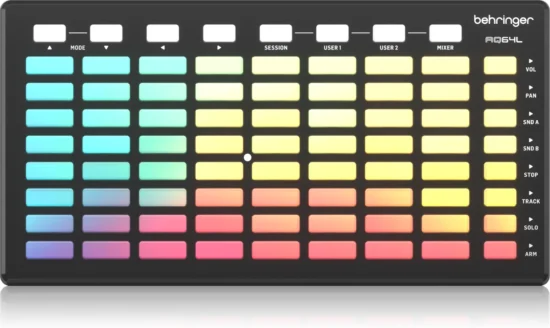
The Behringer AQ64L is an 8×8 RGB grid controller designed for launching audio clips and triggering MIDI events in a DAW.
The company is positioning it as an open hardware platform, publishing a developer kit for the controller, providing example firmware, hardware documentation and tools that allow users to build and install custom firmware.
The AQ64L has 64 illuminated pads arranged in an 8×8 grid, accompanied by 16 RGB function keys for navigation, mode selection and track and mixer control. Its layout is designed around clip-based performance workflows, with dedicated integration scripts available for Ableton Live and FL Studio.
The controller includes modes for session and clip launching, drum control, keyboard operation and mixer functions. In mixer mode, users can access volume, pan and send controls, along with track-related functions. Two user modes provide additional configuration options, while the device can also operate as a conventional USB MIDI controller.
Features:
64-pad RGB clip-launch grid in an 8×8 layout
16 RGB function keys for navigation, mode selection and track control
Dedicated Ableton Live integration scripts
Dedicated FL Studio integration scripts
Session, drum-controller, keyboard and mixer modes
Two user-configurable operating modes
Class-compliant USB MIDI operation
USB-C connection and bus-powered operation
Compatibility with computers and Apple iPad via a USB Camera Adapter
Behringer has not announced pricing or a confirmed release date for the AQ64L. The product page and software downloads are available on the official Behringer website, and the AQ64L developer kit can be accessed through GitHub.
Akai MPC 3.10.1 Update opening up new possibilities.
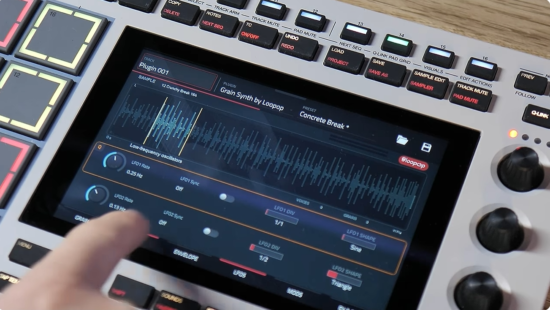
MPC 3.10.1 takes standalone music production further, giving users more freedom to create, experiment, and bring your ideas to life. Discover new sounds with custom plugins built using Akai free official Software Development Kit.
AI-assisted ‘vibe coding’ is rapidly changing the music technology landscape and established brands are being forced to make quick decisions about how they are going to react.
While the phenomenon of users creating their own DIY firmware, mods or plugins isn’t necessarily anything new, both the volume and speed of these community projects has accelerated rapidly in recent weeks. Now, user communities are often developing ideas and new features for their hardware at a pace the official developers can’t match.
The question for music tech brands is, how do you respond to this? While some hardware developers are so far choosing to ignore or actively block DIY firmware, others, including the likes of Behringer and Polyend, have made moves to embrace community development.
Akai is another brand that falls into this latter category. While teasing its upcoming Sample Key hardware last month, the company signposted its intention to move towards making elements of its product line open source. In the weeks since, we’ve seen the first glimmers of what this might look like in practice, and now with its latest MPC update, Akai is making good on its promise of opening up the MPC ecosystem.
With the launch of software update 3.10.1, Akai is now letting users create their own custom plugins for the MPC and Force hardware, assisted by the newly released SDK (software development kit). The update also unlocks the MPC platform’s ‘enhanced development’ features, which lifts limitations on plugin and track counts within the hardware, as well as adding mouse support.
In a video announcing the update, Akai Pro’s Andy Mac explains the need to balance the creative possibilities offered by AI-assisted coding with the risk of cutting corners. While, as he acknowledges, AI tools allows the company itself to speed up elements of development, that doesn’t mean the company will be churning out updates to keep up with the community.
“Faster development doesn’t mean taking shortcuts,” Mac says, “the same focus on testing, stability, and reliability remains essential before we put any releases into the hands of the community.”
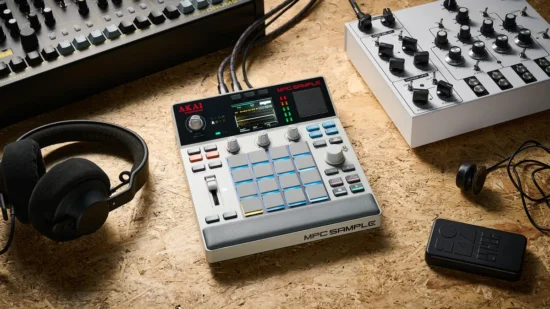
Alongside the update to the bigger MPCs, the MPC Sample gets an update to version 1.4. This adds a variety of new workflow features, but most significantly it also adds community development support and an official SDK to allow users to create their own effects for the unit.
Again, this is something of a middle ground approach to open source, which follows in the wake of numerous high-profile DIY firmware mods that have appeared for the MPC Sample in recent weeks, such as the popular SampQOL mod that, among other things, expands the device’s track and effect counts.
Akai isn’t ignoring these completely though, stating in the announcement video that the company is “already working alongside some of these new community developers, offering ongoing support” – which certainly seems to imply that some of those popular mods may become at least semi-official.
These updates aren’t purely about the SDKs, however. Another handy feature added to the MPC and Force range is the ability to mirror the touch interface and audio to a desktop computer, which is likely to be handy for streamers and content creators.
Akai is launching two new official plugins too. The first is an emulation of the classic SP-1200 vintage sampler, while the second is an SSL SL 4000-style channel strip plugin.
Features:
Official development framework for creating third-party MPC instrument and effect plugins.
C++ plugin framework with support for audio processing, MIDI, transport synchronization, parameters and program states.
Cross-compilation tools for supported MPC hardware architectures.
Example synthesizer, drum machine and stereo delay projects.
Tools for designing custom touchscreen interfaces and Q-Link controls.
AI-assisted development workflows using coding agents including Claude Code and OpenAI Codex.
Plugin validation, testing and packaging utilities.
Host simulation tools for testing plugins before installation on hardware.
Host Ziv Eliraz – in his latest loopop video – takes a deep dive into the update, and discusses how he created his own custom plugins:
The MPC Plugin SDK is available free of charge from inMusic’s GitHub repository under the MIT license. Compatible MPC hardware requires OS 3.10.1 or later and External Plugin Support to load third-party plugins. Visit the Akai Professional MPC release notes for firmware information.
Developer Matt Kuebrich has introdued Patchwerk – a project that transforms the M-Vave FM-1 into a patchable modular instrument, with 85 modules covering sound generation, processing, sequencing, sampling and modulation.
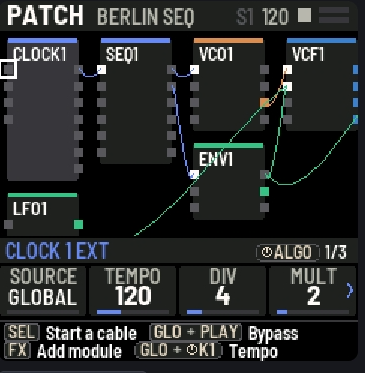
Patchwerk uses a virtual patch-cable system that allows users to connect module outputs to inputs, creating custom signal paths. Its module library includes oscillators, filters, envelopes, LFOs, effects, drum machines, samplers and granular instruments, as well as Casio CZ and TX81Z-style FM synthesis engines.
Patches can be created and edited directly on the FM-1 using its onboard controls. Alternatively, a browser-based emulator provides a larger visual patch bay, allowing users to build and play patches on a computer without connecting an FM-1. When connected over USB, changes made in the browser and on the hardware are synchronized in both directions.
Features:
85 modules, including oscillators, filters, envelopes, LFOs, effects, samplers and granular instruments.
Casio CZ-style phase distortion and TX81Z-style FM synthesis engines.
Multiple sequencers, including step, Euclidean, Turing and piano-roll sequencing.
Sixteen snapshots per patch for storing and recalling sound configurations.
Performance controls for assigning favorite parameters, muting modules and generating variations.
Song mode for arranging snapshots and automating parameters over time.
Four sample banks supporting user-loaded audio files and onboard recording.
Browser-based emulator with a visual modular patch bay and bidirectional USB synchronization.
Twelve display color palettes and a customizable user palette.
Patch backup and restoration tools, including sample banks and settings.
Patchwerk is installed through its project website using a desktop version of Chrome or Edge and a USB connection to the FM-1. The installation process includes an option to restore the original M-VAVE firmware. Users are advised to back up their projects and samples before installing.
Patchwerk v1.0.3 is available as a free, open-source firmware project under the GPL-3.0 license. The browser-based emulator can also be accessed without an FM-1. Visit the Patchwerk website for the emulator, installation instructions and firmware download.