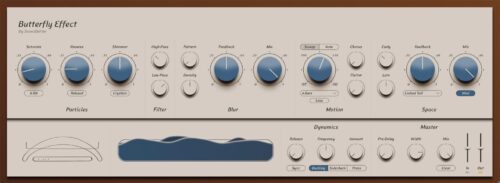
SoundBetter’s Butterfly Effect plugin is a vibey ambient reverb that can create instant meditative music from your melodic playing
Designed “to be felt more than heard”, Butterfly Effect is a new ambient reverb plugin that’s designed to generate pad-style beds from your melodic musings.
One obvious starting point would be to put it on a piano track – start playing and you will instantly get the kind of meditative music that fills all those ‘sleep’ and ‘concentration’ playlists. Butterfly Effect can also drive overtones and create cinematic sweeps from synth pads and strings, or add shimmer to clean guitars.
There are three ambient reverb engines that can be tweaked using various parameters that are spread across Particles, Filter, Blur, Motion and Space sections. The idea seems to be that the Butterfly Effect will act as a kind of musical partner, reacting to your playing in key and time.
Butterfly Effect plugin runs on PC and Mac in VST/AU/AAX formats and is available now for the introductory price of $74 (regular price will be $149). Find out more and download a demo on the SoundBetter website.
Now, Toybox has something new for you to play with.
Already known for its Reaktor packs, Toybox has now released its first plugin, and the good news is that it is free.
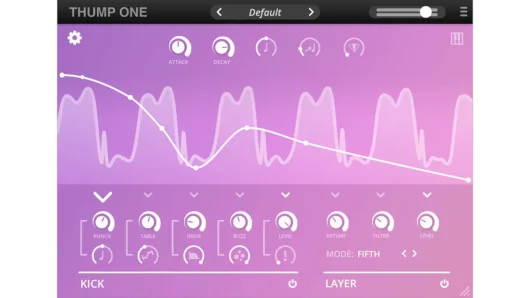
Thump One is a free synth plugin that blends a glitchy wavetable engine with a Roland supersaw-style oscillator.
Thump One is an easy to use music synthesizer plugin. It is a two-engine synth that features a glitchy wavetable oscillator and an emulation of the supersaw oscillator from the Roland JP8000. Stack these two elements together and you should be able to create kick drums, basses and lead sounds.
The supplied set of wavetables is based on both clean and processed analogue kick drums. The Kick engine that houses them also offers a saturation and filtering circuit, plus a Buzz circuit that can create a ‘broken speaker cone’ effect.
The supersaw engine, known as Layer, offers a selection of operating modes that can configure the oscillator to play in intervals and add various amounts of cross-modulation. The upshot of this is that you can create everything from scuzzy, retro synth sounds to glitches or plain old noise.
Further sound designing can be carried out using the envelopes. There’s one for each key parameter, and an automatic curve feature should make shaping a breeze.
The interface is straightforward, and there are 150 presets to get you started.
PC and Mac users can download Thump One for free in VST/AU formats, and there is also an iPad version that costs $4/£4.
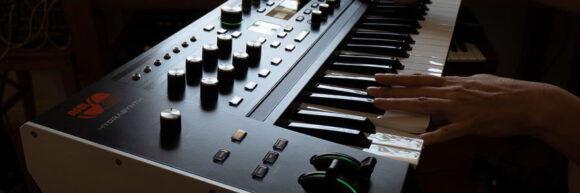
Sound designer Jexus shared this Shut Up and Play style demo of their collection of custom sounds for the ASM Hydrasynth.
All sounds are original and work on the keyboard, desktop, Explorer and Deluxe Hydrasynth modules.
What they shared about the technical details: “I did not use any external FX in the demo; all the delays, reverbs, flangers, noises, crackles and other effects are part of the Hydrasynth engine / mod matrix. However, I used some EQ-ing on selected patches.”
They also shared their thoughts on programming the Hydrasynth:
“The HS is the furthest thing from instant gratification, but at the same time it’s the most gratifying synth out of all the deep synths I’ve come across in my hobby / career as a synth tweaker.
It does not have any idiotic quirks that you have to “learn” from forum nerds with oscilloscopes in order to make the synth into something proper (like “turn this option off, don’t use that feature, and use this output instead of that output” = see Alesis Andromeda). But you do need a different approach and some time to build the sound, because it’s not right there on the panel. It’s one inch underneath it, and several inches deep down in your brain.
I think it’s rational to say the synth is a no-go zone for total beginners; however, if you understand the path of building a sound from scratch and have some experience with tweaking synths, or you really want to start learning it, you’ll probably agree with me that after the first three or four days spent with the HS and its UI, the tweaking sessions are a joy, not a chore.
Finally an electronic instrument has arrived to this world that is incredibly deep, yet playable. I think a synth of this sort comes once in a decade, and if it hasn’t set a new standard already, in the future its appeal will only grow.”
Watch the demo and share your thoughts on the Hydrasynth in the comments!