Free Spectral Synthesizer For Mac, Phosphor, Turns Images Into Audio
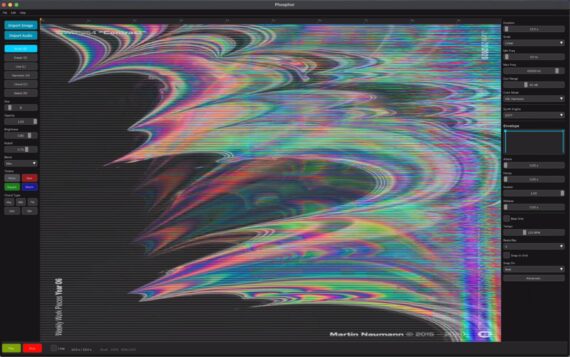

RoEx Audio has introduced Phosphor, a new software instrument for macOS that uses spectral synthesis to convert images into audio.

Spectral synthesis is very different from other types of synthesis. It builds on the idea that audio can be represented as a spectrogram, an image where time runs left to right, frequency runs bottom to top, and brightness represents loudness. A bass note is a bright horizontal line near the bottom. A siren is a diagonal streak. A snare is a vertical column.

Instead of converting audio into a picture, though, Phosphor inverts this and turns pictures into sound. You can ‘paint’ directly on to the spectrogram, or load an image, and Phosphor will synthesize audio from it.

Because of the nature of this approach, Phosphor is probably best suited for sound design – creating textures, drones and soundscapes – that you then export for use in your DAW.

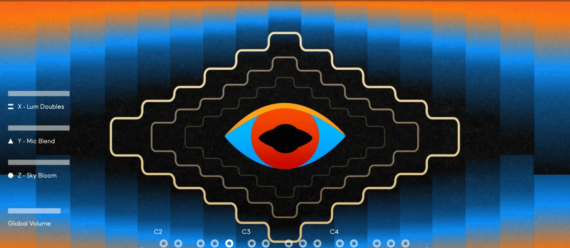
An example of Phospor in action:

Features:

  • Spectrogram Canvas – Draw directly on a frequency-vs-time canvas. The vertical axis follows a logarithmic scale mapped to musical octaves, so equal distances always equal musical intervals. Includes piano roll overlay, beat grid, and snap-to-note.
  • Colour Mode – In standard mode, brightness controls loudness and every frequency is a pure sine. In colour mode, hue shapes the timbre, red produces sawtooth-like warmth, green gives square-wave hollowness, blue creates soft flute-like tones. Saturation controls harmonic intensity.
  • Four Synthesis Engines – Choose how your spectrogram becomes sound.
  • STFT for classic spectral synthesis with iterative phase reconstruction.
  • Additive for clean, precise oscillator-bank synthesis.
  • Noise Band for textural, granular results.
  • Blend to mix tonal and noise components.
  • ADSR Envelope – Shape the amplitude dynamics of your sound with a full attack-decay-sustain-release envelope. Visualize the envelope shape in real time as you adjust parameters.
  • Image Sonification – Load any photograph, painting, fractal, or generated image. Phosphor maps the visual composition to audio, brightness to loudness through a perceptual dB curve, vertical position to pitch, horizontal position to time.
  • Flexible Export – Export in WAV, AIFF, FLAC, or MP3. Choose 16-bit, 24-bit, or 32-bit float at 44.1kHz or 48kHz. Optional peak normalisation. The exported audio uses iterative phase reconstruction for clean results.

Phosphor is available now as a free download, no account required.
 

A New Way To Express Yourself: Google’s Gemini New AI Music Model, Lyria 3


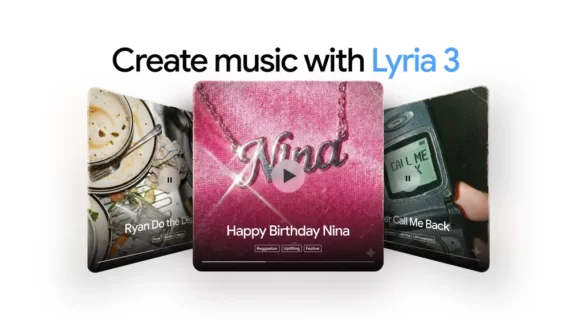
Gemini can now create music with Lyria 3.

Google has launched Lyria 3, which is the latest version of their entrant into the AI music market.

Lyria has been added to the company’s AI assistant Gemini. According to Google, “it’s the most advanced music-generation model yet”, one that allows you to “express, explore, and experiment with high-fidelity music, using prompts to create tracks with natural flow from note to note”.

They add that: “We’ve developed it with input from producers and musicians so it understands musicality – from rhythm to arrangement.”

However, questions remain regarding the legality of all this. Asked by a Billboard journalist about Lyria’s training, a Google representative said that it was “mindful of copyright and partner agreements”. When pushed, they said that it has only been trained on music that YouTube and Google have “a right to use under our terms of service, partner agreements, and applicable law”.


One commenter on Twitter/X was less than impressed, saying the tech giant’s explanation: “sounds worryingly like intentional misdirection”, before adding: “You should assume it’s trained on copyrighted work without a licence unless they come out and say it’s not.”

Anyway, according to Google, Lyria works with you “describing” the track you want, before you “dial in the details.” The program then “handles the complexity, putting new musical possibilities at your fingertips.” This is a significant upgrade on previous iterations of Lyria, where you had to write your lyrics, and had less creative control over elements like style, vocals and tempo.

Lyria is then able to compose “cohesive” songs, “explore global languages and genres”, and compose music by images by uploading photos, all in “professional-grade audio”.

All tracks generated in the Gemini app are “embedded with SynthID, our imperceptible watermark for identifying Google AI-generated content”, which means it should be fairly easy for Spotify and other platforms to flag up any tracks made using the program.

Interestingly, the Google press release announcing Lyria 3 couches it in almost frivolous terms, saying its goal “isn’t to create a musical masterpiece, but rather to give you a fun, unique way to express yourself.” Make of that what you will…


New Virtual Instrument, Nagual, Offers Sounds Of Pre-Hispanic Mexican Cultures


MNTRA has introduced Nagual, a new virtual instrument library, based on the instruments of Pre-Hispanic cultures.

Created in collaboration with Mexican musician Ramiro Ramírez, the library features the sounds of clay flutes, conch trumpets, wooden drums, ocarinas, and ritual whistles.

They say that they also “transmuted them into a living instrument where sources merge, morph, and respond to your touch in real time”.

An example of Nagual in action:

Features:

  • Presets: 134 (Elements, Atelier and Artist)
  • Atelier Presets: 64
  • Artist Presets: 13
  • Sample Maps: 44
  • Size: 1.41 GB
  • Round Robins: Up to 10 RR
  • SSM powered samples: 44 (all sample maps)
  • Range: C1 – C5
  • Recording format: 384 kHz, 32-bit
  • Sample Format: .mntra Format / E.R.A (Extended Resolution Audio)
  • Multimic: Up to stereo 4 streams

Nagual is available now, with an intro price of $39 USD (normally $59).