Meeblip Geode Back, With Limited Nightshade Edition
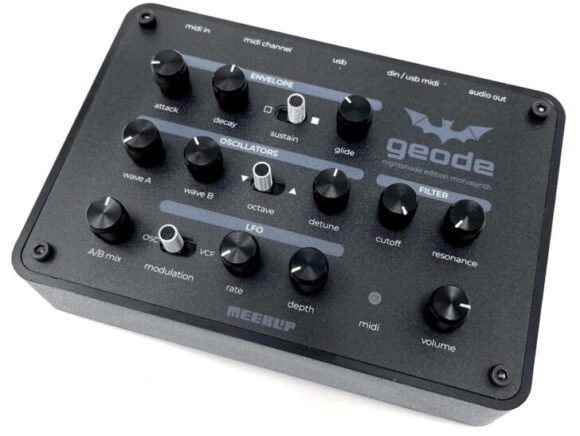

Developer James Grahame let us know that Meeblip has just released 100 units limited run of their geode monosynth, which has been out of production for over 2 years.

The geode is a hybrid synth design that features digital oscillators and an analog filter.

The geode nightshade edition features a monochrome color scheme with aluminum knobs, aluminum switches and a matte black front panel.

Features:

  • Limited edition of only 100 units, signed and numbered.
  • Shape your sound with envelope (attack, decay, sustain) and glide
  • Choose from a range of independent, digitally generated waveforms on two oscillators: PWM, pulse, sawtooth, and triangle (osc A) or noise (osc B).
  • Mix A + B oscillators, or choose one or the other (so you can focus on noise for percussion or single-oscillator acid)
  • Sub octave and detune
  • The unique analog MeeBlip filter, based on a 70s guitar distortion circuit
  • Modulation routable to filter and pitch for subtle effects or cranked for chaotic warbles and FM-style sounds
  • Complete MIDI implementation: use with USB, with iOS (via Apple adapter, not included), or standard MIDI / standalone
  • Dual mono mini-jack output for easy monitoring with headphones or connection to other gear
  • MIDI DIN input for connecting MIDI hardware
  • USB for MIDI input, connecting to a computer
  • Driver-free operation on macOS, Windows, Linux, iOS* and Android
  • USB powered – by a computer/mobile device or USB phone adapter (not included) for computerless operation
  • 30cm USB cable included

Demo of the original geode by synthesist Hainbach:

The geode nightshade edition synth module is available now, with an intro price of $179.00 (normally $199.95).
Venus Theory Launches First New Free Plugin Series Auras: Polyscape With Arturia Polybrute 12 Library


YouTuber and musician Venus Theory has announced the launch of a new series of free sample instruments, kicking off with a free library of sounds sampled from the Arturia Polybrute 12.

In this new video, Cameron explains that he was saddened to learn that Spitfire Audio had transformed its beloved LABS series of free software instruments into a paid subscription service, LABS+.

“I think that fucking sucks, really bad,” he says. “Had I not had access to free music-making software like Audacity, or all the free plugins I’ve used over the years… I don’t think I would be making music today.

“This is a huge loss for the aspiring musician and composer community. But instead of just sitting here bitching about it on the internet, I thought: why not just do something about it?”

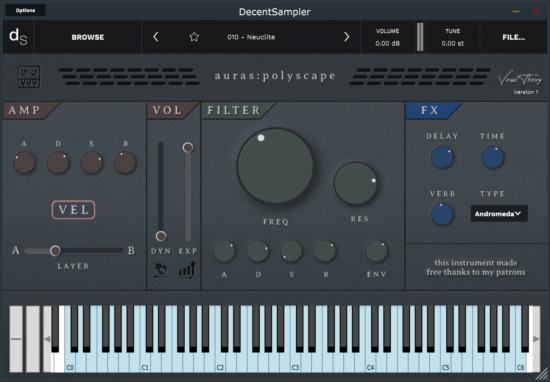
Cameron’s answer was Auras, his own series of free and professionally-recorded sample instruments designed to run in Decent Sampler, a free sampler plugin. The first instrument in the series is Auras:Polyscape, a collection of “deep and cinematic” sounds crafted with the Arturia Polybrute 12 synthesizer.

The sounds in Polyscape were sourced from Cameron’s custom-built patches and recorded through analogue tube preamps to “capture the glorious and imperfect nature of analogue synthesis”.

“Featuring a brand-new UI design and editor, Polyscape brings the expressive nature of these custom patches featuring ‘motion recording’ to life with new dynamics and expression controls, a re-designed velocity response mode toggle for more organic and realistic velocity performance, custom IR’s captured directly from the Polybrute 12, and a hand selected A-B layer system.”

AURAS free instruments for all. No Strings Attached. No Subscriptions Bullsh*t. Just Sound.

Cameron has put a hell of a lot of time and money into this project, so if you find yourself enjoying Polyscape, you can support him by becoming a patron. Download auras:polyscape from Venus Theory Gumroad.

Expressive E Osmose 2.0 Update Now Available


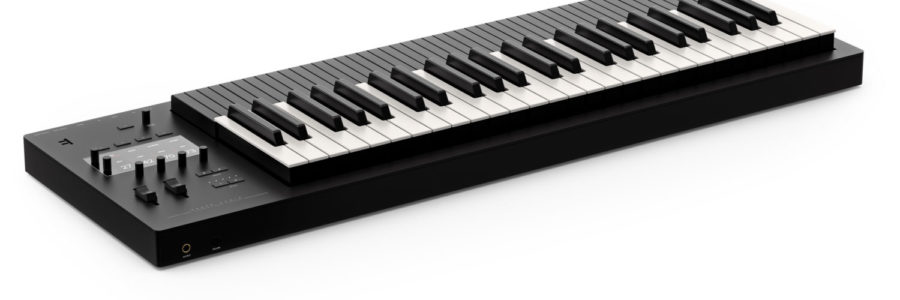
Today, Expressive E shared this overview of Osmose 2.0, the first major firmware update for the unique expressive synthesizer.


Osmose 2.0 is a free update that introduces 7 new features:

  1. Save your favorite presets
  2. Make playlists for your projects
  3. Switch presets & playlists easily w/ program changes
  4. Discover the new preset browser
  5. Use press glide in external midi mode
  6. Use the mpe arpeggiator in external midi mode
  7. Save custom midi config presets

Topics covered:

0:00 intro

0:36 add presets to favorites

1:03 create preset playlists

1:48 switch presets via midi program changes

2:31 discover the new preset browser

3:20 use press glide in ext. midi mode

4:48 use the mpe arpeggiator in ext. midi mode

6:18 save custom midi config presets

7:10 how to update

7:36 what’s next for osmose?

Osmose 2.0 is available now as a free update.