GPU Audio let us know that they’ve released their long-awaited software development kit (SDK), and it’s available now as a free download.
The SDK is designed to let developers unlock Graphics Processing Unit (GPU) acceleration for audio projects. Benefits include ultra-low latencies, multiple layers of processing, cross-platform support, and direct access to high performance DSP.
“As the demand for higher-fidelity, multi-channel processing, and experiences grows, the use of GPUs for audio is a logical progression,” they note. “This SDK represents the first steps towards democratizing access to that previously untapped power.”
The GPU Audio SDK has cross-platform support for Windows and MacOS; with integration for NVIDIA and AMD GPUs as well as Apple Silicon M1 chips and above. There’s no need to write device-specific code for each platform, with each one running as low as 96 samples buffer or 96khz sample rate on all target platforms (which results in 1ms buffer).
A primary goal of this platform is to provide guarantees on backward compatibility. This enables developers, partners, and vendors to detach the update cycles of their products from the update cycles of the GPU Audio platform.
GPU Audio has supplied examples to get started with, including:
Gain Processor – simple example to get familiar with GPU Audio specific APIs and create first GPU-powered processor
IIR and FIR processor – examples of IIR filtering and FIR/convolution. These are integrated into terminal/console tests that can be used to process files and measure performance
NAM Plugin – Neural Amp Modeler with GPU acceleration of the real-time inferencing. We have provided everything to build a VST3 on Windows, with VST3 and AUv2 on MacOS.
Developer and electro producer Erik Griffioen, aka Lloyd Stellar, let us know about his latest project, a free, production-ready, browser-based TR-808 Drum Machine.
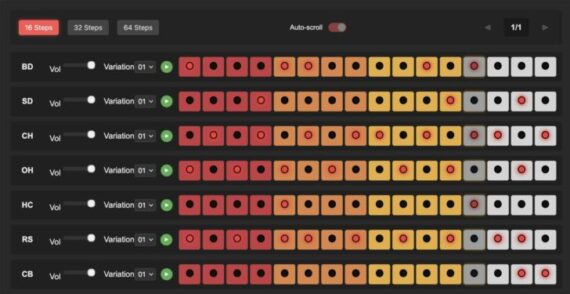
Lloyd’s Online TR-808 Drum Machine is completely browser based, and lets anyone create, edit and play 808 beats. Once you’ve created a beat that you like, you can export it as a wav file to use in your DAW or hardware sampler.
Features:
A 16-step sequencer for classic drum patterns (expandable to 32 and 64 steps)
Multiple drum variations with authentic 808 sounds
Adjustable tempo with swing
Saturation and volume controls
Easy saving, loading, and sharing of patterns
High-quality 24-bit WAV recording and MIDI export
Works best on desktop computers and laptops, but also on mobile devices with larger screens