“I Made My Dream Synth”: Hainbach’s Fluss, a new app, is an experimental granular playground


While you are waiting for all the hundreds of hardware synths that have been introduced over the last couple of years to actually ship, it’s worth remembering that your iOS device can be an innovative platform for synthesis.

YouTuber/producer Hainbach and developer Bram Bos have announced the release of Fluss, a granular synthesizer and effects processor for iOS that’s said to be inspired by experimental composer Iannis Xenakis. And they say that “There was never a better reason for using a touchscreen for music.”
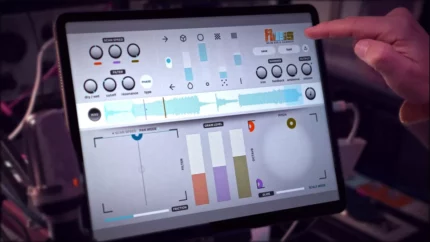
Fluss features a 3-voice grain engine, which is capable of processing three sound sources independently. Each grain engine can be controlled via its own playhead in the centre of the app’s interface, while two XY pads give users control over scan speed, panning, pitch, glide, and more.

The XY pads and the three central sliders are powered by a physics model that enables the user to flick and throw them around using the touchscreen. The dots in the XY pads will bounce around like balls, reacting to a degree of virtual friction that the user can dial in themselves. This is a unique alternative to the traditional LFO that opens up some interesting modulation possibilities.

The app, which runs standalone on iOS or as an AUv3 plugin, enables the user to manipulate tiny grains of audio in a variety of complex ways, using a “kinetic” control interface that’s geared towards live performance and realtime sonic manipulation.

As for sound sources, the app enables you import your own WAVs. User can just drag and drop WAV files into Fluss, record audio directly, or process incoming input live. There’s an extensive preset library featuring recordings of some rare and unusual instruments from Hainbach’s collection.

Fluss is equipped with a unique multi-mode filter that’s been inspired by the Oberheim Xpander, and a Shimmer feedback effect that feeds processed audio back into the grain engine to produce a shimmering reverb-like sound that can be applied with subtlety or pushed into experimental territory to create endless loops.

Fluss is also capable of some advanced pitch quantization, a feature not includes from many popular granular synth plugins. Fluss pitch-shifts its output by default, according to a variety of scales and modes determined by the user, making it easier to integrate the results into a song or composition harmonically.


Features:

  • 3 Voice grain engine, each with an independent playhead
  • Filter inspired by the Oberheim Xpander, including its resonant Phase filter
  • Kinetic sliders and pads for playful interaction with the sound
  • Universal design (iPhone and iPad; iPad Air 2 or higher recommended)
  • Custom scales, unquantised mode and even Scala-import for microtonal experiments
  • Use WAVs, record audio or load the app as a live-processing audio effect
  • Real world tested in live performances by Hainbach

Fluss costs €16.99/$13.99 and is available now in the App Store.
 

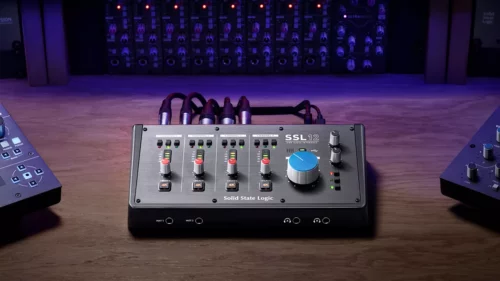
Solid State Logic SSL 12 is “a new class of audio interface”


Solid state Logic’s new SSL 12 could be of your interest, if you need something with more I/O

The SSL 12 is a 12-in/8-out USB bus-powered box that comes in a similar desktop format to its siblings (SSL 2 and 2+ audio interfaces), but is said to represent “a new class of audio interface” in that it offers “professional features and workflow never seen before at this price point”. Highlights include four SSL-designed mic preamps, two Hi-Z instrument inputs, two headphone outputs and 32-bit/192kHz AD/DA converters.

Combine all this with ADAT input and you have a total of 12 tracks of simultaneous recording and eight tracks of playback. In addition, MIDI I/O is present and correct.


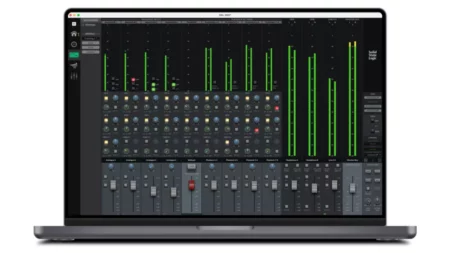
You can dive deeper into the SSL 12’s feature set using the SSL 360° software mixer. This plays host to the SSL Control Room, which offers I/O metering and the facility to assign functions to the three front-panel switches (such as monitoring options and access to the built-in talkback microphone).

The software can also be used to create up to four independent near-zero-latency foldback mixes and save/load sessions. There are also switchable headphone modes – pick the one that best suits your cans – and you can create additional line-outs by repurposing the headphone outs.

Further flexibility comes with the ability to configure where the SSL 12’s Loopback feed is taken from. You can record the output of a media player (eg, via Playback 1-2) or create a custom submix of your podcast via one of the Aux Busses (eg, Line 3-4). Both headphone mixes and line outputs 3-4 are also accessible. And, yes, there are DC-coupled outputs for creating CV signals.

Supplied software includes the SSL Production Pack – a suite of plugins and sounds that cost more than $1,000 – and a 3-month subscription to SSL’s Complete service.

The SSL 12 is available now priced at $499/£399/€499. Find out more on the SSL website.


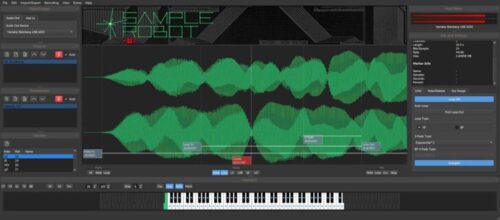
SampleRobot Pro Update adds Support for Waldorf Quantum and Iridium Synthesizers


Developer Christian Halten informed us know that SampleRobot Pro, an application designed to automate and streamline the creation of sample-based instruments, has been updated to version 6.6.

The update adds sample export support for the Waldorf Quantum and Iridium synthesizers.


What they say about SampleRobot 6.6 Pro:


“Working with large sample libraries can be challenging, especially when mapping samples with multiple velocity layers manually.

Quantum and Iridium users can respire now. SampleRobot Pro can do all the work – automatically. From recording and loop creation to multi-layer mapping and export, all steps are controlled automatically in one application, with projects that even offer a down-sampling and channel-remapping option on export.

It is possible to record high-end quality and export at a lower resolution, if there is need for more sampling space on the Quantum or Iridium. The results of SampleRobot’s advanced loop searching algorithms are written to the map file as well.

Sustained samples with inaudible loops – no problem. It’s easy to create and export complex multisamples in one go. SampleRobot even writes the whole Quantum and Iridium file structure to a USB or SD storage medium. Just unmount, insert and import – that’s it, designed for the fun of making samples for these creative machines.”


SampleRobot Pro Features:

  • Sampling of MIDI instruments completely automatically, incl. multi-velocity and advanced MIDI CC control.
  • Sampling of acoustic instruments and sounds in semi-automatic mode with countdown and tuning oscillator.
  • Sampling of VST2 instruments completely automatically with the included Instrument Host featuring offline bouncing.
  • WaveRobot – Large graphical loop and markers editor with freely scalable waveform view, stereo and loop area overlay.
  • Instrument Copier – Sampling of a whole MIDI sound bank in one go.
  • Advanced automatic loop detection algorithm, multiple loop modes and crossfade types.
  • Multisample exports in various software and hardware formats incl. up-/downsampling and channel re-mapping options, loop and crossfade rendering.
  • Project Wizard and Preset Manager for easy setup of sampling projects.
  • Estimate time (to record) and size (on the drive) feature for all projects in the list.
  • Automatic sample import-mapping based on embedded root keys or names.
  • Various export naming options with widely flexible wildcards.
  • MIDI Monitor for analysis of signals.

System Specifications:

MacOS 10.12 (Sierra) and higher, M1 compatible, Windows 11 / 10 / 8 / 7. The update is free for current SampleRobot Pro 6 users. SampleRobot is available for €249.