GForce has introduced M-Tron Pro IV, a major update to their software take on the Mellotron M400, a tape-based keyboard famous for its use in recordings by musicians ranging from The Beatles to Radiohead to Nils Frahm.
M-Tron Pro IV features a 3.5GB sound library, including over 200 tape banks; a newly enhanced browser that simplifies the exploration of this vast library; a scalable UI and more.
New in M-Tron Pro IV:
Fully-scalable UI
New Patch Browser with 800+ presets, all tagged and categorized
100+ new presets.
Tape Browser – Navigate 200+ tapes quickly and easily.
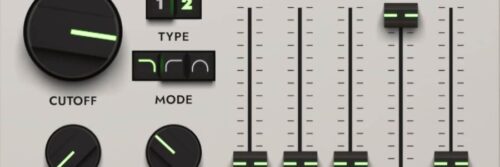
Additional filter – A new state-variable filter to compliment the original.
Additional ensemble effect – A second, new ensemble providing additional sound sculpting possibilities.
New Tape Controls – Wow and Flutter with Instability control.
Amp Simulation – New Amp simulation with Warmth, Noise and Saturate. Beautiful for warm distortions.
Reverb – New Matrix Reverb effect.
Playability – Expanded Poly Aftertouch and Velocity controls for extra playability.
Other new features – Individual FX locks, Extended keyboard range (down seven semitones), Undo, Redo, Copy and Paste, LFO shaping and destinations (Pitch, Filter, Pan, Level).
The M-Tron Pro Complete bundle includes the M-Tron Pro IV instrument with an additional 14 Expansion Packs (9 x Streetly Tapes, OrchesTron, ChamberTron, OptiTron, and Alex Ball and Hainbach – Artist Expansion). It features a huge 11.3GB sound library, with 500+ tape banks and 3500+ presets.
Synthesis Technology has released a selection of their most popular Eurorack modules in software form for VCV Rack, the open software modular synth platform.
Synthesis Technology’s Paul Schreiber let us know that the four modules are authentic re-creations of the original hardware designs, with accurate DSP models of the analog circuitry and digital firmware optimized for VCV Rack.
Since they are software, the VCV Rack versions can go beyond the original’s capabilities, adding support for VCV Rack’s polyphonic patch cables.
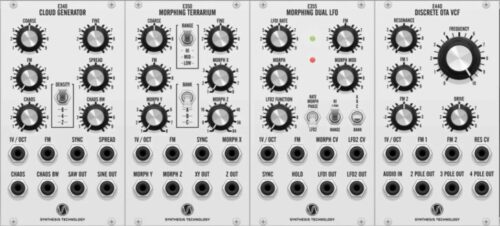
Synthesis Technology VCV Rack modules include:
E340 Cloud Generator – The Synthesis Technology E340 is a super-saw/sine oscillator that’s capable of generating up to 8 waveforms per output. It’s designed to create massive bass and lead voices like the JP-8000 supersaw, thick ambient drones as if played from a slow rotary speaker and more. The module supports VCV Rack’s polyphonic cables, so with 16 voices, you can generate a total of 128 waveforms per output. The module uses the original firmware from the hardware Synthesis Technology E340 module.
E350 Morphing Terrarium – The Synthesis Technology E350 is a wavetable oscillator, with 1D and 2D position modulation, including 3 banks of 64 waveforms. Wavetables are scanned using a glitch-free interpolation algorithm by Synthesis Technology, and the module can operate as an audio-rate VCO or CV-rate LFO. The software module uses the original firmware from the hardware Synthesis Technology E350 module.
E355 Morphing Dual LFO – The Synthesis Technology E355 is a dual wavetable LFO that generates two related waveforms. The LFO1 RATE knob sets the frequency of the first LFO, at the LFO1 OUT port. The MORPH knob sets the wavetable position, modulated by the MORPH CV input and MORPH MOD attenuator. The BANK switch selects which of 3 wavetable banks to load. The second LFO, at the LFO2 OUT port, uses the same frequency, wavetable position (MORPH), and phase as the first LFO, except for the function specified by the LFO2 mode switch. The VCV Rack software module uses the original firmware from the hardware Synthesis Technology E355 module.
E440 Discrete OTA VCF – The Synthesis Technology E440 models the SSM2040 lowpass filter architecture used in the Prophet 5 Rev 2, the Voyetra 8, and others. This software module is based on a virtual analog circuit model of the hardware Synthesis Technology E440 module.
Bitwig has announced that Bitwig Studio 5 is now available, a major update to the DAW that features a new sound library, expanded modulation options, improved Clip Launching capabilities and more.
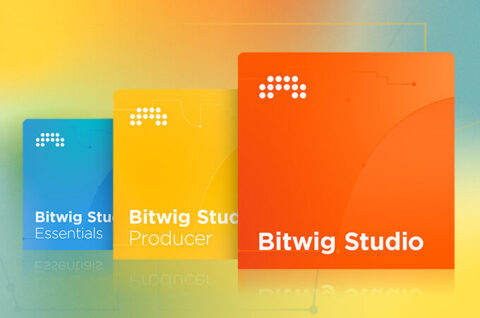
Bitwig Studio 5.0 is available now and is a free update for anyone with a Bitwig Studio license and an active Upgrade Plan. With the launch of version 5, Bitwig also is introducing Essentials and Producer, two new editions alongside their flagship product, Bitwig Studio. Find out details on the Bitwig website.
New in Bitwig Studio 5:
Freeform Sound Package
Any shape can make a sound: a squiggle, a line, a curve. That’s the idea behind Freeform, a Bitwig sound package that contains curves for MSEG devices, wavetables for the Wavetable LFO, presets for instruments and FX, and note and audio clips.
Freeform’s curves can be used in a broad range of musical and sound design contexts: They can be modulators, oscillators, waveshapers, sequencers etc. Dozens of Freeform’s curves were specially designed for specific MSEGs, such as custom oscillators or distortion shapes. But since they’re BWCURVE files, they can be loaded into any of the MSEG devices and used for your own modulations or patches. Freeform also has more than 100 presets that include MSEGs and Wavetable LFOs for a variety of Bitwig instruments, from pad sounds to bass voices and drums.
You will also find some more experimental applications of curves in audio FX, selectors, and note FX presets that generate rhythmic patterns and sequences.
MSEGs: Beyond Envelopes
A multi-segment envelope generator (MSEG) is a tool for drawing custom signals for envelopes, automation shapes, looping patterns, oscillator curves, waveshapers, sequencers etc. We created five different kinds of MSEGs that can be used as Grid modules, and two of them are also available as modulators. Separate devices means each one is focused on and optimized for its particular task.
Segments is a customizable envelope that can be used as a Grid and Polymer module or as a modulator that controls any parameter. Four Play Mode options are available for Segments:
One-shot – Plays through the entire shape (while the voice is alive) when a note is triggered
Hold – Can use any one of the curve’s points as the hold/sustain level, which also acts as the release start
Looping – Can loop forwards between any two of the curve’s points on sustain; the loop end point is also the release start
Ping Pong – Can loop forwards and backwards between any two of the curve’s points on sustain; the loop end point is also the release start
Curves is an LFO modulator and Grid module that can sync to the beat time or groove.
Scrawl is a draw-your-own oscillator for The Grid and Polymer Bitwig’s hybrid modular synth. Its anti-aliasing helps make any shape work and sound good.
Slopes is a pattern sequencer for The Grid with stereo phase options.
Transfer is a waveshaper for transforming incoming audio or other signals in The Grid.
Clicking any curve display opens the curve editor in a Pop-out Editor window that allows for easy freehand drawing. There are also shortcuts for jumping to double time or triplets. All your designs can be saved as a BWCURVE file and loaded in another MSEG. A visual browser displays all presets and user content at a glance.
Modulation, Elevated
In Bitwig Studio 5, modulators are no longer limited to devices — they can grab the mixer and project controls as well. That means one LFO can modulate any device on the same track, as well as the track’s panning, sends, and other parameters. Move that LFO to the project level to add modulations to all devices, channel strips, and transport targets.
Furthermore, MSEGs are not the only 5.0 modulators with Pop-out Editor windows. The Steps and Keytrack+ modulators, as well as The Grid’s data sequencers, also got resizable panes for cleaner editing and some helpful new functions.
New Performance Gestures
Bitwig Studio is adding new performance options, with updates to the Clip Launcher.
You can now set Next Actions to occur when a key or pad is released in addition to when it’s launched. ALT triggers offer a second option for activating scenes or clips. These features allow performers to decide how their set will unfold in the moment, as they can (for instance) tap a clip to launch it at the next bar line, or ALT-trigger to immediately swap to the new clip. Thavius Beck demonstrates this improved live workflow in a new explanatory video.
Project-wide normal and ALT-trigger gestures can be set in one place, and you can customize any clip or scene to have its own settings. That includes release options for both normal and ALT gestures, legato options for following the playing clip or the project transport, and a revamped Next Action section with simple loop counts.
Since all tracks now have their own remotes, the mixer offers a bird’s-eye view of the most important parameters. That way, building a customized set of mix and performance controls is easy. And new mapping options allow users to launch scenes and clips with any hardware.
Updated Browsers
In addition, Bitwig Studio 5 introduces overhauled browsers for a more streamlined experience and a visual way to access content. Now, search results for plug-ins, presets, and wavetables (etc. etc.) all live in one place. There’s also a customizable shortcuts pane that allows users quick access to their favorite sound packages, content types (e.g., wavetables, drum hits, or samples) or folders. Details on all the new features are available in the release change log.