Dawesome Love 2 Granular Multi FX Promises “Instant Beauty For Any Sound”, Here’s What’s New
Dawesome, the Seattle-based developer has unveiled a sequel to Love, a granular multi-effects plugin released in 2023, that expands the capabilities of the original with 15 new effects modules and a drag-and-drop signal flow.
Designed to create “instant beauty for any sound”, Love 2 promises to create “epic drones and soundscapes, lush walls of sound and evolving organic textures” from incoming audio. (Dawesome also makes a plugin called Hate, a “twisted counterpart” to Love that pulverizes audio with wavetable distortion.)
At the heart of the plugin is a granular engine with three modes: Swarm produces smooth clouds of soft grains, Chop slices audio into rhythmic chops, and Robot creates a rhythmic sequence of harmonic tones from the input signal. Granular soundscapes can be spiced up with pitch-shifting, reversing and randomization before passing through a chain of up to six effects modules.
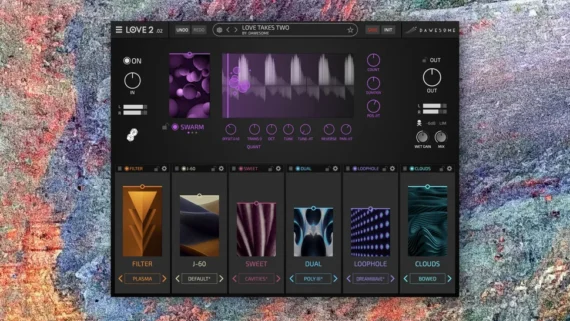
Here’s what’s new in LOVE 2:
- Drag-and-drop signal flow
- FX can be freely arranged
- 15+ new FX modules
- 100+ new presets
Love 2 features a healthy selection of effects that includes multiple styles of reverb, delay, filtering, distortion, chorus, phaser, compression, and more. Each module is equipped with a wet/dry slider and its own preset bank, but deeper sound-shaping can be accessed via a sub-menu – Dawesome says each effect has been optimized to allow for a broad range of creative possibilities with only a few intuitive controls.
While Love 2’s arsenal of 20+ effects covers most of the conventional bases, there are also a few wildcards in the midst, such as the Loophole module, a module equipped with six parallel micro-loopers that can create glitchy and unpredictable textures. You can also dial in an ’80s-style reverb and a Juno-inspired chorus if you’re feeling nostalgic.
All of Love 2’s parameters can be randomized to instantly generate new sounds, and you’re able to lock in chosen modules while randomizing others for targeted unpredictability. Love 2 arrives with 250+ presets to get you started.
Here’s LOVE 2 Walkthrough Video:
Dawesome Love 2 is currently priced at $49, and owners of the original Love plugin can upgrade for only $19.
Find out more on Dawesome website