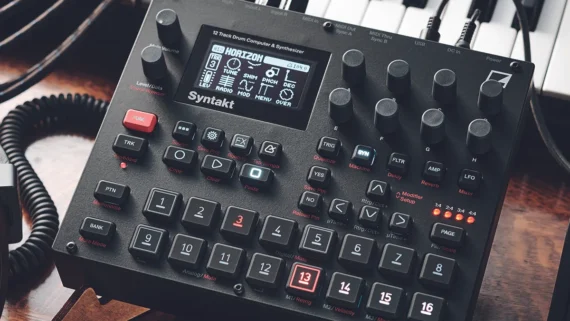
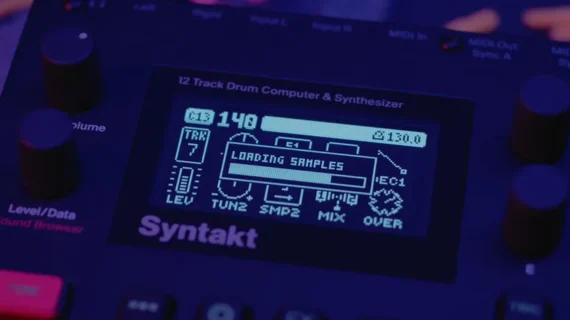
The video, via tubesockor, takes a look at how you can do PPG-style wavetable synthesis on the new Syntakt OS 1.40.
This video shows how you can use the new Twinshot dual sample player machine to play back single cycles from a wavetable, and then scan the table to create classic wavetable sounds.
Next, the video explores playing patches polyphonically, and finally in the context of a sequenced track.
Watch the video and let us know what you think of this new option in the comments!
The v1.40 update is out now, free for all existing users.
Syntakt has been on the market since 2022 but, Elektron further expanding the scope of the hybrid drum machine with a new sample engine and a raft of sequencing features.
These additions land as part of Syntakt’s free v1.40 update, the highlight of which is the new SP Twinshot machine. Those so-called ‘machines’ are the interchangeable sound generators that Syntakt uses for its semi-modular approach to drum synthesis. Existing machines offer a range of sound creation approaches, including FM and analogue synthesis, as well as SidStation-inspired retro digital synthesis.
Now Twinshot adds samples into the mix. The new machine can trigger two one-shots simultaneously, loaded independently into slots 1 and 2 from a global pool of 64 samples. Each sample can be triggered in forward or reverse direction. Twinshot offers decay and filter controls for slot 1, plus the ability to hold and loop the sample loaded into slot 2. The machine also has a digital overdrive parameter applied to both sample slots simultaneously.
The most obvious application of these two sample slots is creating layered drum sounds, using slot 1 for a punchy transient element while slot 2 provides body. This approach is particularly effective for creating snares, hi-hats or kicks with more complexity than those generated by synthesis alone. Users can upload their own sounds for use by the Twinshot machine using Elektron’s Transfer application, allow users to further customise the synth’s sound palette.
Although the primary focus is percussion, as with many of Syntakt’s other machines, it’s not hard to imagine how Twinshot could be pushed into creating more melodic or textural-focused sounds as well.
Announcing the update, Elektron writes: “Syntakt’s newest machine is an unexpected one. Bringing sample playing to a device already covering so many Elektron bases really does solidify it as a heck of an all rounder. And it’s very much a happy bending of the rules of nature in order for it to be possible, given that Syntakt’s architecture wasn’t designed to accommodate samples. But Twinshot is here, nonetheless, in all its quirky goodness.”
Beyond that new machine, v1.40 also adds a new filter pan functionality to the FX track’s multimode filter, allowing for the filter cutoff to be modulated across the stereo field. Syntakt also gains a new Track Relations feature, which lets users link and layer tracks so that they function in unison, as well as apply mute or choke groups.
There’s a new Personalize menu too, which contains existing parameters for things like LED brightness along with a range of new options controlling recording and automation behaviour. Elektron has also added the option to route keytracking to up-to four destinations, as well as a trio of new trigger conditions, LST, Not LST and Not A:B.
There are numerous other quality of life improvements and bug fixes, details of which can be found within the release notes.
All things considered, it’s yet another impressive update for Syntakt, which we’ve loved since its initial release, and has already been significantly enhanced with 2024’s 1.30 firmware, which added four new machines and a Euclidean sequencer.
Tembo is a new instrument that grows with you from beginner to master, A musical instrument for playful music making promises “unforgettable family jam sessions”
It’s difficult to know where to start if you’re planning on introducing your kids to electronic music-making – most DAWs, grooveboxes and hardware synths aren’t exactly child-friendly, presenting a steep learning curve that’s likely to put off even the most determined youngster.
But if a seven-year-old can pick up a guitar and get a headstart on their journey into musicianship, why shouldn’t they be able to do the same thing with a drum machine? That’s the ethos behind Tembo, a new instrument from American manufacturer Musical Beings that’s designed to “enable everyone to create music from the very first touch”.
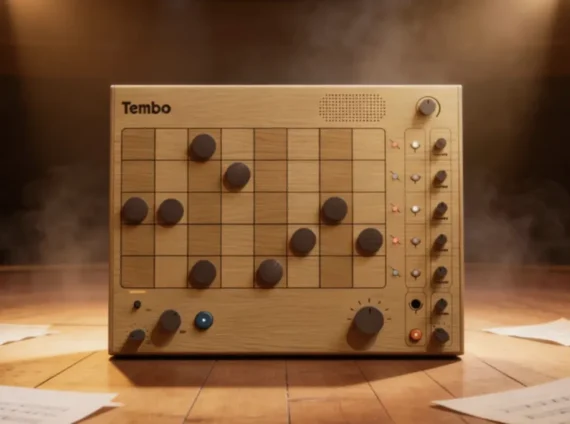
Tembo is a drum machine and sampler aimed at kids, young adults and anyone that’s new to music-making, and though it’s designed to be simple, intuitive and easily accessible, it’s actually more powerful than it looks.
Tembo’s wooden chassis is dominated by a five-channel, 16-step sequencer, and step input is achieved by placing circular magnets, or Beats, on the chosen steps.
Each step in the sequencer has two “sub-steps”; placing one Beat inserts a step on the first sixteenth-note, stacking two triggers both, and you can flip a Beat over to add a step on the second sixteenth-note only. Tempo, swing and pattern length are dialled in via the knobs in the bottom-left corner.
Tembo has five channels for samples, and each channel has its own pitch, volume, and send routed to return channels for the delay and reverb effects. These are joined by four additional channels that can play longer loops.
The instrument arrives with eight sample packs onboard, but you can also sample external instruments with Tembo’s combo XLR/TRS input or the built-in microphone, or resample Tembo’s sample channels into the loop channels to build up more complex arrangements.
Tembo has dual USB-C MIDI connections, so you’re able to hook it up to a DAW and sync up with external gear, and sessions can be recorded via USB audio, a stereo output, or through a companion app. Power is provided by a USB-C rechargeable battery and there’s a built-in speaker too.
“We’re amateur musicians ourselves, and parents, and we’ve seen how quickly that initial spark can fade when trying to learn an instrument. It takes so long to get to the fun part, to the part where you feel free, creative, and expressive,” says Tembo co-creator David Davidov.
“We wanted to bring that feeling into the very first steps of the musical journey – to help people experience music as something they do, not just something they listen to.”
Tembo will be launching on Kickstarter on March 11th, with pricing between $350-$450 depending on the chosen tier.