Sound Magic has released Supreme Drums Blue, a hybrid modeling drum virtual instrument that they say is designed for music production, film and game audio.
Key features include its hybrid modeling engine, up to 65,536 velocity layers, advanced drum physics controls, and an efficient 670MB footprint.
At the core of Supreme Drums Blue is the Epic V2 Hybrid Modeling Engine, which supports up to 65,536 velocity layers via MIDI 2.0 and renders an unlimited array of round-robin variations.
This approach eliminates the mechanical repetition associated with traditional sample libraries, and provides smooth dynamic transitions and a natural performance response. Even under MIDI 1.0, instruments such as the snare drum feature 127 velocity layers.
Supreme Drums Blue is modeled from an original 93GB multi-microphone sample set, distilled into an optimized 670MB library.
The instrument includes 13 drum kit pieces and over 33 individual drums and cymbals, selected to cover a broad range of musical styles. Multi-microphone recording enables flexible mixing for stereo, as well as surround formats up to 11.1.
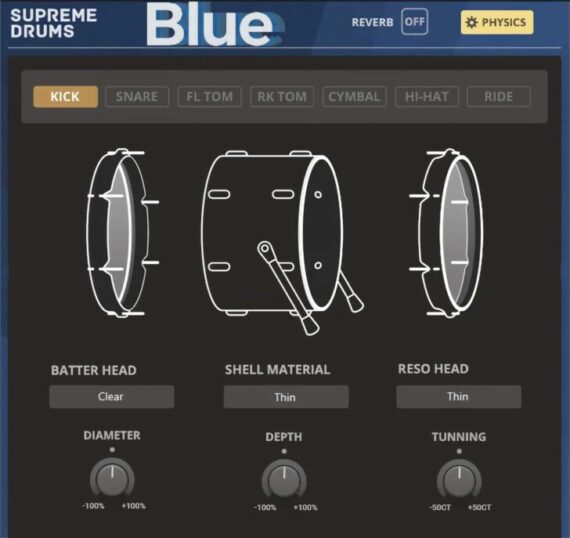
Beyond traditional playback, Supreme Drums Blue features a newly developed Physics Section, allowing users to modify drum head and shell materials, adjust diameter and depth, fine-tune tension and tuning, and shape resonance characteristics. This modeling-based design provides near-limitless customization.
The integrated Fusion Effect System V2 combines EQ, compression, and transient shaping, within a unified interface.
Supreme Drums Blue is also fully optimized for use with electronic drum kits, delivering highly responsive triggering and expressive real-time performance.
The library integrates seamlessly with Supreme Drums Orange, expanding sonic options and effectively doubling the available drum types within the Supreme Drums ecosystem.
Supreme Drums Blue is available now with an intro price of $69.00 USD (normally $129).
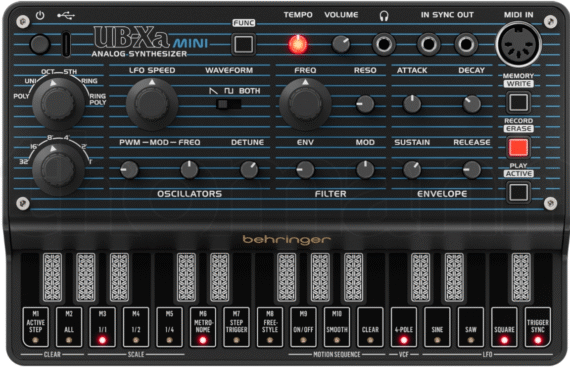
Developer Momo Müller has released a third-party patch editor for the Behringer UB-Xa MINI synthesizer.
The UB-Xa mini Editor gives you direct access to the Behringer UB-Xa MINI’s parameters. This means that you can integrate it into your DAW, record controller movements and save sound changes.
Features:
Simple handling of the UB-Xa mini without menu surfing.
Complex sound changes can be made easily and quickly.
Change Behringer UB-Xa mini Sounds directly from Editor.
Many controllers can be automated.
X-Y modulation of all parameters.
You can random the Controllers of the Behringer UB-Xa mini Synth to produce new sounds.
You can use your Behringer UB-Xa mini as a sound module in your DAW.
A Editor sound bank with 50 new sounds is included.
The Editor is available for:
PC: As VST2 and Standalone for 32bit and VST2, VST3 and Standalone for 64bit Windows.
MAC: As VST2, VST3, AU and Standalone, compatible with MAC Intel and Silicon.
The UB-Xa mini Editor is available now for € 6.90/ $ 7.
Ableton Live 12.4 introduces Link Audio and updates Erosion, Delay and Chorus-Ensemble devices.
Ableton let us know that Live 12.4 enters public beta today, bringing wireless audio streaming, updated audio effects, improved stem separation and a new educational Learn View to the Berlin-based company’s popular DAW. Live 12.4 is a free update for all owners of Live 12.
Introduced in 2016, Ableton Link is a feature that allows music-makers using Live and Link-compatible hardware and software to link up their devices over a local network for hassle-free, tempo-synchronised jamming and collaboration. Live 12.4 sees the launch of Link Audio, enabling users to stream multi-channel audio between Link Audio-equipped devices over a local network in real time.
Enable Link Audio on multiple machines running Live, a mobile device running Note, or on a Move or standalone Push, and audio from those connected devices will appear as an input in Live, making it quick and easy to monitor, sample and record with automatic latency compensation and no cables in sight. (On both Live and Push, it’s possible to send and receive audio, but with Move and Note you can send but not receive audio via Link Audio.)
This is an immensely useful upgrade to Link that should make life a whole lot easier for producers that incorporate multiple Ableton devices into their workflow, or collaborators working across several Live-equipped machines.
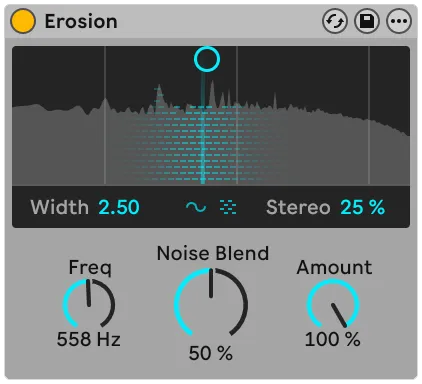
Live 12.4 updates three audio effects: Erosion, Chorus-Ensemble and Delay. An oldie but a goodie, Erosion introduces a lo-fi character to a signal by modulating a brief delay with filtered noise or a sine wave, producing a bitcrusher-like effect. 12.4 ushers in a new version of Erosion that expands its sound design capabilities by allowing for a continuous blend between sine and noise modulation and offering fine-grained control over stereo width; it’s also now equipped with a spectrum visualiser.
Delay’s modulation capabilities have been given a boost with a new LFO section, updated with additional time modes, LFO shapes and waveform shaping via the Morph control. Chorus-Ensemble has been updated with two new parameters that open up access to a wider palette of chorus effects: Time lets you set a fixed delay time and Taps gives you the option to switch to a one-tap delay (Chorus-Ensemble previously used a two-tap by default) reminiscent of vintage pedals.
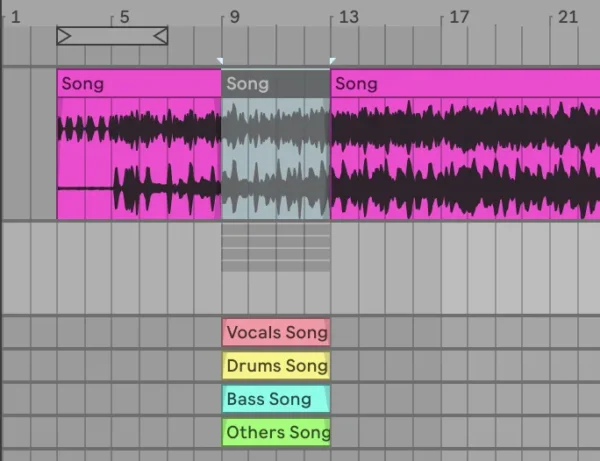
Live 12.4 also brings a handful of improvements to the stem separation feature introduced with Live 12.3 last year. It’s now possible to highlight a portion of an audio clip in Live’s Arrangement View and separate only that selection, which will be useful for quickly isolating specific moments within a track without having to create a new clip. Additionally, separated stems can now be merged into a single audio file, making it easier to strip vocals out of a mix and leave the instrumental intact.
Also new in Live 12.4 is Learn View, a “redesigned learning experience” that replaces the existing Help View, designed to make it easier for beginners to educate themselves on Live’s interface and key features.
Combining short instructional videos with written explanations, Learn View allows you to view tutorials in a floating picture-in-picture window within Live, filtering lessons by topic and ticking them off as they’re completed to track your progress. Only a few video lessons are currently available, but Ableton says new modules will continue to be added throughout the beta period and beyond.
Highlights of Ableton Live 12.4 include:
Link Audio allows audio to be streamed over a local network directly into Live for easier monitoring and recording of external sources.
The update also brings refinements to Stem Separation, including more flexible clip-based processing, as well as updates to devices like Erosion, Chorus-Ensemble, and Delay.
A new Learn View replaces Help View, offering guided tutorials for core workflows.
Push, Note, and Move also receive updates in 12.4. Push benefits from deeper integration with Live and improved device control, while Note and Move gain access to refreshed devices like Erosion and support for Link Audio workflows alongside Live.
Beta testing is usually the final round of testing done before software products get an official release. Beta testers get an early look at the latest version of applications, but may encounter bugs that can only be identified when testing is expanded to a broad group of users.
Ableton Live 12.4 is out in public beta today. Check out the release notes on Ableton website for more info.