Analogue Solutions Series 700 Recreates Roland System 700 Modular Synth
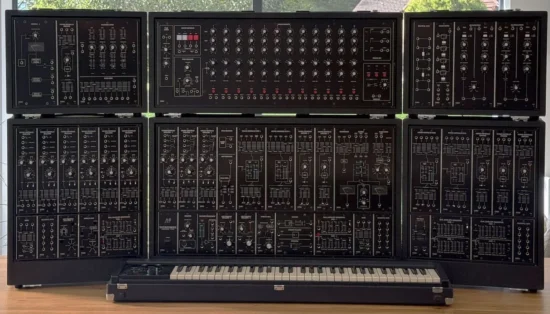
Analogue Solutions has introduced the Series 700, a large-format analog modular synthesizer designed to reproduce the circuitry, layout, and physical dimensions of Roland‘s original System 700, released in 1976.
The British manufacturer says it has recreated circuits from original schematics, making only necessary changes where components are no longer available.
The system is offered in six blocks covering sound generation, filtering, modulation, sequencing, mixing, and effects. A basic single-channel MIDI-to-CV converter is the principal functional addition to the original design. Customers can order the complete system or purchase individual blocks to build or expand a setup over time.
Features:
- Circuit Recreation: The Series 700 reproduces the original Roland System 700’s circuit designs using original schematics as a reference. Component substitutions and internal mechanical changes were made where necessary, while the manufacturer aimed to preserve the original specifications.
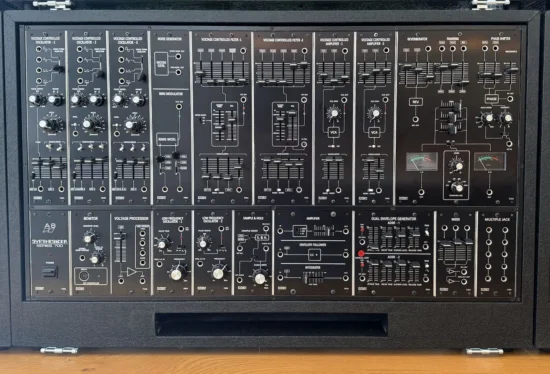
- Main Synthesizer Block: The main block includes three voltage-controlled oscillators, a ring modulator and noise generator, multimode and low-pass filters, two VCAs, dual envelopes, LFOs, sample-and-hold, mixing facilities, and additional signal-processing functions.
- VCO Expansion Block: A dedicated oscillator block adds six VCOs, a three-channel mixer, an LFO, sample-and-hold, and a dual envelope generator, expanding the system’s sound-generation and modulation resources.
- Analog Sequencer: The sequencer block provides a three-channel, 12-step analog CV sequencer and pulse-shaping functions for creating repeating control-voltage patterns and coordinating modular patches.
- Filter and VCA Block: A dedicated expansion block provides additional multimode and low-pass filters, VCAs, gate delay, dual envelope generators, and signal multiples.
- Interface and Mixer Block: The interface block combines an interface module, VCA, and four multimode filters with audio-mixing functionality for additional sound processing and routing.
- Effects Block: The effects block includes a two-channel phase shifter, a two-channel audio delay, an analog switch, and a switched multiple.
- MIDI Integration: A basic single-channel MIDI-to-CV converter is the main addition to the original System 700 design. It supports integration with contemporary MIDI equipment, particularly for synchronizing the analog sequencer.
- Physical Design: The Series 700 retains the original system’s overall physical dimensions, layout, and visual design. Custom-made knobs and slider caps, along with specially ordered switches and potentiometers, help reproduce the original instrument’s appearance and controls.
- Modular System Configuration: The manufacturer offers the system as six blocks, allowing customers to purchase the complete configuration or build a system incrementally. Individual loose modules are not offered for sale.
- Optional Keyboard: An optional keyboard based on the Roland 701 is in development. The proposed design includes four channels of polyphonic CV, MIDI input and output, and velocity CV output. Its availability depends on demand.
The Analogue Solutions Series 700 is now in production, with orders being accepted through the manufacturer. Visit the AS site for details.