Free Native Instruments Audience Choir, Immersive Vocals For Music Production


Free Native Instruments plugin enables you conduct a choir of 1,000s of Jacob Collier fans “polyphonically across many different chords, keys and soundworlds”

Enter Jacob Collier Audience Choir, an awe-inspiring, free instrument from award-winning multi-instrumentalist and Native Instrument Artist Board member Jacob Collier. Created using audience recordings from Jacob’s Djesse world tour (Djesse Vol. 4 out now!), this instrument allows you to harness the emotive power of a huge choir, and sculpt it in exciting ways.

The new free plugin captures the sound of Collier’s audience choir in a software instrument. The audience choir is a regular feature of Collier’s live shows where the Grammy-winning artist invites his audience to participate in the performance of his songs, conducting them “polyphonically across many different chords, keys and soundworlds”.
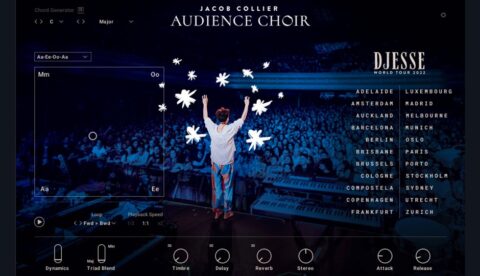
Jacob Collier Audience Choir is built on recordings of 22 concerts in different cities around the world, from Adelaide to Zurich; as notes are played, you’ll be able to see which recordings you’re hearing on the plugin’s interface. The plugin offers four different vowel sounds (Aa, Mm, Oo, and Ee) which can be blended via the XY pad on the interface’s right-hand side.
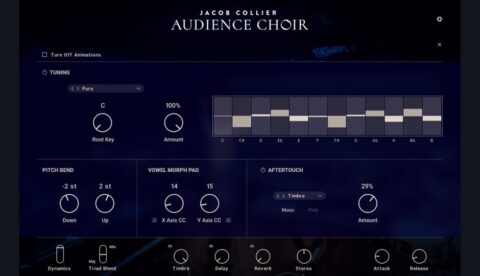
The instrument also features a chord generator, so you’ll be able to play diatonic chords with single notes, and a slider for dynamics control. A timbre knob acts like a low-pass filter, and the onboard delay and reverb do exactly what you’d expect them to do, with five reverb types onboard. You’ve also got a control for stereo width, and you’ll be able to shape your envelope with dials for attack and release.

Open up a separate panel and you’ll find more advanced controls that allow you to automatically tune the chords you’re playing to the just intonation tuning system in real-time. “One of the most amazing things about audience choirs is that people often automatically tune to each other in just intonation, because the way the piano is tuned doesn’t usually apply to groups of singers en masse”, Collier says. “It’s kind of an amazing part of this plugin that it’s able to adapt as people would in real rooms to be very much in tune.”

In addition to the choir sounds, the plugin’s equipped with percussive sounds and a number of other samples of Collier’s audience shouting various words and phrases. The plugin supports polyphonic aftertouch, so you’ll be able to get expressive with MPE-compatible controllers like the Native Instruments Kontrol S MK3.

“I’ve spent the last few years touring around the world, playing shows in every corner of the globe […] one of my favourite parts of the whole experience has been the ever-expanding evolution of the audience choir”, Collier says in the video embedded above.

“Over the course of this experience, one thing I was dreaming about was: what if I could sit in the comfort of my own home, and you could sit in the comfort of your own home, and experience the feeling of an audience choir at your fingertips? So I teamed up with the mighty Native Instruments gang and we put together this amazing instrument, built from real samples of real audiences the world over”.

Download Jacob Collier Audience Choir now at Native Instruments website.
Native Instruments intros Electric Keys Virtual Instruments


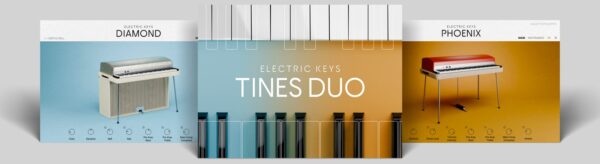
Native Instruments has introduced Electric Keys, featuring a pair of new electric piano virtual instruments.

Electric Keys includes emulations of two classic electric pianos. Here’s what they have to say about them:

  • Electric Keys – Phoenix captures the sound of a true icon – one of the world’s most influential and recognised electric pianos. With a vast spectrum of sounds, from melodious, bell-like textures to rich, warming harmonies and even distorted, barking tones, Phoenix delivers diverse retro timbres.
  • Electric Keys – Diamond immortalizes a very rare, original electric piano from 1967. Beyond its sparkling exterior lie real felt piano hammers, producing a unique and mellow tone similar to a vibraphone.


Features:

  • A versatile pair of electric piano emulations
  • Pure, authentic tones ranging from warm and mellow to bright and barking
  • Customize your sound with a classic array of controls, preamps, and creative effects

Electric Keys Phoenix and Diamond are individually priced $99 each, while the Tines Duo bundle of both is $149.Find out more on Native Instruments website.


Native Instruments iZotope VEA Designed To Let You ‘Love The Sound Of Your Own Voice’


Enjoy the sound of your own voice? iZotope’s AI-powered Vocal Enhancement Assistant plugin promises to make it sound even better.

Native Instruments today announced iZotope VEA, a new AI-powered Voice Enhancement Assistant.

More people are recording their voices than ever before – we’ll leave you to decide which of these voices are actually worth listening to – so a plugin that offers an easy way of improving the sound of the spoken word has a large potential audience. With that in mind, allow us to introduce you to iZotope’s VEA – an AI-powered Vocal Enhancement Assistant for podcasters and content creators.

VEA features AI technology that listens first, then enhances audio, designed so that creators can feel more confident with their voice and deliver better sounding content. They say that VEA increases clarity, sets more consistent levels, and reduces background noise on any voice recording.

“Many people don’t love the sound of their voice when listening back to a recording,” explains Todd Baker, VP Product at Native Instruments. “VEA quickly polishes your vocal sound so you can feel more confident as a host or narrator. VEA is also easy to use even if you haven’t worked with audio tools before, so you can spend more time focusing on what you want to say, not on how you sound.”

Promising to make any voice recording “more powerful, more polished, and more professional,” this is designed for podcasters and other content creators and features enhancement technology from RX, Ozone and Nectar, some of iZotope’s other products.

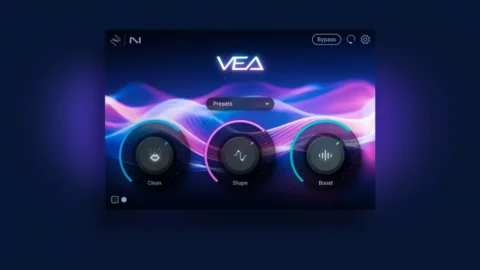
The company says that VEA is adept at increasing clarity, setting more consistent levels and reducing background noise. For people that are new to audio production, VEA offers three simple controls to help you with this: Shape, Boost and Clean.

The Shape dial is billed as an alternative to an EQ, and can tailor your recording’s tone, while the Boost knob handles compression and limiting to even out your volume. Clean is effectively a de-noiser, designed to eliminate background sound and keep your voice intact.

If you have a podcast idol, there’s also the Audiolens feature, which enables you to target a specific voice recording that you like and try and replicate its sound. VEA’s attempt to match the tone is visualised so you can see how close it’s getting.

Features:

  • The Shape control ensures audio sounds professional and audience-ready, without having to worry about an EQ. Shape is tailored to each voice, and matches the sound of top creators or podcasts with the free iZotope Audiolens tool.
  • The Boost control adds loudness and compression as it’s turned up. Easily boost the presence and power of voice recordings without spending time struggling with settings. Boost delivers a smooth and even sound to speech for a more engaging listening experience.
  • The Clean control takes background noise out of the spotlight so every voice can shine. VEA learns the noise in the room automatically and preserves speech for light, transparent noise reduction.
  • VEA works as a plugin within major digital audio workstations (DAWs) and non-linear editors (NLEs). For a list of officially supported hosts, see the System Requirements at www.izotope.com/vea.

VEA runs on PC and Mac in VST/AU/AAX formats. It is available now, with the following pricing: $29 / €29 / £29 / JPY 4200 / AUD 45 / CAD 39 / CHF 29 / CNY ¥199.    You can find you more and download a 10-day demo on the iZotope website.