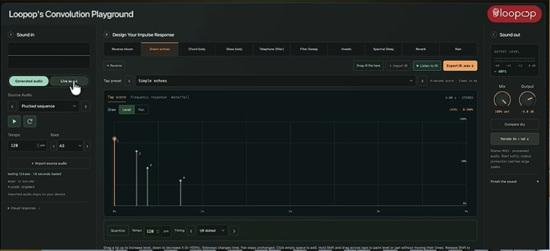
In his latest loopop video, host Ziv Eliraz demos a Convolution Playground, a new browser-based application that lets you explore the sound design possibilities of impulse responses.
Convolution Playground is free to experiment with, but you need to be a Patreon subscriber to use the export function.
Here’s what Eliraz has to say about it:
Turn audio files into effects. Explore ten ways to design an impulse response, from reverse blooms and drawn echoes to chord bodies, filter sweeps, vowels, spectral delays, reverbs, and rain. Try the built-in sounds, drag in your own audio, or select Live audio to process an instrument. Switch between Waveform, Frequency response, and Waterfall to see what you hear. Your imported audio stays on your device.
The free version includes all the sound-design controls and Listen to IR. Exporting your impulse responses as WAV files is available to WaveShaper members on Patreon.
Already a WaveShaper member? Open the export-enabled edition here. Watch the video tutorial about this app here.
This free multiband bitcrusher is a surgical tool for lo-fi sound design.
If you like your sounds distorted, degraded and loaded with lo-fi character, then the humble bitcrusher is your friend.
By reducing the bit depth and sample rate of a signal, this audio effect produces crunchy textures, gritty timbres and artifacts reminiscent of vintage digital gear: it’s a powerful tool for creative sound design, capable of achieving everything from subtle fuzz to total sonic destruction.
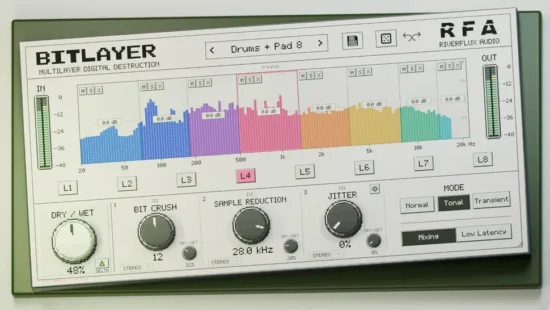
Many DAWs have a stock bitcrusher onboard, like Ableton Live’s Redux or Logic Pro’s Bitcrusher, but these tend to be on the simpler side. BIT LAYER, a new plugin from RiverFlux Audio, takes things to a different level, allowing you to precisely target your digital degradation with a multiband architecture, mid/side routing and tonal/transient processing. This adds up to more versatility than many paid-for bitcrusher plugins, and it’s totally free.
Bit Layer can dial in up to eight independent layers of processing, each with dedicated controls for bit depth, sample rate and jitter (all three can be reordered in the signal path) along with mute, solo, gain and dry/wet mix.
The plugin’s multiband functionality makes it possible to apply lo-fi texture in varying degrees and styles across the frequency spectrum, and this can be seriously useful for surgical sound design. You could crunch up the hi-hats in a drum loop while leaving the kick drum untouched, for example, or add some ear-catching grit to the high-end of a vocal without distorting the mids and lows.
The plugin’s targeting abilities extend beyond the frequency spectrum and into the stereo field, too: all three modules across each band have mid/side routing, so you’re able to apply the effect independently across mid (the sum of the left and right channels) or side (the difference between the two) channels.
There’s also tonal/transient splitting across each band, meaning that you can treat the transient (attack) portion of a signal independently to its sustained tonal content, once again opening up new possibilities for fine-tuned signal corruption.
All in all, this is a respectable amount of flexibility for a free plugin. If you’re looking for an upgrade to your DAW’s stock crusher but you’re not already in possession of one of the more full-featured paid-for options on the market, Bit Layer looks like a capable alternative.
RiverFlux Audio BIT LAYER is available now for Windows and Linux in VST3/CLAP formats, with AU support on macOS.
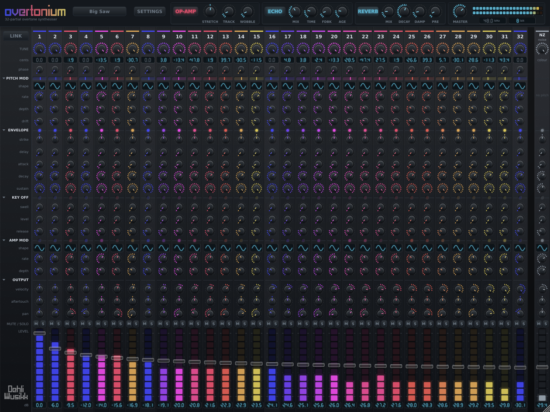
Overtonium is a free, open-source 32-partial additive synthesizer that gives each harmonic its own channel-style controls for tuning, envelopes, modulation, stereo placement and level.
Developer Benjamin Dehli has introduced Overtonium, a free additive synthesizer plugin for Linux, Mac and Windows.
Overtonium approaches additive synthesis like a 32-channel mixer, with each channel representing a sine oscillator locked to a harmonic of the played note. Each partial has its own tuning, envelope, modulation, velocity, aftertouch, panning and level controls, while a separate noise channel provides additional non-pitched sound.
A central feature is the TUNE control, which continuously moves each partial between its equal-tempered position and its exact whole-number harmonic ratio. The instrument also separates this partial tuning system from keyboard temperament and inharmonic stretch, with six keyboard temperaments available: equal, just, Pythagorean, quarter-comma meantone, Werckmeister III and Young.
The instrument supports MPE, channel pressure and polyphonic aftertouch, along with per-partial pitch and amplitude modulation, random pitch drift, two-stage envelope behavior and global effects including wobble, tape echo and reverb. Twenty-eight presets are included.
Features:
32 sine-wave harmonic partials
Separate noise channel
32 channel-style partial strips
Individual tuning for every partial
TUNE control that moves partials between equal temperament and just harmonic ratios
Inharmonic STRETCH control
Six keyboard temperaments
Adjustable keyboard root and reference pitch from 415 to 466 Hz
Keyboard tracking
Per-partial phase control
Per-partial pitch modulation with eight waveform shapes
Per-partial amplitude modulation with seven waveform shapes
Per-partial random pitch DRIFT
Individual delay, attack, decay and sustain envelope controls
Separate KEY OFF envelope
Independent velocity response for every partial
Independent aftertouch response for every partial
Channel pressure and polyphonic aftertouch support
MPE support
Per-partial stereo panning
Individual mute, solo and level controls
Global WOBBLE effect
Tape echo with two paths
Global reverb
Master level control
Twenty-eight factory presets
User preset saving and folder-based preset organization
macOS, Windows and Linux support
AGPLv3 open-source license
Overtonium is available now as free software under the GNU Affero General Public License v3. The complete source code is available through the project’s repository.