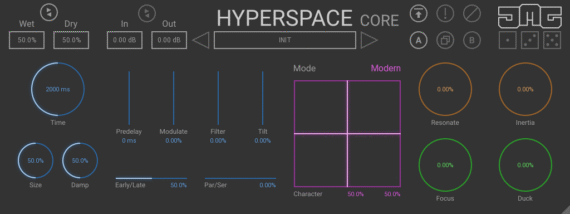
United Plugins has released HyperspaceCore, a free reverb – based on their Hyperspace algorithmic reverb – that they call ‘The most powerful free reverb ever’.
X-Y Pad – the XY pad lets you morph the parameters of the algorithm, such as delay times, frequencies and internal routings. This allows almost unlimited possibilities to create your own algorithm characters. Plus this can be automated for creative uses.
Intelligent Randomization – The dice symbols are smart randomizers that dial in useful settings to give you great sounding reverbs in just one click. With 3 levels of randomness, you can use them to subtly change the character of your existing sound or unleash chaos.
Intuitive Interface – The GUI is resizable and HDPI compatible, so it will fit perfectly on any screen.
Smart Control – The parameters in Hyperspace offer extreme value ranges to give you the most flexibility possible while having the useful values tuned to the center of the controls, allowing you to find that sweet spot quickly. Separate controls for Wet & Dry give you control over the balance of reverb, with a link option to give you the typical mix behavior found in most other plugins. Time-based parameters can be synced to the host tempo to get predelay and decay grooving with the beat.
CM Legacy – HyperspaceCore is a successor to the discontinued Hyperspace CM version, which was created for (late) Computer Music magazine.
64-bit audio quality at any sampling rate – The plugin provides the maximum audio quality you can get. It uses internal 64-bit audio processing and can handle any sampling rate. 192 kHz or even higher.
Smart bypass – ensures that you don’t get any clicks or noises when automating the parameter. It also compensates for latency, ensuring that the bypass states are perfectly in sync with each other.
Intelligent sleep on silence – This plugin intelligently detects whether it makes sense to perform processing at all. If not, it temporarily turns on sleep mode. In such a state, it requires virtually no CPU, to save the computing sources for other processes.
HyperspaceCore is available now as a free download for Mac & Windows. Registration is required.
Lese let us know that they has just updated Codec to version 2.0, bringing a handful of new features that give you more control over the way the plugin manipulates audio.
Codec repurposes a real-time audio coding standard designed for internet voice communications as an audio effect, producing a crunchy, digitally degraded sound that simulates a poor internet connection.
What’s new in Code 2.0 video:
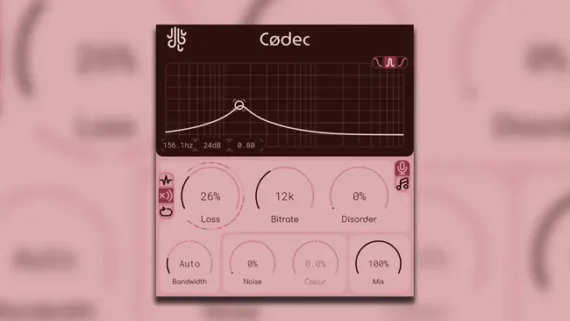
Codec divides audio into individual packets, some of which can be randomly dropped out using its Loss control. This prompts the plugin’s internal decoder to try to conceal the packet loss, and there’s a choice of three modes that determine how this is handled by the plugin, each giving you a different sonic flavour.
The Disorder control (new in Codec 2.0) adjusts the ordering of packets being fed into the internal decoder to create a chaotic, glitchy effect, while a new Noise mode adds noise to the signal before it’s fed into the encoder, creating a “messier” sound.
Additional crunch can be applied via Codec’s Crunch controls, which crank up the gain on a selected frequency range prior to the encoding stage and dial it down it once the audio is compressed, creating more distortion artifacts with no added volume.
Codec is available now for PC and Mac in VST/AU formats. You can download it for free from the Lese website.