WoodPecker MIDI Sequencer 2.5 Update Brings New Sequencing Options, MIDI CC Learn
Woodman’s Immaculate Maple Syrup Studio has released WoodPecker v2.5 both on MacOS and iOS.
WoodPecker has 4 sequencers, which can send to 4 different MIDI channels (and/or MIDI V2 groups). Each sequencer has up to 64 steps and 4 variations (resulting in max 256 steps). The app can be used stand-alone or as a plugin in a DAW.
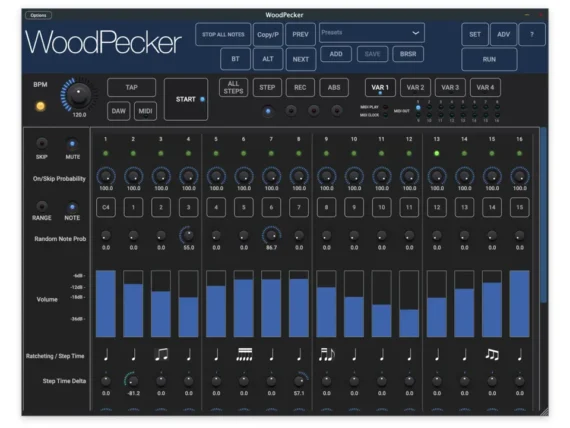
Here’s what’s new:
New features:
– Added Variation selection by keyboard note-on.
– Added Quantised Variation switching (at start of new bar, cycle).
– Added sequencer name (like bass, lead, …).
– Added Midi Learn for CC controls.
– Added Stop keyboard note for the “Note On” start modes.
– Added C3/C4 middle note selection.
– Added 1-shot start mode (auto stops after 1..8 cycles).
– Added Multi Note On mode : each subsequent note on starts the next sequencer.
– Added column nudging : horizontal drag on note button will move the column with all step parameters.
– Start/Stop note is not changing the key note any longer.
v2.1 :
– Added Fader flip : new dropdown selects which values are displayed and set/drawn by the Volume faders.
– Added KeyNote modes in Sequencer Settings : First Step , Follow Sequencer 1 or Set in Sequencer Settings.
– Added new Start (Stop) mode : Start-Stop with specific note.
– Sustain pedal now works with Start mode “While Note On”.
– Added “Common Variation Switching” button to the Variation Settings.
– Added red blinking led to “Set in All Steps” and “Set in All Sequencer” buttons.
– Arrow keys to go to steps > 16 are now visible when any of the sequencers has more than 16 steps.
– Added On/Off button in Sequencer Settings panel.
Visit Woodman’s site for details.


