Developer Michael Compton has launched a Kickstarter project to fund production of MIDINA, a new open source ‘brain’ for electronic music.
What he say about it:
“Midina is an open-source sequencer born from a passion for electronic music and technology, designed to be powerful and accessible.
Midina stands out with its ability to record pitch bends, aftertouch, and MIDI CCs, providing you with a versatile and expressive sequencer. There are easy ways to trigger program changes automatically or manually. The linear sequencer within each Song provides a clear Block Order, designed to help you make music that moves. It supports extended track and block lengths, enabling different creative methods of song building to be explored. Additionally, for those who enjoy a traditional approach, Midina offers robust step sequencer options that will only get better with time.
One of the core philosophies behind Midina is community engagement, iterative software development, and the support of customization through community contributions to both software and hardware. I believe that anybody who wants to contribute should be welcome to contribute. By opening the code, I hope to see others tailor Midina to their personal needs, enhancing their creative process and the project offerings along the way.
Midina is built on the versatile Raspberry Pi platform, making it an accessible and affordable choice. Its open-source nature means that you have the freedom to explore, modify, and expand its capabilities.
Midina is still young, but it is a project I am committed to developing and improving for the long haul. I set out to build a sequencer which fits my own production needs in a live environment, and I am happy with what it currently offers. At the same time, I know it can do much more over time, and I am excited to iterate and improve as the days go on.
Thank you for exploring Midina. I look forward to hearing the music you create with it.”
Video Intro:
Features:
- MIDINA is made of 128 Songs.
- Each Song contains up to 16 Blocks in the Block Order.
- Each Block contains 16 Tracks.
- Each Block has its own Lifetime and BPM. Block Lifetime can be from 16-2048 Steps.
- Each Track has its own Lifetime, unique per Block. Track Lifetime can be 4-2048 Steps.
- When a block lifetime expires, the song automatically advances to the next block. You can toggle “Loop” On/Off to stay looping within any given block. You can manually jump between any blocks in the block order at any time. Each block can have up to 48 program change messages assigned. If there are program changes assigned to a block, they will be sent out to the assigned channels when the block is selected. Program changes won’t be sent more than once if you are working in Loop mode.
- Each track has its own lifetime, which is the measure of recording length and loop length for the track sequencer. Each track can be anywhere from 4-2048 steps, unique in each block. Each track has 16 program change Favorites that can be applied. Each track also has 8 CC macros that can be applied.
- Songs, Blocks, and Tracks, Favorites, and CCs can all be easily renamed with an on-screen keyboard for custom labels.
- There is a Live Record mode that records all Note data, but allows expressive modulated data to pass without being recorded. You can toggle on “MOD” and record all Pitch Bend data, Aftertouch, and MIDI CCs. You can quickly jump between armed tracks, or enable Multi-Arming and you can arm all 16 simultaneously. You can clear just the note data by hitting “Clear Track”, and you can clear just the MOD data but pressing “Clear Mod”.
- The sequencer supports pagination up to 2048 steps, and has a few modes of input.
- The first is POLY mode. In POLY mode, whatever step you are on will write any incoming notes to the current step while it is active. To change active step, simply press one of the 16 buttons on the current page. You can also send MIDI CCs to sequence control change data. Note data and CC data are represented by different colored steps.
- The second is PERC mode. In PERC mode, the sequencer remembers the last note that was received. Then, any step you press will automatically get that note assigned. In PERC mode, pressing a step which already has a note assigned will remove the note. This allows you to create rapid percussive changes while also controlling notes along the way.
- The third is Live mode. This is a traditional live input recording. Playback your notes or modulations in real time and see them recorded into the sequencer.
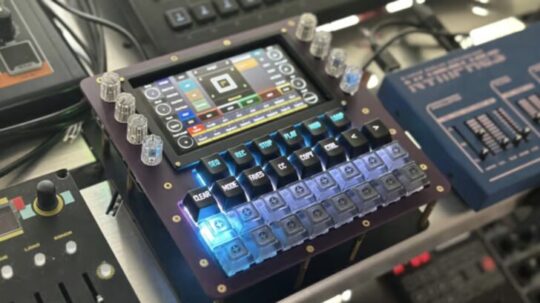
- The eight knobs that are attached to the touch-screen act both as controls for the MIDINA application, as well as assignable CC knobs for each track. The knobs will automatically update their labels and values based on the application state. You can toggle between being in “operation” or “CC” state by pressing the hot button “CCs”. Assigning CCs to the knobs is simple – in the popup just press the knob you want to assign, and then select the CC value you want, and done. It automatically saves your assignments so the next time you power up, they’re still assigned to that track. Each track has 128 CC assignments, broken in to 16 pages of 8.
- On the home screen for MIDINA you will see the current song title at the top of the screen. The current Measure:Beat:Bar value are printed in the center rotating indicators, and below these values is the relative position of the current track. Further down is the message bar which displays incoming midi data and important application messages. Below the message bar are the primary transport controls and sequencer toggle. On the sides are the knob indicators and labels. To the right of the center is the Block Order, which is a scrollable list of up to 16 Blocks, each displaying name, BPM, and Length. The 16 track toggles, labels, and mute-switches are below. You can mute or unmute tracks by toggling on/off the yellow mute strip of each track. Buttons for block operations are to the right of the Block Order. Sequencer buttons and track buttons are to the left, with three hot buttons for ARP, CCs, and Favorites.
- There is an Arpeggiator that can be triggered at any time.
- There is a “Key” and “Scale” assignment which are adjustable on the home screen. By default you will be in the Key of C and the Scale of Chromatic, so all 12 musical notes are considered valid. You can change the key and scale to adjust the playback of notes from MIDINA to be locked into a mode. Currently support the 7 standard modes with plans to add more.
- MIDINA makes no sound. It is a box dedicated to recording and sequencing MIDI.
*Note: Crowdfunded projects can involve risk. See the project website for details.
Production of MIDINA is being funded via a Kickstarter project. It’s available to project backers starting at $399.