Audiomovers has introduced AirCaster, a new monitoring tool that lets you listen to mixes on AirPlay-enabled speakers, without needing bounce your mix.
AirCaster is a plugin for Mac that lets you send audio from your DAW directly to any AirPlay-enabled speaker.
The official video intro:
With AirCaster, you can instantly transmit stereo audio to any AirPlay-enabled speaker on the same network. You can use this to monitor how a mix will sound on different speakers without bouncing, including using multiple instances of AirCaster to transmit different channels to different speakers or across several rooms in a house or facility.
Producer and engineer Matt Genovese (Analog in the Digital) says that “AirCaster has completely streamlined how I check mixes outside of my control room. Instead of printing mixes through my analog gear and transferring files, I can instantly stream my DAW output to the speakers in my house, giving me a fresh perspective in a real-world listening environment. It’s especially useful when finalizing an album and needing to step away from the studio to ensure everything translates. No extra devices, no unnecessary steps—just instant, high-quality playback wherever I need it.”
Audiomovers’ AirCaster is available now for $49.99. A free 7-day demo is available.
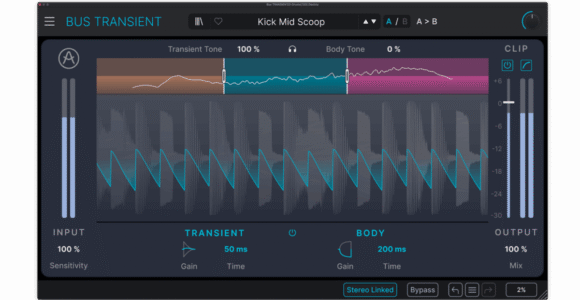
Arturia has introduced Transient, a new tool for intuitive attack and sustain shaping, multiband processing, and real-time visual feedback.
Here’s what they have to say about it:
“For producers and mixing engineers looking to refine their dynamics with precision and clarity, Bus TRANSIENT is the go-to transient shaper, offering intuitive attack and sustain shaping, multiband processing, and real-time visual feedback for fast, musical results.
Perfect for percussive and plucked instruments, as well as full bus mixes it brings instant definition and dynamic control without the complexity of traditional compression.”
Features:
Transient Section – Boost or reduce the attack; set attack length.
Body Section – Boost or reduce the sustain; set sustain timing.
Visualizer – Shows shaping applied in real time.
2x Modes – Full Band or Multiband with tilt filters.
Sensitivity – Focus shaping on strong hits or capture subtle details.
Tone Control – Brighten or darken transients and body.
Clipper – Soft/hard clipping for output management.
Mix Control – Blend processed and dry signals.
Differentiators – Frequency-specific and multiband shaping.
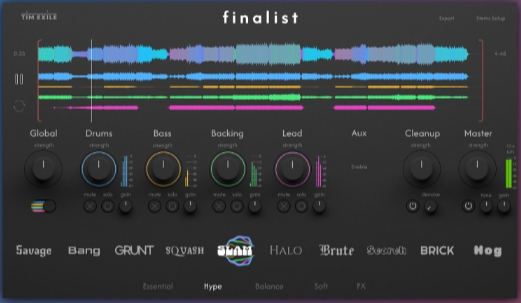
Producer/developer Tim Exile has introduced Finalist, a new application for Mac and Windows that’s designed to let you create “release-ready” mixes in minutes.
Finalist presents you with simple aesthetic choices, and then uses audio analysis and DSP to create a mix, based on your preferences.
It features 40 varied mix presets, which you can tweak to your taste. Strength and gain knobs give you extra control over each group. Module locks allow you to lock individual modules to different presets.
Finalist’s mix engine was developed from the ground up to respond to the 300 data points it extracts from your audio during the analysis process. Analog warmth emulation, mid-side processing, multiband dynamics, transient-shaping, clipper-limiters and more are used to map your source material to targets set in each mix preset.
Finalist handles up to 32 stems and supports MacOS 11-15 and Windows 10-11 via Native Instruments’ free Reaktor Player.
Here’s an example of Finalist in action:
Finalist is available now, with an intro price of £89 through the end of October 2025 (normally £99).

 Producer and engineer Matt Genovese (Analog in the Digital) says that “AirCaster has completely streamlined how I check mixes outside of my control room. Instead of printing mixes through my analog gear and transferring files, I can instantly stream my DAW output to the speakers in my house, giving me a fresh perspective in a real-world listening environment. It’s especially useful when finalizing an album and needing to step away from the studio to ensure everything translates. No extra devices, no unnecessary steps—just instant, high-quality playback wherever I need it.”