SAND Combines Audio Tracks, MIDI Sequencing, AUv3 Plugin Hosting On iOS


Record & Make Music, Host AUv3

Developer Matteo Caldari has released Sand 3.0, an iOS sequencing app that combines grid-based MIDI and audio clip workflows with AUv3 hosting, song arrangement, automation, and external MIDI routing.

Sand is a sequencing environment for iPhone and iPad built around MIDI clips, AUv3 plugin hosting, and, in version 3.0, dedicated audio tracks with recording and editing.

The app does not generate sound on its own, instead relying on hosted AUv3 instruments, audio effects, MIDI processors, and external MIDI devices.

Its workflow centers on a grid sequencer for arranging clips, a piano-roll editor for MIDI editing, section-based song construction with per-section time signatures, and flexible MIDI routing.

Version 3.0 expands the app with audio clips, audio recording, audio editing, project snapshots, drum pads, plugin favorites, hidden tracks, and Apple Silicon Mac support.

Features:

  • Grid sequencer for arranging MIDI and audio clips into projects
  • Each track can host one instrument along with unlimited audio effects and MIDI effects
  • AUv3 instruments, audio effects, and MIDI processors can be hosted directly inside the app
  • MIDI clips can be copied, duplicated, merged, combined, dragged, quantized, transposed, and edited for length and legato
  • The piano-roll editor supports note position, pitch, duration, velocity, split, duplicate, copy, paste, chord building, scale highlighting, and adjustable or free note placement
  • Recording can start with a count-in or from the first played note
  • Recorded MIDI can be quantized after capture
  • Song Mode arranges clips into sections with independent lengths that play back sequentially
  • Sections can also function as scene launchers by launching all clips in a section at once
  • Each section can override the project time signature
  • Automation is available for volume, pan, effect parameters, and MIDI
  • A master track can host global effects and automation
  • External MIDI devices can be recorded directly into the app
  • MIDI can be sent out for realtime playback and routed between tracks
  • SAND can operate as a virtual MIDI input and output
  • MIDI controller mapping is supported, including shift mappings for expanded control
  • Ableton Link is supported for synchronization with other apps and DAWs
  • Version 3.0 adds dedicated audio tracks and audio clips in the grid
  • Audio can be imported into clips with preview before committing
  • Audio can be recorded into clips with per-track input settings and track arming
  • Audio clips can be set for loop or one-shot playback with beat-aligned or immediate start options
  • Looping clips can follow project tempo and optionally store clip BPM
  • The audio editor includes crop, gain adjustment, normalize, silence, fades, reverse, pitch, stretch, split, copy, and paste functions
  • MIDI clips can be rendered to audio by dropping them onto an audio track
  • Version 3.0 adds Project Versions for saving and restoring named project snapshots
  • Version 3.0 adds on-screen drum pads
  • Tracks can be hidden and assigned custom icons
  • Tracks can be saved as templates for reuse in future projects
  • Projects can be renamed, duplicated with Save As, and started from templates on supported systems
  • Plugins can be marked as favorites for faster access
  • An on-screen velocity-sensitive keyboard is included with selectable scale and root settings
  • Projects can be exported as audio, MIDI, stems, and Ableton Live sets
  • The app supports iPhone, iPad, Apple Vision, and Apple Silicon Macs on compatible operating systems

SAND is available as a free download for iPhone and iPad with a 14-day trial. The full app is unlocked via a $9.99 in-app purchase, and Audio Tracks are offered as a separate $9.99 in-app purchase.



Akai MPC 3.9 Adds Built-In Oscillators, Arrange Editing Tools + Time Signature Updates


AKAI Pro has released MPC 3.9, an update that adds a new oscillator engine for Drum and Keygroup tracks, expands Arrange Mode editing, introduces per-sequence and per-clip time signatures, and extends MPC Desktop with Arrange Mode beta and AU/VST3 plug-in support.

Overview:

Akai’s MPC 3.9 update is centered on three major additions: a new oscillator engine that lets Drum and Keygroup tracks use synthesis sources instead of samples, expanded Arrange Mode editing tools, and more flexible time signature handling for sequences and clips.

The release also extends MPC Desktop with a beta Arrange Mode and new AU and VST3 plug-in formats, while MPC One G2 and MPC Key 37 G2 gain expanded USB audio and USB-C host/device capabilities.

For standalone users, the key change is that MPC can now build Drum and Keygroup sounds from internal oscillator sources including analog-style waveforms, FM, ring modulation, single-cycle, and wavetable modes.

Features:

  • Drum and Keygroup tracks can now use oscillators as sound sources instead of samples
  • The new MPC Oscillators include Warm Sine, Digital Sine, Saw Square, Digital Saw, Pulse, Noise, FM2, RM3, Algorithmic Waveforms, Single Cycle, and Wavetable modes
  • Wavetable oscillators support custom wavetable formats using mono WAV source files and JSON wavetable definitions
  • Single-cycle and wavetable oscillator assets can be saved with projects and tracks for portability between MPC systems
  • Oscillator parameters can be targeted from the Modulation Matrix, including wavetable position, crossfade, and start phase
  • Arrange Mode on standalone now adds touch-based Cut, Copy, Paste, and Duplicate tools tied to the Loop Brace selection
  • Arrange editing now includes Clear, Delete, Insert Blank Bars, and Insert Clip Row commands directly from the Loop Brace edit menu
  • Clip Matrix rows can now be inserted directly into an arrangement timeline
  • MPC Desktop now includes an early beta version of Arrange Mode with Loop Brace-based arrangement editing and a Single Track Grid Editor
  • Time signatures can now be assigned individually to sequences and clips
  • MPC Desktop now includes plug-in versions in AU and VST3 formats
  • MPC One G2 and MPC Key 37 G2 now support up to 24 channels of USB audio input and output
  • MPC One G2 and MPC Key 37 G2 now support USB-C host and device operation in standalone mode
  • MPC Key 37 G2 adds Ableton Live Control Mode
  • Drum and Keygroup tracks add Jura LP and Iona LP low-pass filter models derived from AIR Jura and AIR Iona
  • Program files saved from MPC Desktop now use the MPC3 JSON-based program file format

MPC 3.9 is available now as a free firmware update.


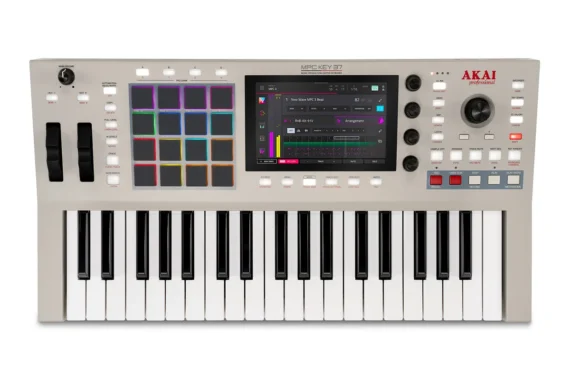
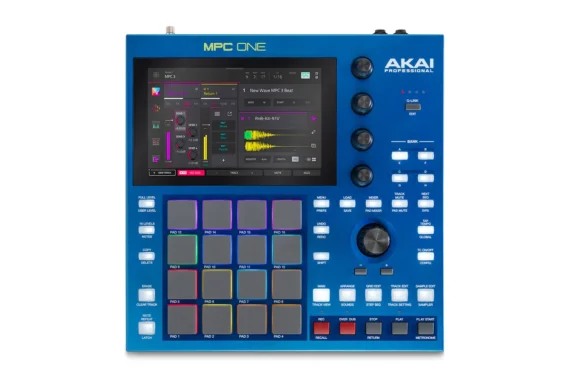
Akai MPC Key 37 G2 & MPC One G2 ‘Next-Gen Standalone MPC’ Now Available


Akai MPC One & MPC Key 37 get G2 upgrades.

Akai Professional has announced updates to its range of standalone MPCs, giving the entry-level MPC One and keyboard-equipped MPC Key 37 Gen 2 upgrades that bring them in line with the MPC XL and MPC Live III.

As with those latter models, the big news is a significant step up in processing power and storage capacity. Both MPCs also now pack 4GB of RAM, up from the 2GB of their predecessors, along with 64GB of storage. The previous MPC Key 37 had 32GB of storage, while the MPC One+ had just 16GB.

Here’s what they have to say about it:

The MPC One G2 and MPC Key 37 G2 introduce a new generation of standalone MPCs built around the same core idea: faster workflows and bigger creative potential. Both devices are powered by MPC3 and a new G2 eight-core processor, delivering significantly increased performance for larger sessions, faster load times, expanded track counts, and deeper plugin usage.

For beatmakers and producers who want the classic MPC feel in a compact desktop unit, MPC One G2 delivers next generation standalone power, MPC3’s modern track and arrangement tools, and USB-C hybrid connectivity—making it the most capable and future proof entry point into the MPC standalone ecosystem.

For producers and players who write on keys but want the speed and focus of an MPC workflow, MPC Key 37 G2 delivers next-generation standalone power, MPC3’s modern track and arrangement tools, and one-cable USB-C studio connectivity in a compact production keyboard that eliminates the laptop dependency.

The improved specs mean that both models can make better use of the MPC3 OS in standalone mode, with the capacity for up-to 32 simultaneous plugin instances and 16 stereo audio tracks.

The extra power can also be put to use for pro-grade stem separation and real-time time-stretching, although access to these features requires the optional Pro Pack expansion, which also adds the Clip Matrix seen on other new MPCs.

The most significant addition on this front is the introduction of multi-channel audio streaming via USB-C, which lets users stream multiple tracks of audio and MIDI to/from a DAW, as well as sample directly via USB-C.

The MPC One G2 and MPC Key 37 G2 give producers and beat makers the most powerful standalone MPC we have ever built at these prices,” said Andy Mac, Director of Artist Relations at Akai Professional.

“From bedroom beat makers to established producer communities around the world, creators now have four times the power, MPC3 OS, and a powerful collection of instruments and samples ready to get you started. This is generation 2 of MPC standalone production.”

Here’s Overview & Deep Dive on MPC Key 37 G2:

Key Features:

Shared Platform Features (Both Models):

G2 8-core processor with 4x the processing power of the previous generation

  • 4GB RAM and 64GB internal storage
  • Up to 32 simultaneous plugin instances and 16 stereo audio tracks in standalone
  • MPC3 OS with modern, track-based workflow and full Linear Arranger
  • 7″ full-colour multitouch LED display
  • USB-C with 24×24 audio streaming, expanded MIDI, host and device support over a single cable
  • Ableton Live Control Mode and Ableton project import/export
  • Direct sampling from phones, tablets, and external devices via USB-C
  • Wi-Fi (2.4 GHz / 5 GHz, 802.11ac) and Bluetooth 5
  • Over 20 GB of included content; NI Analog Dreams MPC Edition free at launch
  • An optional Pro Pack expands both systems with advanced production tools including professional-grade stem separation, real-time time-stretching, and Clip Matrix.

MPC One G2 – Additional Features:

  • 16 velocity- and pressure-sensitive RGB pads across 8 banks
  • 4 touch-sensitive Q-Link knobs with 4 accessible columns
  • 5-pin MIDI in/out and 4 TRS CV/Gate jacks (8 outputs total) for hardware and modular integration
  • SD card slot and USB-A port for expanded storage and accessories
  • 11 included plugins and 9 expansion packs

MPC Key 37 G2 – Additional Features:

  • 37 synth-action keys with aftertouch, pitch bend, and modulation wheel
  • 16 velocity- and pressure-sensitive RGB-backlit pads with 8 accessible pad banks
  • 2 × 1/4″ TRS inputs and 2 × 1/4″ TRS outputs (stereo)
  • 8 CV/gate outputs (4 × 1/8″ TRS jacks), 5-pin MIDI in/out
  • 13 included plugins and 6 expansion packs

MPC One G2 – Included Plugins (11):

  • NI Analog Dreams MPC Edition (free, included at launch)
  • Bassline
  • Electric
  • Fabric Select
  • Hype
  • Mellotron
  • Odyssey
  • Organ
  • Solina
  • Tubesynth
  • Drumsynth

MPC One G2 – Included Expansions (9):

  • Acoustic Tools
  • Classic Drum Machines
  • Apollo Retro Kits
  • Percussion Tools
  • ATL Song Starters
  • Marco Polo Lo-Fi Boom
  • Welcome to ATL Kits
  • Welcome to ATL Melodics
  • Producer Essentials

MPC Key 37 G2 – Included Plugins (13):

  • NI Analog Dreams MPC Edition (free, included at launch)
  • Bassline
  • Electric
  • Fabric Select
  • Hype
  • Mellotron
  • Odyssey
  • Solina
  • Tubesynth
  • Drumsynth
  • OPX-4
  • Jura
  • Sub Factory

MPC Key 37 G2 – Included Expansions (6):

  • Acoustic Tools
  • Classic Drum Machines
  • Apollo Retro Kits
  • Marco Polo Lo-Fi Boom
  • Gemini Future Classic Synths
  • Orion Future Classic Workstations

The MPC One G2 and MPC Key 37 G2 are out now priced at $799/£729/€849 and $999/£849/€999 respectively. Both sport new colours inspired by classic MPC designs. Visit the official Akai site for more info.