Scaler 3 Music Theory Workstation Now Available For iPad
Scaler Music has announced that Scaler 3, described as a ‘music theory workstation’, is now available for iPad. It was previously available for macOS and Windows.
Scaler 3 for iPad offers the full feature set as the desktop version, and integrates with iPad DAW applications via AUv3.
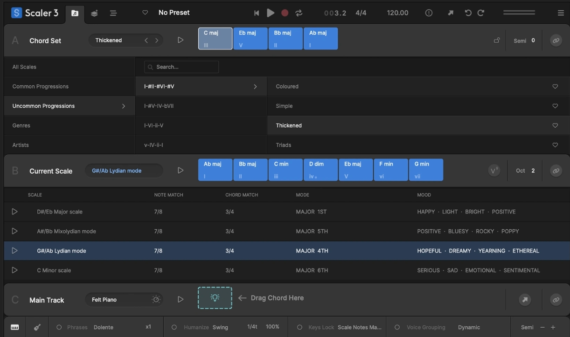
Features:
- Access over 1,000 chord sets, keys, and modes, categorized by mood, artist, and genre.
- Build chord progressions with the sequencer, as Scaler 3 suggests chords based on your current selection and automatically voice-leads between them for smooth musical results.
- Create evolving arrangements with Scenes. Build, duplicate, and arrange different chord variations or sections to structure full tracks quickly and intuitively – ideal for songwriting, performance setups, and workflow exploration.
- Play your favorite instruments and effects directly within Scaler 3 with VST/AU Plugin Hosting, expanding creative options.
- With Detection of MIDI and audio, Scaler can identify chords, determine what key and scale you are in, and suggest chords that match your music.
- The Arrange Page now features a timeline layout with dedicated lanes for chords, melody, bass, and phrases. Each lane syncs with the main chord track, and clips are fully adjustable with independent control for each lane or clip.
- Work in Standalone Mode without needing a DAW, perfect for desktop use when you want to focus on music theory, composition, or experimentation.
- Create ideas and tracks on the move with your iPad, then bring them into Scaler 3 on desktop when you’re ready.
- Scaler 3’s massive library of Motions, transforms chords into melodies, arpeggios, basslines, and phrases, preserving original dynamics and nuances. Modify these with the piano roll editor and innovative modifiers for transposition, density, and range, unlocking endless creative possibilities.
- Sync your Main Track chords across all Scaler 3 instances with Live Sync. Change one chord in the “leader” and all “follow” instances will respond, ensuring consistent progressions and simplifying workflow with DAWs that don’t support multi-channel MIDI out, like Ableton.
- Route Scaler’s chords, melodies, Scenes, and performances to any external instrument or plugin with full External MIDI Out, now available in both the plugin and standalone versions for a seamless workflow across your entire setup.
- Control how your chords split between multiple instruments with full Divisi and advanced voice allocation. Send upper and lower voices to separate Scaler instances for more realistic ensemble parts and richer arrangements, giving you detailed control over how each voice is played and layered.
- New in Scaler 3, the Bass Follow Track automatically follows the root note of your chord track, creating a dynamic bassline. Use the Inversion modifier to send voices to different instruments.
- Unlock new harmonic possibilities with the Circle of Fifths, discovering nearby chord substitutions and extensions to create unique chord progressions or expand existing ones.
- Modulation Suggestions help you move between your current key and a destination. Created by professional musicians, these suggestions help solve your modulation puzzles in five ways: Progression, Secondary Scale, Modal Interchange, Mediants, and Neo-Riemannian.
- Experiment with Voice Grouping and Advanced Voicings to keep your chords within a certain range or apply drop voicings, guitar voicings, and more—instantly transforming diatonic chords into richer harmonic results.
- 50 internal sounds (including pianos, synths, and orchestral instruments) let you play your progressions, or you can load VST/AU plugins for further sonic expansion.
- Scaler’s Bind to Keyboard feature lets you control chord playback directly from your MIDI keyboard for one-finger chords, arpeggios, and melodies that lock to your chords —making composition fast and intuitive.
- The Explore Page lets you discover a harmonic universe of chords untied to any scale. Click on a chord to see compatible or adventurous options, styled to show darker or brighter choices.
- Discover new chord expressions – substitutions, inversions, variations, voicings, extensions, and parallel/negative harmony-on the Colors Page, enhancing your harmonic vocabulary.
- Compare up to seven progressions side by side in the Sketch Pad, experimenting with different motions and chord variations to find the ideal progression for your track.
- User Track lets you record directly into Scaler’s piano roll, capturing melodies, chords, and ideas in real time.
- Record chord triggers to build your own rhythmic sequences or capture your Keys Lock performances as editable MIDI. Chord, scale, and note guides keep everything harmonically grounded, and full MIDI editing lets you refine your performance quickly.
- Scaler syncs with your DAW’s position, tempo, and time signature, maintaining sync while writing. Use the internal cycle function to loop a smaller progression or turn off DAW sync to work independently, writing trigger notes just like Scaler 2.
- A step-by-step Onboard Tutorial overlay greets you on startup, providing a guided walkthrough for new users to get started quickly.
Scaler 3 for iPad is available now, with an intro price of $14.99 USD (normally $19.99).


