OXI Instruments is the Spanish manufacturer behind the OXI One, a popular and versatile sequencer that received a MKII update earlier this year.
This week, OXI announced the latest addition to its product lineup: E16, a portable and lightweight controller that OXI promises will allow you to “control your entire set-up from one compact interface”.
OXI One is a powerhouse sequencer with an extensive set of features, and while E16’s design looks a little more stripped-back at first glance, there’s a similarly comprehensive level of functionality under the hood.
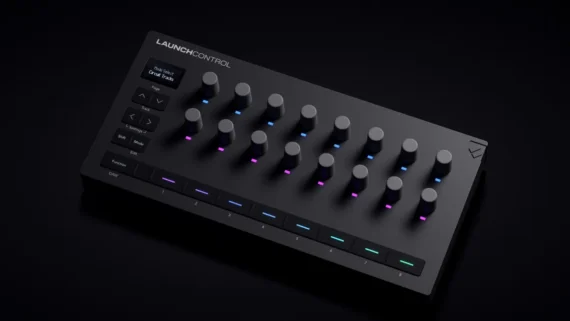
E16’s aluminium unibody chassis features 16 endless encoders encircled by LED rings that display parameter values, joined by a single shift button in the top-left corner next to its OLED screen. Each knob has two assignable destinations and the LED colours can be customized to your liking.
Each of E16’s 16 scenes stores 12 pages of controls with 16 per page, giving the user 192 controls per scene that can be mapped directly from the hardware or through OXI’s companion app. Customized layouts and banks of parameter values can be saved to each scene as presets for instant recall.
“We didn’t want to make just another controller – we wanted to bring the OXI philosophy to the MIDI world,” OXI says of the E16 in the demo video embedded above, pointing to a handful of features that expand its capabilities in a live performance context.
E16 offers a neat grouping function that allows the user to link multiple controls together to be controlled via one macro encoder – useful for executing complex transitions that involve a number of different parameters or instruments. E16’s snapshot feature goes even further by letting the user morph, Octatrack-style, between two sets of 16 saved parameters across an entire page of controls with a single knob twist.
There’s also a knob recording function onboard that allows the user to capture the movement of a given encoder, which is played back on an unsynchronized loop – each encoder has its own loop buffer and length, so you’ll be able to dial in evolving, polyrhythmic modulation with ease.
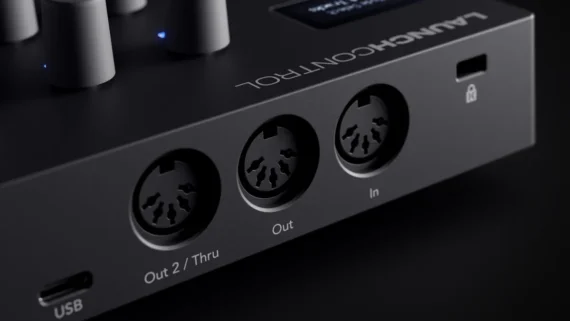
On the I/O front, E16 has two 3.5mm MIDI outputs, a MIDI input and wireless Bluetooth MIDI, alongside its USB-C connection and two virtual USB ports. It’s available in two editions, a standard edition with smooth, non-detented encoders, and a limited edition with “clicky” encoders that give tactile feedback as they’re turned.
Priced at £339/€409/$499, OXI E16 is available for preorder now – first units will ship at the end of December. Find out more on OXI Instruments website.
Launched in 2018, Serato Studio was originally pitched as an entry-level DAW designed to lower the learning curve for DJs getting into music production. With an interface loosely based on that or Serato’s DJ software and an emphasis on loops and samples, it was designed to allow musicians familiar with the basics of dance music construction to build track ideas quickly.
Now Serato, has announced the launch of SLAB, the first-ever pad controller designed specifically for Serato Studio. Co-developed with AlphaTheta Corporation, SLAB turns Serato Studio’s production tools into an expressive, intuitive hardware experience for producers and artists of every experience level.
Designed around the core elements of sampling, sequencing, and performance, SLAB brings the raw feel, instinct, and speed of beat making back to its essential elements.
Designed to maximize efficiency with Serato Studio, SLAB also natively controls Serato Sample, and Serato DJ Pro as an accessory device, giving creators flexibility across both production and performance setups.
With a versatile MIDI mode, producers can switch effortlessly between SLAB’s native control of Serato Sample and any custom mapping within a compatible DAW.
Built for both studio production and live performance, SLAB’s combination of tactile control with deep software integration bridges beatmaking and performance into a unified workflow.
Although it was already possible to map controllers to Studio, Slab aims for a slick plug-and-play workflow that mimics the intuitive and user-friendly experience of the software. The hardware itself has been created in collaboration with AlphaTheta, a brand with experience of bridging the gap between DJ and production hardware.
Slab is a pad-focussed controller laid out in the style of Akai’s MPCs and Native Instruments Maschine. Its main interface element is a grid of 16 velocity- and aftertouch-sensitive performance pads. These pads are flanked by a variety of other control elements including four rotary encoders, a touchstrip and a variety of buttons for switching between Studio’s various functions.
To the left of the hardware is a large transport section featuring sizable play and record buttons, and a chunky dial used as the primary browsing/navigation tool.
This dial can also make use of a handy feature called Focus Control, which allows the user to hover their mouse cursor over any parameter within Studio or a third-party plugin, and then adjust that parameter with Slab’s main dial, allowing for quick tactile control without the need for MIDI mapping.
Slab’s pad grid can be used in a number of different ways, including triggering sample slices and step sequencing, as well as a Pad FX mode, which allows users to layer and manipulate multiple effect types across the 4-by-4 grid.
Although Slab is primarily designed for use with Serato Studio, it can also be used with Serato Sample and Serato DJ Pro.
In all three applications, the controller can be used for hands-on control of the software’s stem separation features, allowing users to adjust the volume of individual stems with the device’s four rotaries – a feature that could make it a potentially handy additional controller within Serato DJ setups. DJ Pro users can also use Slab to control other performance features within the software.
Although it’s clearly capable of undertaking a variety of tasks, Slab is also notable for how stripped-back it looks compared to the latest generation MPCs and Maschines. That simplicity is clearly by design though, with its creators aiming for the same approachable learning curve as that of the Studio software it accompanies.
As the tagline on Serato’s official website states, “The best MIDI controller setup isn’t about having more—it’s about staying connected to what matters. SLAB keeps your head in the game, and your hands on the beat.”
Yoshinori Kataoka, President and CEO of AlphaTheta Corporation, said: “This product was designed to empower DJs, artists, and creators to explore new creative possibilities and more intuitive ways to make music. From people who want to make their first-ever track to experienced producers, we can’t wait to see how music lovers around the world will use SLAB to turn their ideas into sound.”
SLAB Key Features:
16 velocity-sensitive RGB pads for finger drumming, sequencing, and Pad FX, highly responsive multicolored LED performance pads with an intuitive layout that gives quick access to features like Auto Set and Favorite, speeding up production processes and workflow
Large multi-function dial for library browsing, scrubbing, and sample slice editing, plus Focus Mode to control anything your cursor hovers over in Serato Studio—including plugins
Dynamic LED display that provides information on global project, Deck (instruments, samples, drums), individual Pad, and parameter controls including EQ, Stem, FX, BPM, Key, etc., with four touch-sensitive encoder knobs on the top panel to switch effortlessly between modes
Dedicated transport controls and buttons to navigate between Scenes, Deck, and Pads
13cm long-stroke touch strip for dynamic parameter control, such as filter sweeps, pitch bending, swing subdivision, and note repeats— adjustable live even while triggering pads or recording automation.
Precise Step Sequencer with grid editing, velocity control, swing, and note nudge
Streamlined, compact, US letter-sized body that transforms any space into a comfortable studio environment with optimized design and conveniently USB-powered for immediate functionality
“For three decades, Serato has been a leader in providing best-in-class software for DJs and music producers, and now we are incredibly excited to dive into the world of music production hardware by working with AlphaTheta to co-develop SLAB, the first native controller for Serato Studio,” said Young Ly, CEO of Serato. “Our artist community is at the forefront of everything we do, and given our track record of successful collaboration with AlphaTheta, we knew they were the right partner for developing an exceptional hardware product to enhance the workflow of our highly creative community.”
“We’re so excited to announce the launch of SLAB. AlphaTheta and Serato have been working together closely since 2011, and this product embodies both companies’ deep passion for music,” stated Yoshinori Kataoka, President and CEO of AlphaTheta Corporation. We look forward to seeing music lovers around the world use SLAB to enjoy an even richer creative experience.”
SLAB’s release lands alongside major updates across the Serato ecosystem, with cross-functionality with Studio 2.5.0, Sample 2.2.0 (also including new Stems Levels and Stems Automation features) and DJ Pro 4.0.1.
SLAB is available now through authorized sellers worldwide and costs $329US. Find a local retailer/distributor here. For additional information on SLAB, visit the Serato website.
Launched in 2016, Arturia’s KeyStep MIDI controller was a slim and minimalistic 32-note keyboard that squeezed an impressive level of functionality into a portable, reasonably-priced package.
Today, Arturia has launched KeyStep mk2, a major upgrade that brings an OLED display, USB-C connectivity, new generative tools and a redesigned sequencer and arpeggiator to this popular controller.
Arturia is pitching KeyStep mk2 as “the ultimate compact controller and sequencer” for both DAWless workflows and computer-based set-ups, maintaining the “core essence” of the range while introducing a raft of significant improvements.
KeyStep mk2 features the same 32-key slim keybed with velocity and aftertouch as its predecessor, but this has been complemented by an OLED screen and clickable encoder, meaning all editing is now directly accessible from the hardware, a task that previously entailed the use of Arturia’s Control Center software.
On the hardware front, Arturia has added a power switch, swapped the USB Micro-B connection from KeyStep mk1 for a USB-C port and added an extra CV output. In total, KeyStep mk2 offers four 3.5mm CV outputs, MIDI In/Out over 5-pin DIN, analogue sync in/out and a 1/4″ sustain pedal jack – a healthy amount of connectivity for such an affordable controller.
KeyStep mk2 introduces a number of new tools for idea generation and manipulation, including a new Mutate function, which allows for one-touch transformation of patterns and sequences, accessible via the dedicated Mutate button.
The sequencer has been upgraded with support for unquantized recording and pattern chaining, and the arpeggiator has been bolstered with eight new modes. Scale and Chord Modes have been brought over from the KeyLab Mk3, while the new Spice and Dice functions (first seen on the MicroFreak) allow you to create randomized variations on sequencer and arp patterns in real-time.
Here’s KeyStep mk2 Overview:
Arturia KeyStep mk2 is priced at $169. Find out more on Arturia website.