Roland Go:Mixer Studio Mixer & Audio Interface For Social Media Content Creation
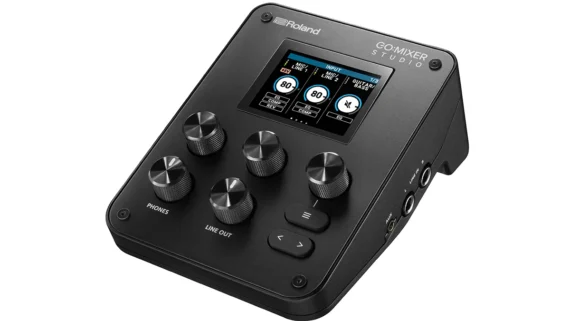
Ahead of the 2026 NAMM Show, being held Jan 22–24 in Anaheim, California, Roland has introduced its most comprehensive model yet: the Go:Mixer Studio, a compact audio interface and mixer designed to provide high-quality sound in a portable setup.
Roland says that the GO:MIXER STUDIO is “ideal for musicians and Instagram or TikTok creators, and delivers studio-quality audio for iPhone, iPad, and desktop recording.”
Go:Mixer Studio offers 12 input channels and six outputs, and you can record at up to 24-bit/192kHz quality. There are also built-in effects – a 3-band EQ, a compressor and a reverb – which can be used for recording or just monitoring, along with features designed to make it easy to integrate with video production. Mixer setups can be stored in 16 scene memories.
The selection of inputs cover most eventualities: there are two XLR mic/line inputs with mic preamps; a dedicated guitar/bass input; and 1/4-inch inputs for stereo sources such as a keyboard, electronic drum kit or anything else you might be wanting to record. Further stereo sources can be plugged into the aux input, which has TRRS support for bidirectional audio with mobile devices. There’s also MIDI I/O.
Monitoring connectivity includes a 1/4-inch headphone jack and a further mini-jack output for your wired earbuds. This supports a headset or inline mic, giving you a further recording source to work with. If you’re back in the studio, you can use the 1/4-inch line outputs to plug into your speaker setup.
The Go:Mixer Studio’s control panel looks nice and clean, with just a few knobs and buttons below the display. You can take control using the Go:Mixer Cam iOS app, for iOS, Mac & Windows, which enables you to capture both multitrack audio and video. Every input can be mixed from here, and you can also export the multitrack audio files for use in your DAW or video editor.
PC and Mac users can also take advantage of the Go:Mixer Editor, which puts all of the device’s parameters on a larger display.
Power can be drawn from your device, an adapter or a USB battery pack (there are two USB-C ports so you can connect and plug in a power supply at the same time) and you can mount the Go:Mixer Studio on a tripod if required.
Features:
- Portable mixer and audio interface for performance video creators and music artists
- Capture high-quality audio anywhere with an iPhone/iPad or a macOS/Windows computer
- Studio-grade sound quality with support for recording rates up to 24-bit/192 kHz
- Intuitive panel knobs and color display for easy operation
- Onboard EQ plus compressor and reverb modeled after popular studio processors
- Up to 12 total input channels and six outputs (three stereo pairs)
- Two XLR inputs for mics or line-level devices
- High-gain mic preamps and support for 48 V phantom power (requires 15 W power from a mobile device, computer, or USB adaptor/battery)
- Stereo line-level input, high-impedance guitar/bass input, and aux input with TRRS (bi-directional) capability
- Versatile audio outputs include 1/4-inch stereo output jacks, a 1/4-inch stereo headphones jack, and a mini headphones jack with headset mic support
- Save complete mixer setups in 16 scene memories for fast recall
- Loop Back function for playing along with backing tracks from your mobile device via USB-C
- TRS MIDI I/O with MIDI Thru functionality
- USB-C ports for device connection and independent power
- Versatile power options: bus power, external adaptor, or USB mobile battery
- Integrated mount for a tripod
- GO:MIXER Cam app for iOS enables you to record and mix multitrack audio alongside video
- GO:MIXER Editor for macOS and Windows provides real-time access to GO:MIXER STUDIO functions on the computer’s display
The Roland GO:Mixer Studio is available now priced at $299, and you can find out more on the Roland website.


