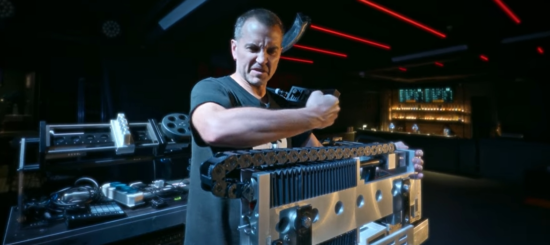
In this mini-documentary, mechanical engineer and industrial metal artist Author & Punisher (Tristan Shone) shares his perspective on why he thinks so many electronic music performances are boring, and how he’s trying to change this.
The behind-the-scenes interview was filmed during his recent European Summer tour in Krakow, PL.
“I’m not interested in your costumes and extreme stage presence, running around in the crowd. I’m more interested in you being able to perform the songs you wrote in a live capacity and that being captivating and powerful,” explains Shone. “What is gained and lost by the lack of risk in a live performance? If it is perfect and the same every night with backing tracks and auto tune (or some variant thereof), then it loses something.”
“I love to see folks work within a set of limitations that they can play live,” he adds. “It may take years to perfect, but show us what you practiced and developed over 100 shows, not what you recorded last week and augmented with costumes and makeup. “
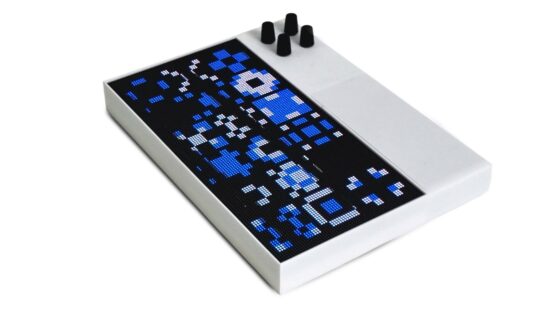
Patternflow is an open-source LED ‘light synthesizer’ that you play with four knobs.
It does not make any sound, but it speaks OSC (Open Sound Control) bidirectionally, so you can control it with music or us it as a music controller with compatible software.
Patternflow features 8,192 LED pixels, in a 128 × 64 matrix, that respond to your control in realtime. Nothing is pre-rendered – every frame is computed live on the device as you play.
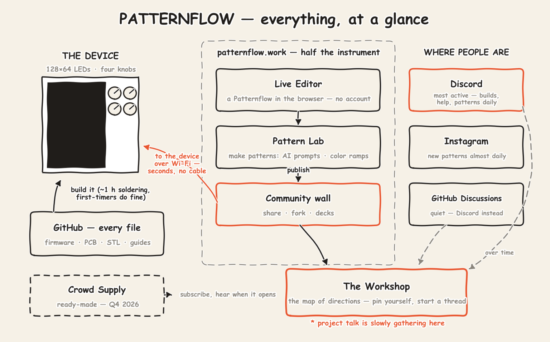
It runs on a power bank; setup is one trip to a computer to join your Wi-Fi, and everything after that happens in the browser: patterns, decks, even firmware updates arrive wirelessly.
Patternflow speaks OSC over Wi-Fi. Send values from Max, TouchDesigner, or anything else that speaks OSC, and they land on the virtual knobs; turn a physical knob, and the value goes back out to your session. There is no cable and no audio interface in the path. The device joins your network and shows up as an OSC endpoint.
Patternflow is available as a DIY project via Githu. You can also try a virtual version in your web browser.
A crowdfunding project is also in the works for assembled Patternflow devices. Note that crowdfunding projects involve risk, which is discussed at the site.
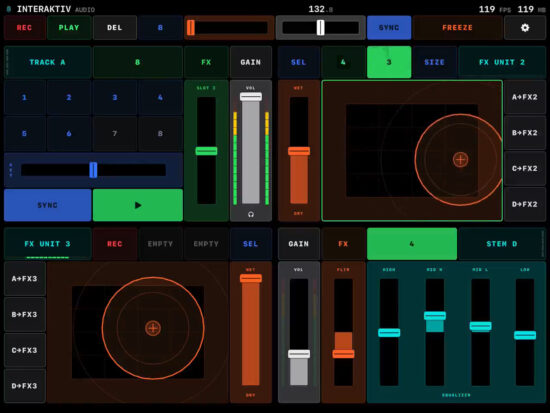
Interaktiv Audio has released Interaktiv Tap, a multi-touch iPad instrument that plays Traktor Pro 3 and 4 over one USB cable.
Interaktiv Tap provides a touchscreen control surface for Traktor Pro 3 and 4 running on a Mac or PC. The iPad communicates with Traktor over USB MIDI and does not carry the audio signal. The surface provides control of Track, Stem, Remix and Live Input decks, along with effects, EQ, loops, hot cues, master tempo, synchronization, looping and other performance functions.
It installs as its own device in Traktor’s Controller Manager, allowing other controllers and mappings to remain connected.
Features:
Track deck control with hot cues, loops, key fader, four-band EQ and filter
Stem deck control with per-stem filter, effects send, volume, mute and cue
Remix deck control with beat-synchronized cell launching, queue, punch-in and slot pages
Live Input deck control with EQ, filter, effects and gain
Four effects units
Multi-touch FX pads tracking X, Y and finger-distance axes
Two recorded gestures per FX unit
Traktor Loop Recorder control
Master tempo control
Tempo Bend for adjusting deck phase
Headphone cue control
Pre-fader meters
Key fader with free or semitone-locked operation
Expandable deck views
App Lock for preventing accidental touchscreen input
Traktor effect browser and per-unit effect shortlists
Two-way synchronization of effect names, cue colors and meters
Traktor Pro 3 and Traktor Pro 4 support
Interaktiv Tap is available now. It’s free to download and includes a seven-day free trial. Full access costs US $14.99 as a one-time purchase.