Archive for February, 2026

Abbey Road x Charles Jeffrey Loverboy Release First Free Virtual Instrument, The Big Nessie
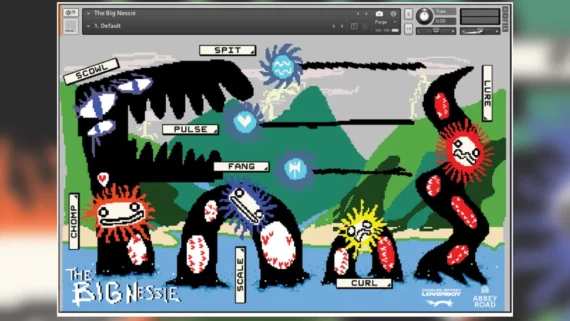

Abbey Road has partnered with British fashion house Charles Jeffrey Loverboy to release a free Kontakt instrument, The Big Nessie.

The instrument was created to coincide with the launch of Loverboy’s Spring/Summer 2026 collection, Prepared Piano, which is inspired by composer John Cage’s experimental techniques of the same name.

The Big Nessie draws on a library of sounds that includes field recordings from the Loverboy workshop in London’s Somerset House, and recordings made in Abbey Road’s Studio Two by Charles Jeffrey, his musical director Tom Furse, and the Abbey Road team.

According to a press release, the instrument features an assortment of “beautifully strange and raw sounds”, spanning “warped percussive textures, tonal fragments and experimental rhythms”. These are divided across the keyboard into five groups – Loops, Drums, Bass, Melodic and Sound effects – and can be shaped and manipulated via eight effects, spanning reverb, bitcrusher, filter, tremolo, distortion and more.

While Abbey Road has previously collaborated on products with companies such as Spitfire Audio and Waves, The Big Nessie is the studio’s first virtual instrument to be built entirely in-house.

According to a press release, The Big Nessie has been inspired by Abbey Road’s “Curve Bender” philosophy, named after the EMI TG12345 Curve Bender EQ, which “allows the studio to capture sounds, process them via their range of unique vintage equipment and acoustic spaces, and present these as playable digital software instruments for creators of all levels to experiment and play”.

“There are many beautiful examples of how music and fashion have seamlessly fused together over the years, but this feels like the first time these creative worlds have come together to present a music production creative tool,” said Abbey Road’s Head of Audio Products Mirek Stiles.

“Working with Charles Jeffrey was a truly inspiring experience that took both Loverboy and Abbey Road out of their comfort zones to make a fun and quirky sampled instrument for the creative community across the globe.”

Watch The Walkthrough Video:

The Big Nessie is a free download, but you’ll need Native Instruments Kontakt or the free Kontakt Player to run it.

The Big Nessie Audio Examples:

Download The Big Nessie at Abbey Road website.
 

Free VST Collection For Windows


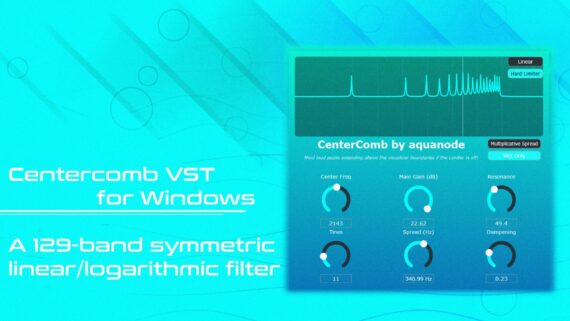
Aqua Node has introduce a free collection of 20 VST plugins for Windows.

The collection includes audio effects, synthesizers and utilities.

They are free and open source. So – while they are currently only available for Windows – other developers are free to use the source code to build versions for Linux or Mac.

The free VST plugins are available now via Aqua Node.


Free Spectral Synthesizer For Mac, Phosphor, Turns Images Into Audio


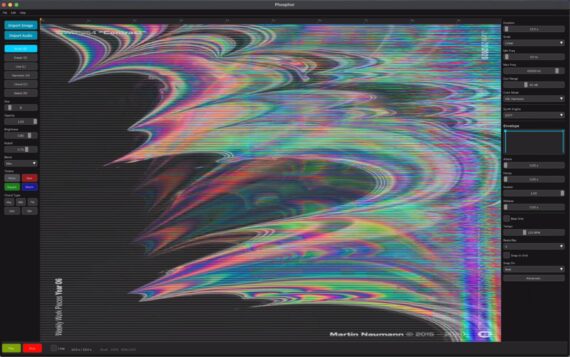
RoEx Audio has introduced Phosphor, a new software instrument for macOS that uses spectral synthesis to convert images into audio.

Spectral synthesis is very different from other types of synthesis. It builds on the idea that audio can be represented as a spectrogram, an image where time runs left to right, frequency runs bottom to top, and brightness represents loudness. A bass note is a bright horizontal line near the bottom. A siren is a diagonal streak. A snare is a vertical column.

Instead of converting audio into a picture, though, Phosphor inverts this and turns pictures into sound. You can ‘paint’ directly on to the spectrogram, or load an image, and Phosphor will synthesize audio from it.

Because of the nature of this approach, Phosphor is probably best suited for sound design – creating textures, drones and soundscapes – that you then export for use in your DAW.

An example of Phospor in action:

Features:

  • Spectrogram Canvas – Draw directly on a frequency-vs-time canvas. The vertical axis follows a logarithmic scale mapped to musical octaves, so equal distances always equal musical intervals. Includes piano roll overlay, beat grid, and snap-to-note.
  • Colour Mode – In standard mode, brightness controls loudness and every frequency is a pure sine. In colour mode, hue shapes the timbre, red produces sawtooth-like warmth, green gives square-wave hollowness, blue creates soft flute-like tones. Saturation controls harmonic intensity.
  • Four Synthesis Engines – Choose how your spectrogram becomes sound.
  • STFT for classic spectral synthesis with iterative phase reconstruction.
  • Additive for clean, precise oscillator-bank synthesis.
  • Noise Band for textural, granular results.
  • Blend to mix tonal and noise components.
  • ADSR Envelope – Shape the amplitude dynamics of your sound with a full attack-decay-sustain-release envelope. Visualize the envelope shape in real time as you adjust parameters.
  • Image Sonification – Load any photograph, painting, fractal, or generated image. Phosphor maps the visual composition to audio, brightness to loudness through a perceptual dB curve, vertical position to pitch, horizontal position to time.
  • Flexible Export – Export in WAV, AIFF, FLAC, or MP3. Choose 16-bit, 24-bit, or 32-bit float at 44.1kHz or 48kHz. Optional peak normalisation. The exported audio uses iterative phase reconstruction for clean results.

Phosphor is available now as a free download, no account required.